
All your meeting requests and booked meetings are on the Meeting page. From there you can answer requests, cancel or reschedule a meeting, and see everything about a meeting in one place.
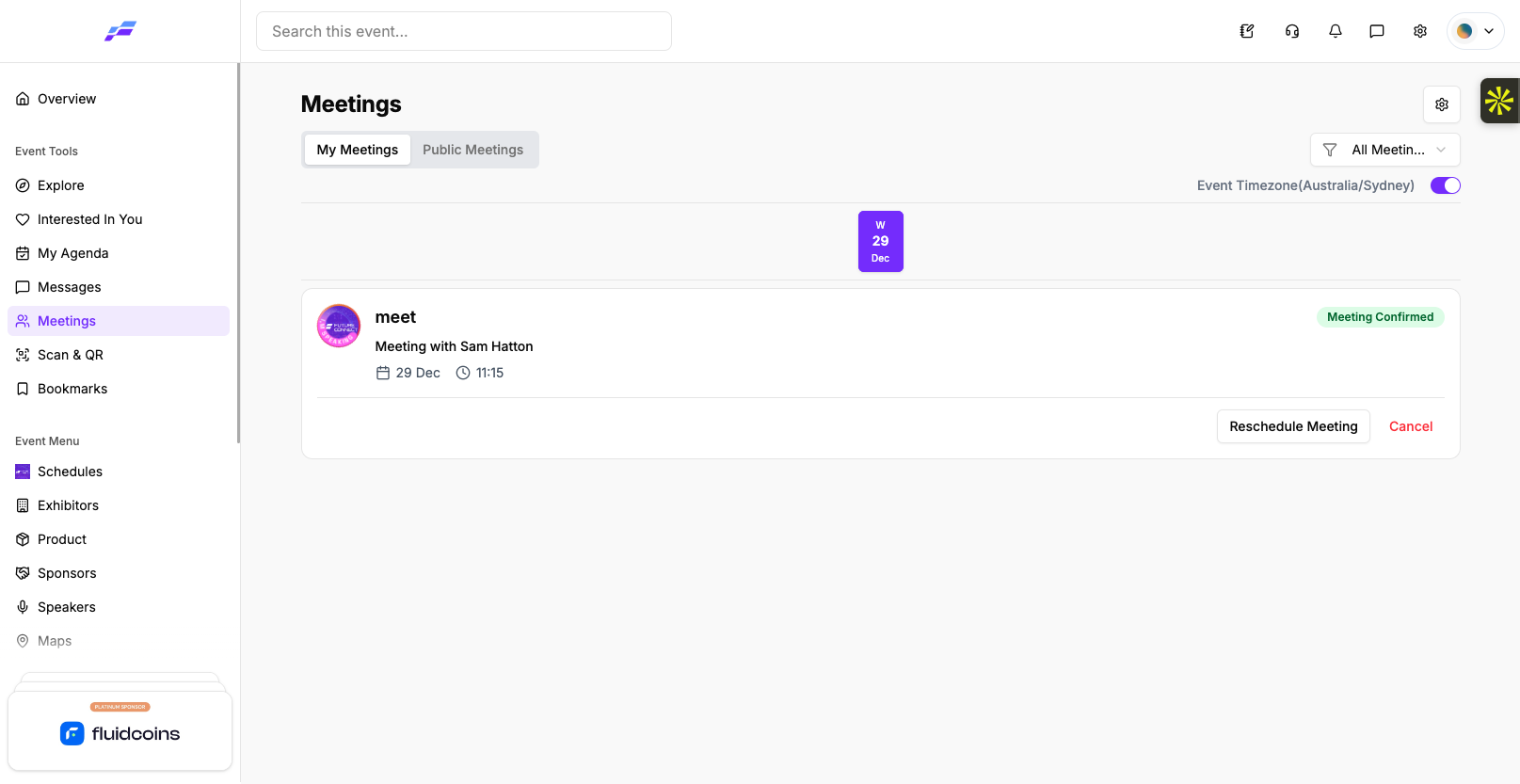
Open Meeting from the Event Tools group in the sidebar. Your event may call this section something else, such as Meetings or B2B Meetings. The My Meetings tab lists your meetings.
#image# My Meetings tab with the status filter, date strip and meeting cards
Each card shows the meeting title, "Meeting with" and the other person's name, the date, time and location, and a Meeting Confirmed or Pending badge.
When someone asks to meet you, the card shows Accept and Reject.
The other person sees the change on their own Meeting page.

You can reschedule a meeting you created, or any meeting that is already confirmed.
You can also click Edit Meeting inside the meeting details. It opens the same steps.
Click Cancel on the meeting card, or Cancel Meeting inside the meeting details.
Past meetings don't have these buttons.
Click a meeting card to open its details.

The top of the window shows the status:
Below that you see Date & Time, Location, the TimeZone, any Meeting Notes, and a card for each participant. Click a participant card to open their profile.
If a meeting is waiting for you, click Accept Meeting here to confirm it.
Meeting emails can include a link to the meeting. When you click it while signed in to the portal, the Meeting page opens with that meeting's details. If you're not signed in, the link can't open the meeting for you. Sign in, then open Meeting and find it under My Meetings.
If your organiser allows it, you can add other attendees to a confirmed meeting you're part of.

Only attendees who accept meetings can be invited. Each person's status shows as Invitation sent, Accepted or Declined. To take someone off the meeting, click Remove participant. If nobody has been added yet, the section shows "No one invited yet".
When someone invites you to their meeting, the card on your My Meetings tab shows Accept and Reject, the same as any other request.
The Eventify app shows the same meetings and status messages, but you act on a meeting from its details screen, not from the card.
Open Meeting from the side menu or the bottom bar, or tap the Meeting tab inside Messages. Your meetings are listed by day, with a date strip at the top. There's no status filter. A green tick on a card means the meeting is confirmed. If the location is a web link, the card shows a Meeting Link button.
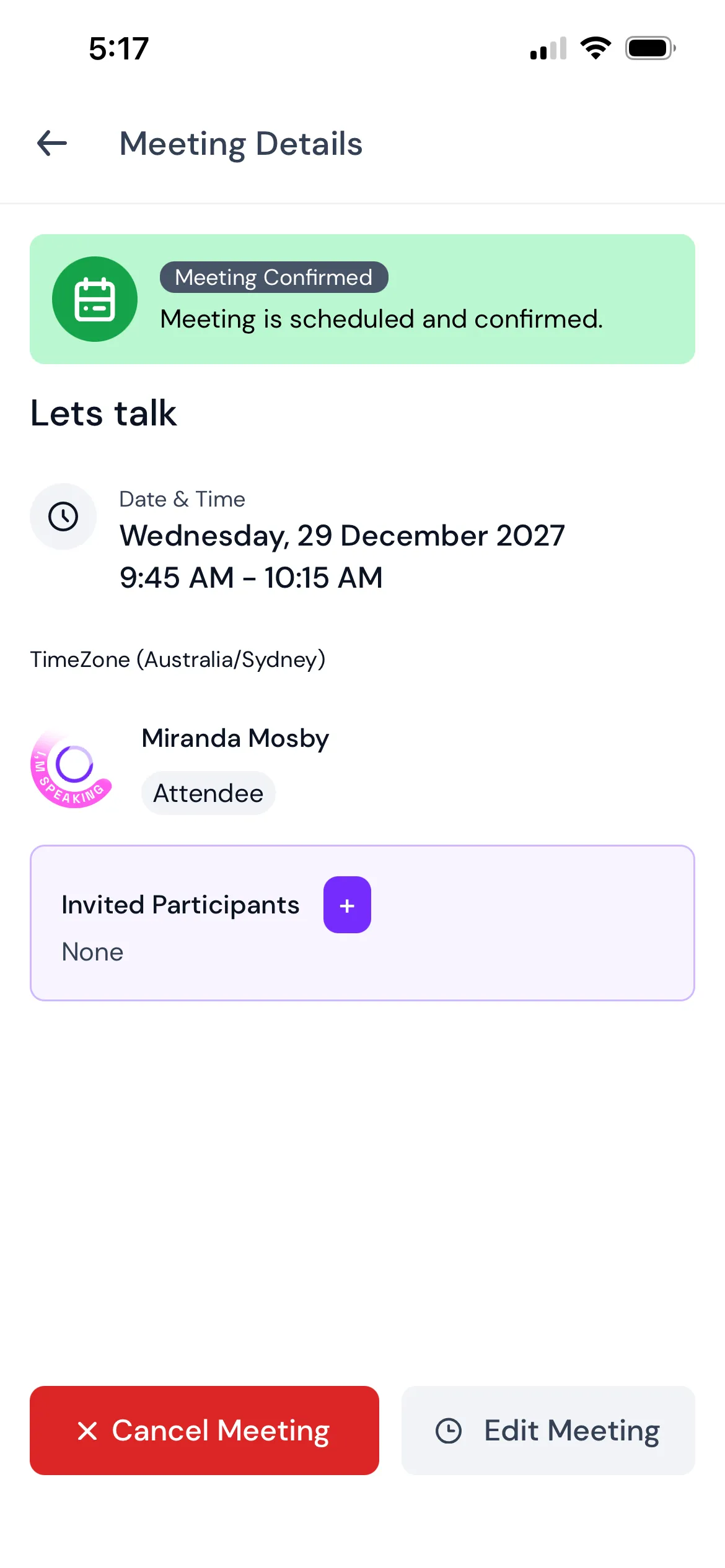
Tap a meeting card to open Meeting Details, then use the buttons at the bottom:
The buttons disappear once the meeting has started. If the location is a web link, tap Join Meeting to open it.
Each person shows "Waiting for user response", "Invitation accepted" or "Invitation cancelled". Tap the red cross next to a name to take them off the meeting. If someone invites you to their meeting, open it and tap Reject if you can't go.
When you allow calendar access, the app adds your confirmed upcoming meetings to your phone's calendar with a reminder 10 minutes before. If push notifications are on, you also get a reminder for each meeting and a morning message on meeting days: "You have few meetings scheduled for today." Cancelled meetings are taken off your calendar. See How Attendees Can Manage Push Notifications and App Permissions in the Mobile App.
If your organiser has set up meeting feedback, Rate this meeting shows at the top of Meeting Details once the meeting has started. Tap it and fill in the form. You can rate each meeting once.
What does "Meeting slot is not available anymore. Please reschedule or choose another slot." mean?
The time you picked was taken before your change was saved. Reschedule and choose another slot.
The page says "No Meetings Invite". What does that mean?
You don't have any meetings yet. Set your availability so others can book you, or request a meeting yourself.
How do I cancel a meeting?
Click Cancel on the meeting card, or Cancel Meeting inside the meeting details. In the Eventify app, open the meeting and tap Cancel Meeting.
Can I reschedule a meeting someone else booked with me?
Yes, once it's confirmed. You can reschedule any meeting you created and any meeting that is already confirmed.
Will I get a reminder before a meeting?
In the Eventify app, yes. With calendar access allowed, confirmed upcoming meetings go into your phone's calendar with a reminder 10 minutes before.
Don't see this? Your organiser decides which features are switched on for your event and who can use them. See Why Attendees Can't See a Feature in the Event Portal.
