Eventify Logo
Eventify LogoWhy Eventify
Platform
Core Products
Event Management Software
Event Registration Software
Event Ticketing Software
On-Site Badge Printing
Event Check-in Software
Lead Capture & Retrieval
Mobile Event App FEATURED
Event Management
Budget Planner
Speakers & Abstracts Mgmt.
Maps or Floor Plan Builder
Agenda Management
Event Reporting & Analytics
Attendee Engagement
Meetings & Matchmaking
Event Networking App
Gamification
Live Polls & QA
Community Builder
Event AI
NEW
More Platform Tools
Custom Branding & Whitelabeling
Widgets & Embeds
Security and Compliance
Pricing Plans
Request a Demo
Download Feature Deck Presentation
Solutions
industries
Non-Profit Associations
Event Agencies
Education
Information Technologies
Healthcare
Pharma
Retail
Pharma
USE CASES
Virtual Events
Hybrid Events
In-Person Events
Community Meetups
Workshops & Trainings
B2B Conferences
Expo and Fairs
Trade Shows
Virtual Job Fairs
Medical Events
Product Launchs
Sales Kickoffs
Education Events
Networking Events
Learning & Development
Internal Events
Awards & Recognition
Virtual Exhibitions
White Label Mobile Apps
Native Event App
Deliver a seamless event experience with your own branded app.
Event Community App
Empower networking and collaboration within your event.
Lead Scan & Retrieval App
Simplify lead scanning and retrieval for exhibitors and sponsors.
Pricing Plans
Request a Demo
Download Feature Deck Presentation
Features
Content Management
Agenda Builder
Speaker Profile
News
Event Guide
Social Boost
Live Screen Display
Registration
Event Ticketing
Check-in Software
Abstract Management
Event Content Mgmt.
Badge Printing
Dynamic Form Builder
Floor Planner

Supervisa el progreso y el estado de las iniciativas clave en tiempo real

Floor Planner
Event Itinerary
Exhibitors & Sponsors
Exhibitor Profile
Sponsored Ads
Lead Scanning
Interactive Maps
Engagement
Event AI
Matchmaking
Chat & Meetings
Social Feed
Community Forum
Poll & Live QA
Gamification
Communications
Push Notification
Email Notification
mORE tOOLS
Event Surveys
Analytics & Reporting
Pricing Plans
Request a Demo
Download Feature Deck Presentation
Resources
Resources
Blogs
Knowledge Base
Customer Stories
Feature Updates
FAQs
Podcasts
Company
About Eventify
Security & Compliance
Careers
Support
Contact Us
Pricing Plans
Request a Demo
Download Feature Deck Presentation
Customer Stories
Pricing
Request a Demo
Contact Us
Request a Demo
Download Eventify Feature Presentation
Trusted by 5000+ Event Managers
99% Positive Reviews
Terrific Data Security
Topics

Fresh On Eventify

How To Host An Event On Eventify?

How To Login To Eventify?

How To Reset Forgotten/Lost Password?

Eventify Admin Settings

How Are User Credits Calculated?

How Can I Submit Details for My White-label Event App?

How To Add Multiple Admins To Manage Your Event ?

How To Enable SSO For Your Event?

How To Troubleshoot Admin Panel Content Cache?

How to Find The Account Usage History?

Where Can I Find My Billing Details?

Setting Up An Event

How Can I Setup A Virtual/Hybrid Event?

How To Add A Custom Domain For The Event Landing Page?

How To Change The Event Timezone?

How To Change The Event Url?

How To Manage Features Of The Event?

How To Manage Live Display Features?

How To Modify The Interests Tags?

How To Set The Event Dates?

Customise The Event Branding

How To Customize Profile Share Backgrounds?

How To Customize The App Home Screen?

How To Customize The App Menu?

How To Customize The Profile Frames?

How To Customize The Splash Screen?

How To Have Custom Branding On Eventify?

User Registration

How To Setup Approval Based Registration?

How To Add And Sell Booths On A Floor Map?

How To Make A Custom And Dynamic Checkout Form?

How To Make User Registration Publicly Available?

How To Modify A Registration Form?

How To Set Up A Ticket's Refund Policy?

How To Setup The Registration Policy?

How To Setup The Registration Settings?

How To Update The Checkout Form Settings?

How to Add Social Links In The Registration Forms?

How to Add a New Floor Map?

How to Make Questions Mandatory in Checkout Forms?

Event Settings

How To Add Or Manage Multiple Admins For An Event?

How To Customise Email Templates For User Groups?

How to Integrate Salesforce?

How to Integrate Hubspot?

How To Export Data From Eventify Through Zapier Based On Event Triggers?

How To Import Data To Eventify From Zapier?

How To Add Multiple Languages For An Event in Eventify?

How To Use Available Integrations?

How Can I Change My Password?

Where Can I Find My Billing Details?

How to Find The Account Usage History?

How Are User Credits Calculated?

How Can I Submit Details for My White-label Event App?

How to Schedule

How To Export Session Details?

How To Set Up Specific Check-Ins For The Sessions?

How To Set Up Session Rating Time?

How To Delete All Tracks With Sessions?

How To Bulk Assign Users To Sessions?

How To Delete All Sessions At once?

How To Bulk Edit Sessions?

How To Add A Session ?

How To Bulk Import Sessions?

How To Link Sponsors To A Session?

How To Link Exhibitors To A Session?

How To Link Speakers To A Session?

How To Collect Ratings For A Session?

How To Enable Polls For A Session?

How To Enable Q&A For A Session?

How to Setup & Join Virtual Sessions from Eventify?

How to Bulk Import/Export Data

How to Showcase Important Event Media With or Without Restrictions

How to Enable Self Check-in

How to Download Session Files from The App

Can Multiple Speakers Speak in The Same Session

Can I Have A Pre-recorded Virtual Session

How to Add Private Sessions

How to Bulk Add Sessions

How to Know About The Interested Attendees for My Session

‍How do I Make Paid Sessions

How to Add Multiple Tracks

How to Add Schedule in Event

Manage Attendees

How To Restrict Single Device Login?

How To Set A Mandatory Login Access?

How To Add Attendees Manually?

How To Send Welcome Email?

How To Restrict Features Based On User Groups?

How To Customise User Groups?

How To Disable/Enable User Suggestions?

How to Download Documents From The App

How To Add An Attendee Manually For Your Event?

How Do I Allow Access To Selected Attendees?

How To Send Welcome Email To Attendees?

How To Manage Event Attendees?

How Can I Update An Attendee?

How to Differentiate Attendees Based On Categories or Groups?

How To Manage Attendee's Private Files?

Manage Attendees

No items found.
No items found.

Manage Ticketing

How To Create A Ticket Order Manually?

What is the process of offline payment or Pay later?

How to Change The Ticket Tag

How to Search or Filter Sold Tickets

How to Transfer A Ticket to Someone Else

How to Get A Lost Invoice

How to Share Sales Reports

How to Track Your Ticket Sales

How to Set Up Ticket Price

How to Modify Your Ticket - Making Changes to Your Ticket

How to Customize and Control Payment Options in Eventify?

How to Delete Tickets

How to Add A New Ticket

How To Manage Event Passes

How to Export Attendee List Outside The Platform

How to Allocate Tickets Manually To Special Guests

Can One Attendee Have Multiple Tickets?

How Can I Check-in Attendees To The Event?

Badge Scanning, Check-In & Badge Printing

Brother Printer Error Codes

How  can I export a list of people who have scanned exhibitors/sponsors?

How To Customize The Kiosk App?

Setting up Brother Label Printer

Setting up Zebra Printer

Which Printers Can I Use to Print Badges?

How to Reassign Misplaced Badges

How do I Print User Badges Onsite?

How to Assign Different Badges to Different User Groups

How to Make Accurate Badges for Attendees with Their Data?

How to Know The Number of Attendees Actually Attending The Event

How to Make Check-ins Easier for A Huge Crowd

Eventify Analytics

How To Add Trivia Challenge in Gamification?

Is There A Social Platform Available Open to All

How do I Generate Leads

How to Get The Event's Analytics Data Overview

How to Get The Session's Analytics Data

How to Get The Speaker's Analytics Data

How to Analyze The Networking Happening in My Event

How to Analyze The Chat Interactions in My Event

How to Analyze Social Interactions

How to Get The Sponsor's Analytics Data

How to Get The Exhibitor's Analytics Data

Where Can I Get The Advertisement Insights

Can I Download Session Analytics Data

How to Get Analytics Data for A Custom Range

How Can I Check-in Attendees To The Event?

Outreach

How Can I Generate And Send Event Certificates To The Attendees?

How to use your own email gateway using SMTP?

How to Send Event-related Relevant Emails

How to Send Notifications over Multiple Channels

How to Add Redirection Content in Notifications

How to Send Notifications to A Certain Group of Attendees

How to Schedule A Notification?

How to Send Custom Notifications to Attendees

How Can I Send Across Important Information Without Notifications

What do The Statistics Signify in Outreach

How to Send Push Notifications

Abstract Calls

How to Shortlist and Arrange My Event Visit

How to Collect Abstracts

How to Make A Custom Abstract Collection Form

How to Manage A Huge Number of Abstract Submissions

How Can The Abstract Reviewer Tool Improve The Experience of Abstract Reviewers

Can Abstracts be Resubmitted

What Features and Functionalities does The Abstract Reviewer Tool Offer

Promotions & Discounts

How can I Associate The Promo Code with A Single Ticket?

How to Add One Promo Code for All Tickets

Can I Apply Multiple Promo Codes at The Same Time

How to Apply Percentage and Amount Based Promo Codes

How Does The Usage Limit of Promo Codes Work

What Are The Benefits of A Promo Code

How to Delete An Active Promo Code

How to Modify A Promo Code

How Can I Sell My Tickets Outside of Eventify

How to Add A Promo Discount

Support & Feedback

How to Contact Eventify in Case of Issues with The Event Setup

How to Ensure Active Participation from Attendees in A Session

How to Determine A Session's Success‍

How to Gather Session Related Feedback

How to Collect Feedback from Attendees After The Event

Manage Contents

How To Add A Location Map?

How To Add Additional Event Content Using Webview?

How To Add Advertisement?

How To Add An Interactive Map?

How To Add Booth Staff For a Speaker?

How To Add Booth Staff For a Sponsor?

How To Add Booth Staff for an Exhibitor?

How To Add Different Categories Of Sponsors?

How To Add Event Guides?

How To Add News Items?

How To Allow Attendees To Add Photos To Gallery?

How To Bulk Add Attendees?

How To Bulk Import Exhibitors?

How To Bulk Import Speakers?

How To Bulk Import Sponsors?

How To Export Gallery Images?

How To Highlight News Items?

How To Upload A File for A Speaker

How to Add All Speakers at Once

How to Display Advertisement Banners on Eventify

How to Download Exhibitor Files from The App

How to Download Speaker Files from The App

How to Download Sponsor Files from the App

How to Integrate Maps?

How to Use Interactive Map

How to edit the exhibitor form?

How to edit the sponsor form?

Engagement & Networking

How To Create & Manage Custom Teams for Quests?

How To Use the Quest Leaderboard (Individual, Team & User Group Views)?

How To Export Gamification & Leaderboard Data?

How To Announce Quest Winners?

How To Add Bonus Points to Participants?

How To Configure Gamification Reward Settings?

How To Send Participation Certificates for a Quest?

How To Manage Quest Entries & Verify Submissions?

How To Manage & Organize Challenges in Gamification?

How To View & Manage the Gamification Leaderboard?

How Can I Set Up Communities For Networking?

How Can I Set Up Event Survey?

How To Add Quest Challenge in Gamification?

How To Add Trivia Challenge in Gamification?

How To Add Scan QR Challenge in Gamification?

How To Setup Social Boost?

How To Create Polls For Sessions?

How To Create Live Q&A For Sessions?

How To Make Use Of Gamification To Boost The Event?

How To Connect With Other Attendees On 1:1 Basis?

How To Control Posts in A Community?

How to Create Different Types of Communities Within The Event

How To Build A Community Within The Event?

How To Manage & Organize Challenges in Gamification?

Published on
March 19, 2026

Once you've created challenges (Scan QR, Trivia, or Quest), you'll want to organize, filter, and manage them efficiently. This guide covers all the tools available on the Manage Challenges screen 👇

Step-by-step guide

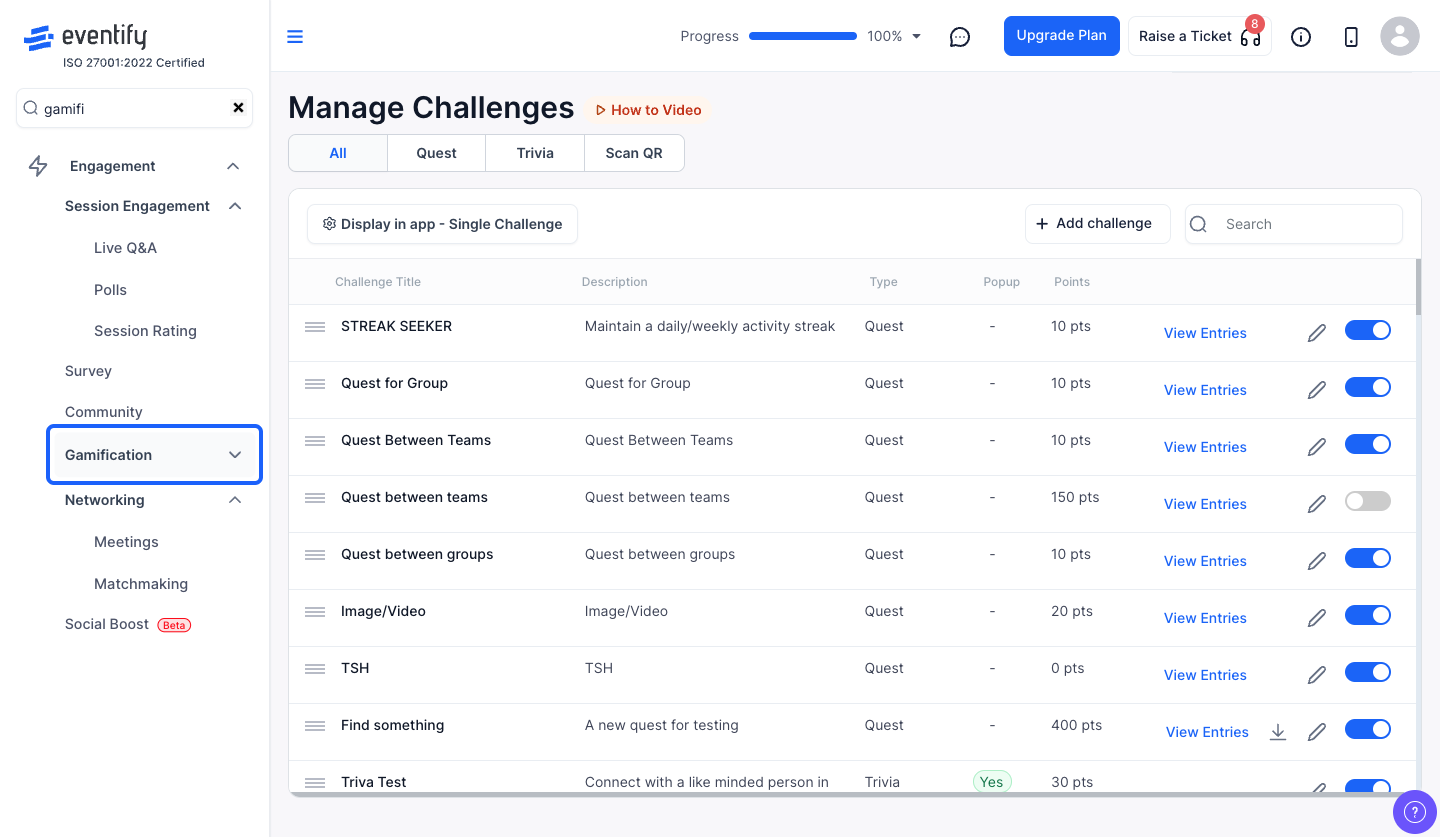
1: Go to Engagement > Gamification

From the admin panel sidebar, navigate to Engagement > Gamification.
 

2: Select "Manage Challenges" from the sub-menu

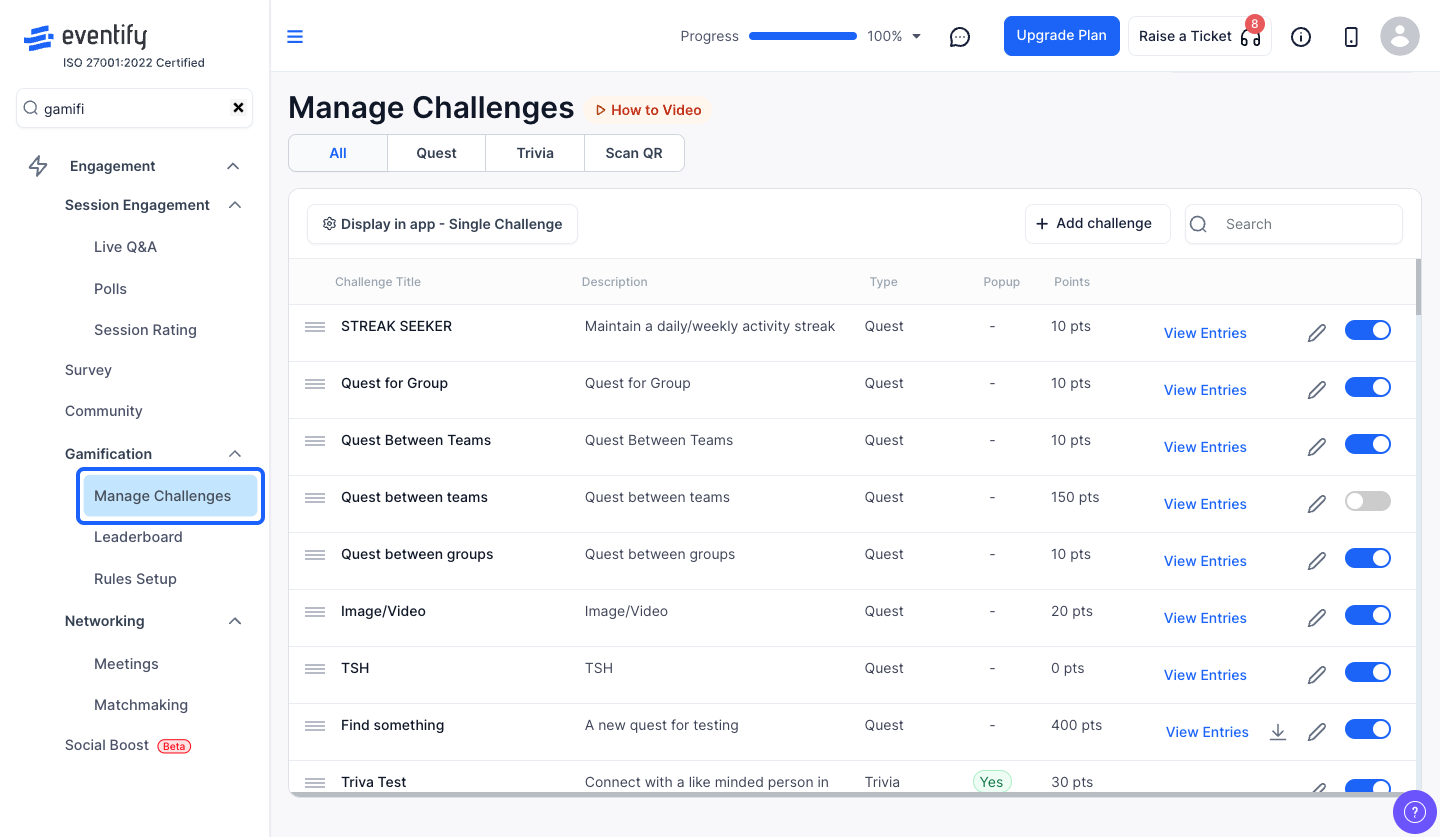
Click on Manage Challenges in the left sub-menu. This is the main hub for all your gamification challenges.
 

3: Use the type tabs to filter challenges

At the top you'll see filter tabs: All, Quest, Trivia, and Scan QR. Click on any tab to show only that type of challenge. This is helpful when you have many challenges and want to focus on a specific category.


4: Search for a challenge by name

Use the search bar on the right to quickly find a challenge. Start typing the challenge name and the list will filter in real-time.


5: Filter challenges by status (Enabled / Disabled)

Click the "Status" dropdown to filter by All, Enabled, or Disabled. This helps you see which challenges are currently live and which ones are turned off.


6: Set the display visibility in the app

Click the ⚙️ Display in app button (top-left). You can choose how challenges appear to participants in the mobile app:

  • All — show all challenges
  • Single — show one challenge at a time
  • Recurring — show only recurring challenges

This setting controls what participants see without affecting which challenges exist.


7: Drag to reorder challenges

Grab the drag handle (≡ icon) on the left side of any challenge row and drag it up or down. The new order is saved automatically and reflects in the attendee app. Use this to prioritize your most important challenges at the top.


8: Enable or disable a challenge

Use the toggle switch on the right side of each challenge row to quickly enable or disable it. A confirmation prompt will appear before the change takes effect. Disabled challenges won't be visible to participants.


9: Edit a challenge

Click the edit icon (✏️) on any challenge row to open its settings. For Scan QR and Trivia challenges, the edit modal will open directly. For Quest challenges, the system will load all quest data first before opening the wizard.


10: Download QR codes for a Quest

If a Quest contains Scan QR tasks, you'll see a download icon (⬇️) on its row. Click it to download a PDF file containing all QR codes for that quest — one per page, with the task name and event name printed below each code. Print these out and place them at your event venue.


11: View Quest entries

For Quest challenges, a "View Entries" link appears on the row. Click it to open the entries verification modal where you can review participant submissions. (See our separate guide on managing quest entries for details.)


12: Understand the challenge list columns

Each challenge row shows:

  • Challenge Title — the name of the challenge (with a "Recurring" badge if applicable)
  • Description — a brief description
  • Type — the challenge category (e.g., QR, Trivia, Quest, etc.)
  • Show Popup — whether a popup notification appears for this challenge (Yes/No)
  • Points — points awarded for completion (shows total points for Quest, or "N/A" for award-type rewards)


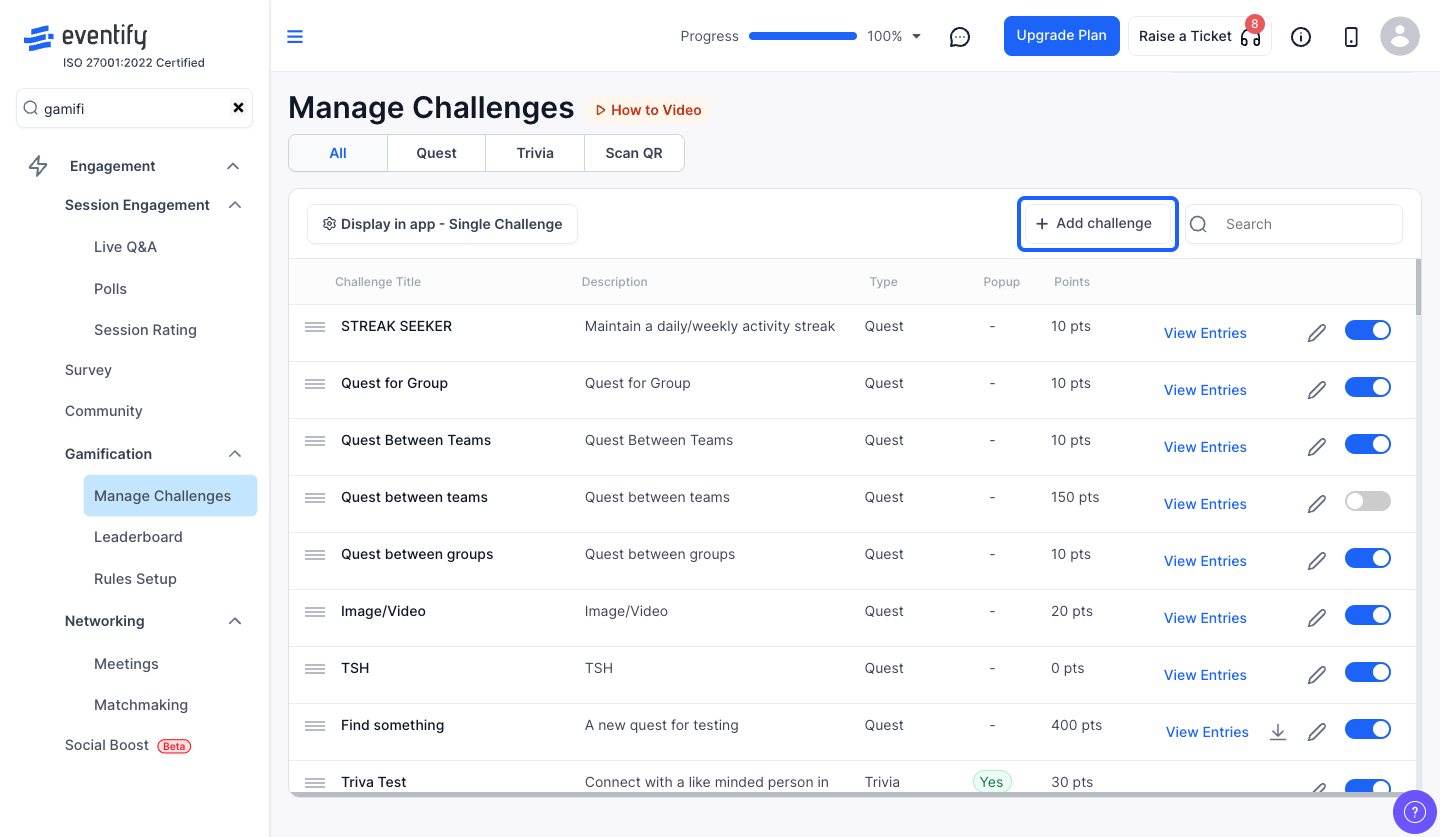
13: Add a new challenge

Click the "+ Add Challenge" button at the top-right. A dropdown will appear with options:

  • Scan QR challenge
  • Add Trivia
  • Add Quest

Select the type you want and the corresponding creation modal will open.
 

⚠️ Important

Changing the display visibility setting affects all participants immediately. If you switch from "All" to "Single", attendees will only see one challenge at a time in the app — make sure the order is correct before changing this setting.

💡 Tips

  • Drag-reorder is your friend. Place high-priority or time-sensitive challenges at the top so participants see them first.
  • Use status filters to audit. Before your event goes live, filter by "Disabled" to make sure no important challenge was accidentally left off.
  • Use type tabs for large events. If you have 20+ challenges across different types, the tabs make it much easier to find what you're looking for.
  • Download QR codes early. Generate and print QR PDFs before the event day so they're ready to be placed at booths, sessions, or checkpoints.

Related Topics You May Like

How To Create & Manage Custom Teams for Quests?

Read post

How To Use the Quest Leaderboard (Individual, Team & User Group Views)?

Read post
The future of events
is here.
PLATFORMS
Virtual Event PlatformHybrid Event PlatformIn-person Event PlatformMobile Event AppExpo & ExhibitionEvent Management PlatformEvent Registration PlatformTrade ShowCorporate Event AppEnterprise Event AppTrade Show AppTrade Show Management Software
PRODUCTS
Event Ticketing SoftwareEvent Check-in AppEvent Badge PrintingTicket Sales ReportLead Retrieval AppEvent Networking AppEvent Gamification AppEvent Poll & QAEvent Matchmaking AppEvent Concierge ServiceAttendee Management
RESOURCES
ContactAboutBlogCustomer StoriesFeature UpdatesPodcastsFAQReferral ProgramCommunity
OTHERS
Privacy PolicyTerms of UseBug Bounty & Responsible DisclosureSite MapRestricted BusinessesSecurity
Download Eventify App
Eventify is ISO 27001:2022 certified
iso 27001 certified logoAICPA SOC logogdpr logoSOC 2 TYPE 2 LOGO
Eventify - Featured on Startup Fame
happiest users badge
Quality choice badge
Eventify is a leader in Mobile Event Apps on G2
Leader
High Performer
Leader
Best Support
Users Most Likely To Recommend
Easiest To Do Business With
© Eventify 2024. All rights reserved.
FacebookTwitterInstagramLinkedin