

Introduction
Founded in 2013, Whova is an event management platform that offers an event app designed to streamline the organisation of in-person, virtual, and hybrid conferences and events. The platform is widely used by academic institutions, professional associations, and corporate organisers for features such as attendee networking, agenda management, and sponsor visibility.
In this guide, we break down everything you need to know about Whova pricing. We will give you insight into how much their fees may cost, including registration, licensing, add-ons, and other potential charges that are often not immediately obvious. By the end, you will have a clearer understanding of whether Whova is the best fit for your event needs, and we will also explore alternatives with clearer pricing models to help you make informed decisions.
How much does Whova cost?
Whova does not operate with fixed or publicly listed prices. Instead of choosing from a visible pricing page, organisers must first submit details about their event, such as size, format, and duration. Pricing is then determined based on these factors rather than a universal plan. Once your information is submitted, Whova typically assigns a representative to assess your needs and recommend a suitable setup. This process leads to a custom quote, meaning two events of similar size may still pay different amounts depending on feature requirements and usage scope.
Whova offers a free ticketing plan for free events, meaning it does not charge organisers. However, they do charge for paid events, which will be addressed below.
While Whova primarily sells an all-in-one event management platform, it offers a range of products to help ensure a smooth event.
Eventify: An Alternative
Eventify is designed for event organisers who want simplicity, transparency, and control over their budgets. Unlike platforms with opaque, quote-based pricing, Eventify offers clearly defined plans that outline exactly what features are included at each level. The platform brings together essential event tools, including registration, ticketing, attendee engagement, event apps, and analytics, into a single, easy-to-use system. This eliminates the need for multiple integrations or unexpected add-on costs.
What makes Eventify stand out?
- Transparent, Tiered Pricing Plans: Eventify publishes defined pricing tiers with clear costs tied to specific feature sets and attendee credits, so organisers know upfront what they’ll pay and what they’ll get at each level.
- Built-In Community Engine: Eventify goes beyond agenda and networking to enable long-term event communities. Organisers can keep conversations active before, during, and after the event through discussion walls, topic channels, and attendee-driven interactions.
- Integrated Sponsor & Exhibitor Self-Service: Instead of manual back-and-forth coordination, sponsors and exhibitors can manage their profiles, upload assets, track leads, and update booth information directly on the platform.
By combining flexible pricing with practical, engagement-focused features, Eventify allows organisers to plan and execute events confidently, regardless of size or format. Start by booking a free demo and experience the difference for yourself.
Whova Pricing Plans: A Breakdown
Unlike platforms with tiered monthly plans, Whova uses an event-based pricing model that is shaped by the specific requirements of each event rather than fixed, predefined packages. This approach makes pricing less predictable, as a combination of operational scale, event complexity, and support needs determines costs.

1. Event App
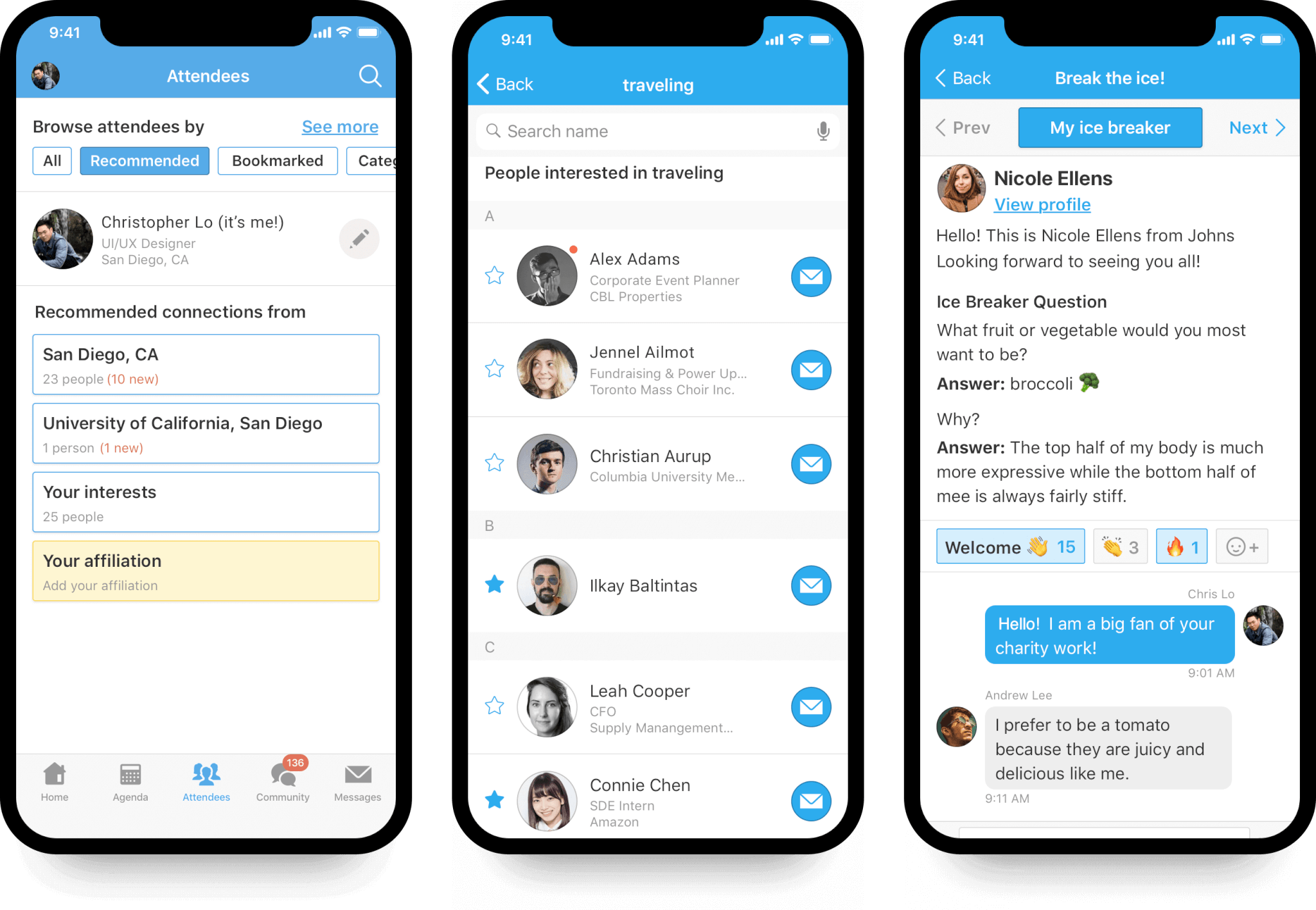
The Whova Event App is one of the platform’s core offerings and is designed to enhance attendee engagement during conferences and events. The app allows organisers to share detailed agendas, speaker profiles, announcements, and venue information in one centralised mobile platform. It also encourages networking through features such as attendee profiles, community boards, live polling, session Q&A, and discussion forums.
When it comes to pricing, the Event App is typically not sold as a standalone product with a fixed price. Instead, it is usually bundled into Whova’s event management packages. The cost depends on factors such as the number of attendees, the length of the event, and the level of customisation required. For many conferences, the pricing can run into several thousand dollars per event, particularly for large gatherings. Because of this flexible structure, organisers usually need to request a quote from Whova to determine the exact cost.
2. Online Registration System
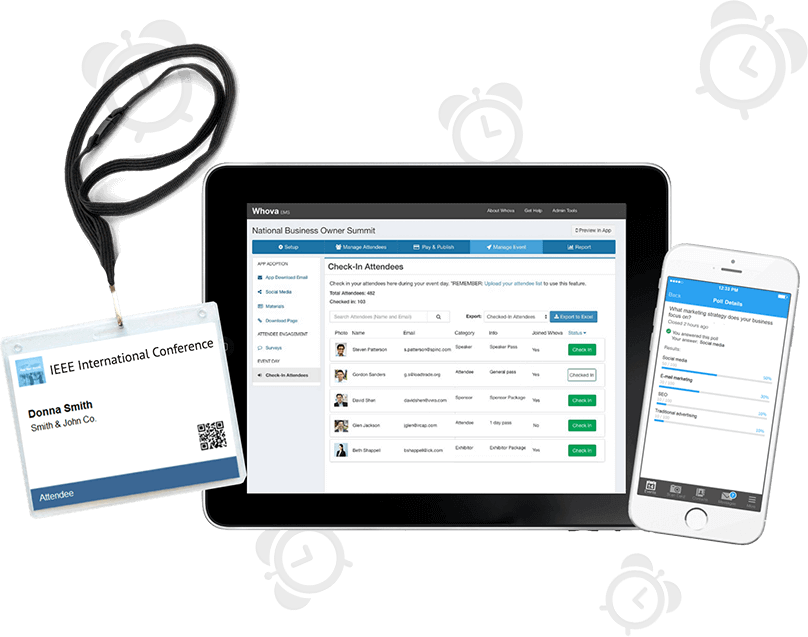
Whova’s Online Registration System provides organisers with a complete ticketing and attendee management solution. With this feature, event organisers can create customised registration forms, sell tickets, offer promotional discounts, and manage attendee data from a single dashboard.
The system also supports different ticket types, such as early-bird pricing, VIP access, group tickets, and complimentary passes. This makes it particularly useful for conferences and professional events that require structured registration processes. In terms of pricing, the registration system operates on a transaction-based model rather than a flat subscription fee.
For paid tickets, Whova typically charges a platform fee of about 3.0% plus $0.99 per ticket, in addition to any payment processing charges from the payment provider. Free tickets usually do not attract the platform fee. This pricing structure means the total cost will depend on the number of attendees and the price of the tickets being sold.
3. Virtual Event Platform
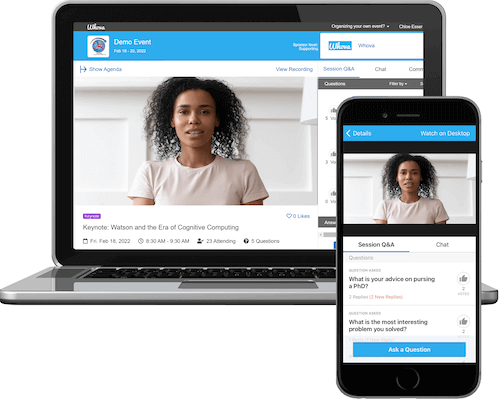
The Whova Virtual Event Platform allows organisers to host fully online conferences, webinars, and networking events. It includes features such as live streaming, pre-recorded sessions, virtual exhibitor booths, live chat, breakout rooms, and audience engagement tools like polls and Q&A. The goal is to replicate the experience of an in-person event while allowing participants to join from anywhere in the world. Unlike the registration system, pricing for the virtual event platform is customised rather than publicly listed.
The total cost depends on factors such as the expected number of attendees, the number of sessions, the event duration, and whether additional features, such as virtual exhibitor booths or networking lounges, are included. For many organisers, this means the final price can vary significantly from one event to the next. As a result, organisers typically need to contact Whova directly to receive a detailed quote based on their event requirements.
4. Hybrid Event Solution
Whova’s Hybrid Event Solution is designed for organisers who want to host events that combine both in-person and virtual participation. This feature allows both physical attendees at the venue and remote participants to experience the same event ecosystem. Organisers can livestream sessions from the physical venue to remote attendees, enable interactive chat and Q&A across both audiences, and provide access to event materials, speaker information, and networking spaces within the same platform.
This helps ensure that remote participants are not left out of discussions and engagement activities. In terms of pricing, Whova’s hybrid event solution typically follows a custom pricing model. The cost depends on several factors, including the number of in-person and virtual attendees, the length of the event, streaming requirements, and additional engagement tools. Because hybrid events require both physical and virtual infrastructure, they are often more expensive than purely in-person or purely virtual events. Organisers usually need to request a tailored quote from Whova to determine the total cost based on their event needs.
5. Event Management Tools
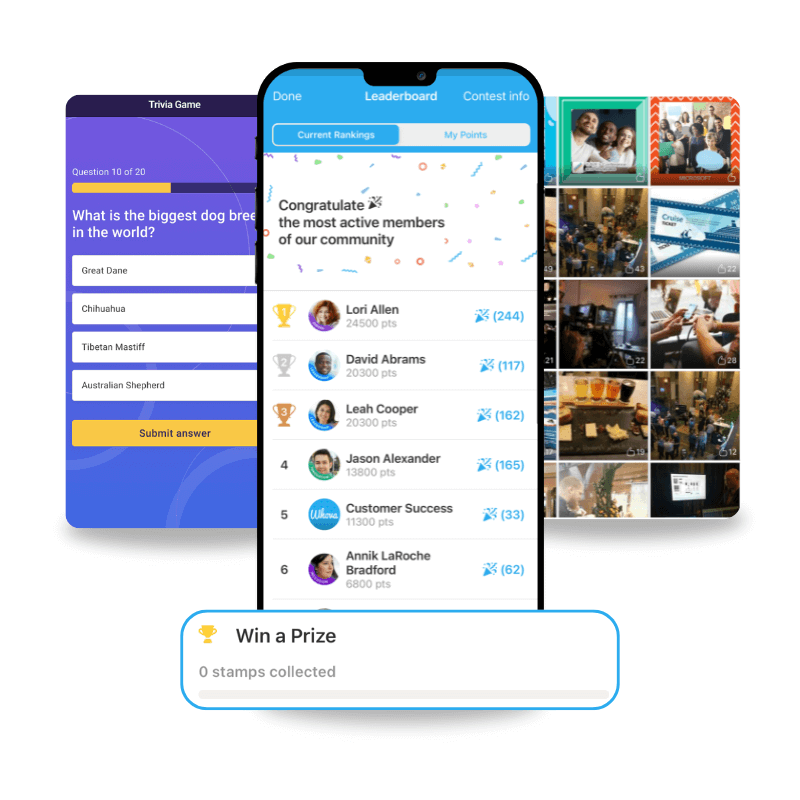
Whova also provides a suite of Event Management Tools that help organisers manage the logistical aspects of an event. These tools include attendee check-in systems, badge printing, agenda scheduling, speaker management, and real-time analytics. Through the organiser dashboard, event planners can track attendee registrations, monitor engagement levels, update session schedules, and communicate directly with participants through announcements or push notifications.
Pricing for these management tools is usually included within Whova’s broader event platform packages rather than sold separately. The final cost depends on the overall event package chosen, the number of participants, and the level of features required. For example, events with thousands of attendees or complex scheduling needs may require higher-tier packages. As with most of Whova’s services, organisers generally receive a custom quote rather than a fixed public price, making it important to consult with the company before budgeting.
6. Lead Retrieval for Exhibitors

The Lead Retrieval feature is designed specifically for event sponsors and exhibitors who want to capture and manage potential customer leads during an event. Using this feature, exhibitors can scan attendee badges or QR codes through the Whova platform to collect contact information instantly. The system allows exhibitors to track interactions, add notes about conversations, and export lead data after the event for follow-up marketing or sales outreach.
Lead retrieval is generally offered as an add-on feature rather than a standard inclusion in all packages. Pricing for this service can vary depending on the number of exhibitors using the feature and the specific event package selected. In many cases, exhibitors or sponsors may pay separately for access to the tool. Because the pricing is not publicly fixed, organisers and exhibitors typically need to request details from Whova when planning their event budget.
Whova Hidden Costs
While Whova markets itself as an all-in-one event platform covering everything from registration to networking, its pricing structure and feature delivery suggest several costs that may not be obvious from the front-end website.
- Registration Fees on Paid Tickets: Whova’s event registration system does not charge for free events, but for paid ticketing, it applies a platform fee of 3.0% + $0.99 per ticket on top of any credit card processing fees. These fees may not be included in early pricing discussions and can significantly affect revenue or attendee costs, especially for high-priced tickets or large attendee numbers.
- Add-Ons or Modular Costs: Third-party pricing proposals (not always published by Whova) indicate that additional event tools can be optional and carry extra costs, including speaker submission systems, surveys and feedback tools, exhibitor booth lead retrieval, certificate generation, and advanced document handling. These extras may be essential for many academic or corporate events, yet they are not clear on the main pricing form and can add thousands to the total event bill.
- Support and On-site services: Whova promotes strong customer support, but it does not specify whether dedicated account management, premium support, or on-site assistance during the event is included in the base quote or billed separately. Events with complex logistics or tight timelines often require higher-tier support, which can be more costly.
- Storage, Recordings & Content Management: While Whova provides virtual and hybrid event support, there is no public detail on storage limits for recordings, multimedia, or heavy digital assets. Planners may incur additional charges after uploading large volumes of session videos or digital content.
Whova Pros & Cons
Choosing an event platform requires balancing functionality, ease of use, and cost, especially when the platform will shape both the organiser’s workflow and the attendee experience. Below is an objective breakdown of Whova’s strengths and limitations, based on how the platform is positioned and commonly used.
Pros
- Strong engagement tool: Whova offers robust features, including community boards, attendee messaging, and networking tools, to encourage interaction before, during, and after events. These features help sustain conversations and improve attendee participation beyond just attending sessions.
- Mobile-first experience: The Whova mobile app is the centrepiece of the platform and plays a major role in how attendees interact with events. Its intuitive design and accessibility make it easy for participants to navigate schedules, network, and receive real-time updates.
- Conference-friendly: Whova is particularly well-suited for academic, corporate, and professional conferences with structured agendas and multiple stakeholders. Its tools support speakers, sessions, exhibitors, and attendees in ways that align well with conference-style events.
- All-in-one structure: Most of Whova’s core tools are bundled into a single event setup rather than split across multiple standalone products. This reduces the need to integrate multiple platforms and helps organisers manage events from a single central system.
Cons
- No public pricing: Whova does not publish its pricing publicly, so organisers must engage directly with the sales team to understand costs. This can make early-stage budgeting and cost comparisons more difficult.
- Can be expensive for large events: As attendee numbers grow, Whova’s pricing tends to increase, raising the total event cost. Large conferences may find that expenses rise quickly once higher attendance thresholds are reached.
- Limited flexibility for small events: For small meetings or low-budget events, Whova’s comprehensive feature set may feel excessive. Organisers with simple needs may end up paying for tools they do not fully use.
- Event-based licensing: Whova typically licenses its platform on a per-event basis rather than through ongoing subscriptions. This can be less cost-effective for organisers who run frequent small or recurring events throughout the year.
While Whova stands out for its strong benefits, its lack of transparent pricing and event-based licensing model may limit its appeal for smaller teams or organisers seeking predictable, budget-friendly solutions.
Who is Whova best for?
Whova is not designed for every type of event organiser, and its value becomes clearer when matched with the right use case. It performs best for organisers who prioritise structured programming, attendee engagement, and conference-style interactions over simple or low-cost event execution.
1. Academic Conferences & Professional Associations
Whova is particularly popular within academic, research, and professional association communities that host conferences with detailed agendas and multiple sessions. Its tools for agenda management, speaker profiles, and attendee discussion boards support knowledge exchange and ongoing professional dialogue. These features make it well-suited for long-form conferences where learning, discussion, and networking are central goals.
2. Event Teams Focused on Engagement
For event teams that prioritise attendee interaction, networking, and community-building, Whova delivers strong value. Features like messaging, discussion boards, and personalised schedules help keep attendees actively involved throughout the event lifecycle. Even with its less transparent pricing, teams focused on engagement outcomes may find the investment worthwhile.
3. Medium to Large Conferences
Organisers hosting conferences with hundreds or thousands of attendees benefit from Whova’s ability to scale engagement without overwhelming users. The platform supports high attendee volumes while maintaining structured networking, announcements, and session management. This makes Whova a practical option for events where coordination and communication at scale are essential. Small meetups, workshops, or low-budget events may find Whova excessive relative to their needs. The platform’s comprehensive feature set and event-based pricing can feel disproportionate for simple gatherings. In such cases, lighter or more budget-friendly tools may offer better value.
Whova Tool Customer Reviews
Reviews offer a more realistic picture of how Whova performs beyond marketing promises and sales presentations. Reviews from event organisers, exhibitors, and attendees across platforms like G2, Capterra, TrustRadius, and Trustpilot highlight both the platform’s strengths and its shortcomings. While many users praise Whova for its engagement features and conference-focused design, others point out usability issues, pricing concerns, and limitations in certain tools. Bringing these perspectives together helps provide a balanced understanding of what using Whova is actually like in practice.
Positives
- “As a vendor, being able to scan each participant and getting their contact info was amazing. Usually, you have to pay a lot of money for this, and while I'm sure the organizer may have had to pay extra, as an end user, I really liked this feature. It's easy to show my team the event's benefits and to follow up on important leads. The scanning was easy, and the tags/notes were beneficial, too. I also like the feature that the organizer could message everyone easily.” - Whitney H.
- “Everything is in one place. From the hotel accommodations and directions, to the meet-ups, and the floor map. This app is very easy to use. It is simplified, yet with many functions. You can send/receive messages, notifications, earn points, and see the leaderboard in real time. You can view the sessions and then add the ones you want to attend to your agenda. During your session, you can take notes right there in the app next to the session. This helps remember who said what and helps remember the materials. Also, you can add photos of the power points, so you are not busy writing the whole time. The notes and photos are emailed to you so you can retain them - no half-used notebooks with info scribbled all over them - that you can never find! It is all kept electronically and easy to refer to. This is an innovative app that I have used several times.” - Denise, T.
- “Being a recent attendee of Women of Steel, I found their use of the Whova app to be extremely beneficial in connecting with others whom I would not have had the chance to meet otherwise. It was interactive, with polls and Q&A for the sessions, incorporated some meetups, and I was able to connect with some potential future clients. I love the way it integrates with LinkedIn. I added a number of new connections and look forward to introducing myself. I am going to go through the attendees now that the event is over and see who else I can network with. Overall, this app made the event much more valuable than it would have been without it!” - April O.
Complaints
- The interface is terrible. It's hard to navigate, with so many features that the whole experience is dizzying. I can never find anything in the app, and using the app feels forced. The notifications are frustrating, to say the least. I receive countless app updates, release notifications, and Whova team notifications, all of which upsell me to buy their product. It's an odd experience - it's like no attendees are using the app - just Whova pushing messages to their own app. - Chip, US.
- “We used Whova for our association's conference, and we had a horrible experience. The abstract submission tool is very poor and lacks basic features. The event platform is spammy and has serious limitations. We were sold a product that was very different from reality, and this created so much more work for our team.” - Paulina, BR.
- “Disappointing. Paid USD2,999 and tried to cancel within 24 hrs. They refuse to give a refund for a service we haven't used. Apparently, their company policy would appear to contravene UK legal Consumer Contract Regulations. Would not recommend.” - Cat, GB.
Alternative To Whova: Eventify
Planning an event does not have to involve complex pricing models or tools that feel heavy to manage. Eventify takes a more practical approach by providing organisers with everything they need in a streamlined system, regardless of whether the event is virtual, physical, or hybrid. It focuses on making the organiser’s job easier, from setting up registrations to keeping attendees engaged during the event and measuring outcomes afterward. By removing unnecessary friction and prioritising ease of use, Eventify helps organisers create well-run events that feel organised, engaging, and memorable for attendees.
What Makes Eventify Stand Out?
Key Features of Eventify
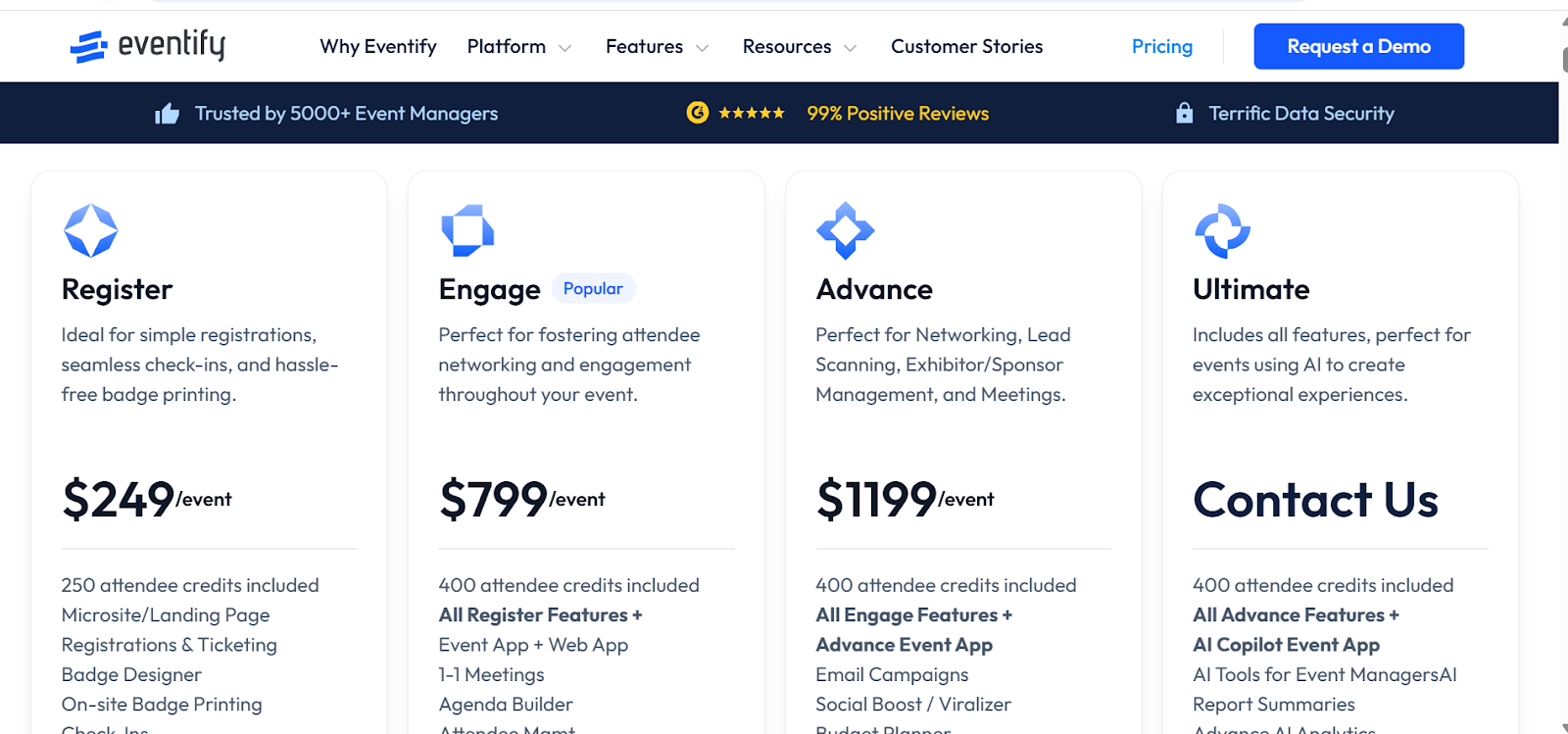
- Transparent and tiered pricing: Eventify offers various packages to suit different event needs and budgets. From simple attendee registration to more sophisticated engagement tools, the pricing is clear. There are no hidden costs, and what you see in each plan is what you get.
- End-to-End Registration & Onsite Execution: Eventify connects registration to onsite operations, including badge design, QR check-ins, on-demand badge printing, and session-level tracking. This reduces manual processes and ensures smooth event-day logistics from entry to session attendance.

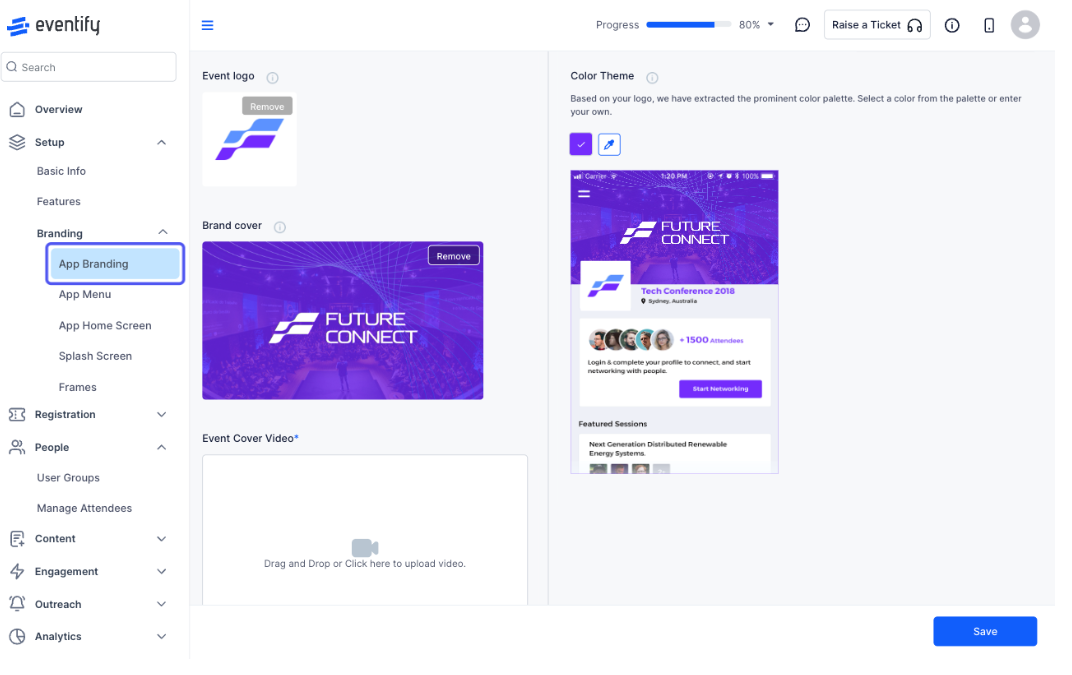
- Custom-Branded Event Apps & Web Portals: Eventify allows organisers to fully brand their event app and web experience with custom themes, sponsor placements, branded splash screens, and domain personalisation. This ensures your event technology feels like an extension of your brand, not a generic third-party tool.
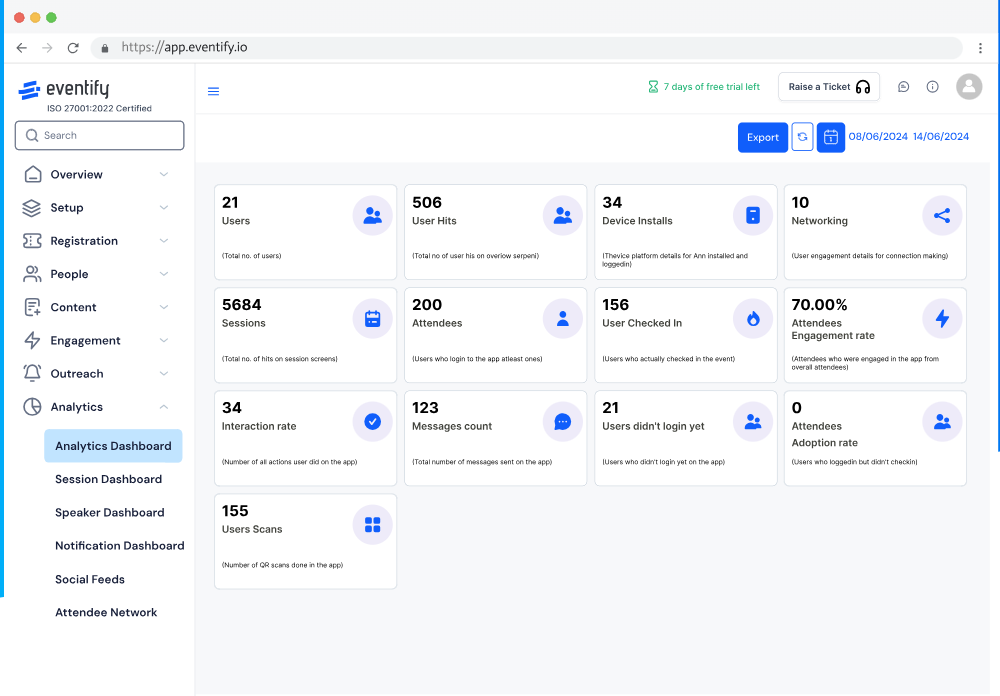
- Actionable Analytics Dashboard: Eventify provides engagement heatmaps, attendance tracking, sponsor performance insights, and behavioural analytics, helping organisers understand what worked and where improvements are needed for future events.
Eventify Pricing
Unlike Whova, Eventify is built around pricing clarity, so organisers know exactly what they are paying for from the start. Its tiered plans are designed to match different event needs, and even the entry-level option includes practical tools that support a seamless attendee journey.
Beyond pricing, Eventify focuses on usability and efficiency, making it easy for both organisers and attendees to navigate the platform. It supports everything from small meetings to large-scale hybrid and international events, allowing teams to deliver engaging experiences without stretching their budgets or dealing with unexpected costs. You can check it out by requesting a demo here.
Does Whova pricing fit your budget?
Whova offers a polished, engagement-driven event experience, but its pricing model is best suited to organisers with medium- to large-event budgets. It works particularly well for teams that prioritise attendee interaction, networking, and community engagement as core outcomes of the event. Because pricing is quote-based, organisers must be comfortable discussing requirements with sales representatives rather than selecting a fixed plan. This structure allows some flexibility but makes early budgeting less straightforward. As a result, Whova is often chosen by organisations that can absorb variable costs in exchange for strong engagement tools.
However, if you value pricing transparency, predictable costs, or monthly subscription plans, Eventify is your best option. With clearly defined plans and publicly listed features, you can compare options, forecast costs, and make decisions without waiting for custom quotes or navigating unclear add-ons. This level of visibility simplifies early-stage planning and reduces financial surprises later. It also combines powerful engagement capabilities with cost transparency, allowing organisers to prioritise both attendee experience and financial control without compromise. Get started with Eventify today!
.png)