

Introduction: Why Choosing the Right Event Management Software Is the Most Important Decision You'll Make This Year
Running a conference or trade show in 2026 is nothing likeit was five years ago. Attendees arrive with higher expectations than ever -they want personalized agendas, seamless networking, instant event check-in, and real-time updates on their phones. Sponsors demand measurable ROI data, not just a logo on a banner. And your operations team? They're trying to juggle registration forms, speaker coordination, badge logistics, catering timelines, and live trouble shooting - often with fewer staff and tighter budgets than the year before.
Here's a reality most event organizers learn the hard way:the gap between a well-run event and a chaotic one is no longer about howexperienced your team is. It's about the technology stack you're using tocoordinate everything.
Event organizers who still rely on spreadsheets,disconnected email threads, and generic project management tools aren't justworking harder than they need to - they're actively creating risk. Duplicate registrations slip through. Sponsor leads vanish into a pile of business cards. Check-in lines destroy first impressions. Communications go out to the wrong segments. These aren't random bad luck; they're predictable, preventable failures.
This guide was written to cut through the noise. Whether you're organizing your first corporate summit, scaling a national trade showseries, or managing hybrid events across multiple time zones, you'll leave witha clear framework for choosing the right event management software in 2026 -and the confidence to actually use it.
Here's exactly what you'll learn:
- What event management software is and how it actually works end-to-end
- The specific operational problems it solves (and what even good software won't fix)
- Every key feature to evaluate before signing a contract - and when each feature actually matters
- How leading event planning platforms like Eventify, Cvent, Whova, Bizzabo, EventMobi, and Eventbrite compare
- How to match a event platform to your specific event type, size, and budget
- Pricing models, hidden costs, and questions to ask vendors before signing
- What AI-powered event features actually matter in 2026
- A complete buyer's checklist and decision framework
- 50+ FAQs answering the real questions event organizers search for
Let's start from the beginning.
[→ See how Eventify handles the full event lifecycle: Request a Demo]
Why Trust This Event Management Software Buyer’s Guide?
Selecting the best onine and onsite event management software can directly impact registration, attendee engagement, exhibitor success, sponsor visibility, and overall event performance. With dozens of platforms available, finding the right fit is often more complex than it seems.
This buyer’s guide is built using real event management experience across conferences, trade shows, expos, corporate meetings, association events, university programs, and hybrid experiences helping organizers understand what actually matters when evaluating event software in 2026.
Trusted by Event Professionals Worldwide
- 50,000+ events supported
- 5,000+ event organizers served globally
- Trusted for in-person, virtual & hybrid events
- ISO 27001:2022 Certified
- SOC 2 Type II Certified
- GDPR Compliant
In this guide, you’ll learn what features to prioritize, how to compare platforms, common buying mistakes to avoid, and which event management software solutions are best for different event types and budgets.
What Is Event Management Software?
Event management software is a digital platform thatcentralizes the planning, execution, and analysis of events - replacing scattered spreadsheets, disconnected tools, and manual processes with a single connected system.
At its core, event management software handles thefull lifecycle of an event: from the moment a speaker submits a proposal to themoment a post-event analytics report is generated. It brings registration, ticketing, event websites, mobile apps, attendee engagement, check-in, badge printing, sponsor management, and reporting into one place.
The key word is connected. A spreadsheet can track registrations. A separate tool can send emails. Another can build a webpage. But when none of those systems talk to each other, your team becomes the glue -manually transferring data, reconciling records, and fielding errors that should never have existed. That's the core problem event management software actually solves.
Who Uses Event Management Software?
Event technology is used across a wide range of industries and roles:
- Conference organizers running multi-day professional events with complex agendas and speaker lineups
- Trade show and expo managers coordinating hundreds of exhibitors, sessions, and lead capture
- Corporate event planners managing internal town halls, product launches, executive retreats, or incentive trips
- Associations and nonprofits running annual member gatherings, chapter meetings, or fundraising galas
- Marketing teams executing demand-generation events, field roadshows, and webinars
- Government and education institutions hosting public seminars, graduation ceremonies, and citizen engagement events
- Event agencies managing events on behalf of multiple clients simultaneously
Event Types Supported
Modern event management platforms are built to handle a wide range of formats:
Key Takeaways: What Is Event Management Software?
- Centralizes registration, ticketing, apps, check-in, networking, and analytics in one system
- Eliminates manual data transfer between disconnected tools
- Used by conference organizers, trade show managers, corporate planners, nonprofits, agencies, and more
- Covers in-person, hybrid, virtual, and specialized event formats
How Event Management Software Works
Understanding the workflow mechanics helps you evaluate platforms more accurately - and ask better demo questions. Here's how acomplete event lifecycle looks on a purpose-built platform:
1. EventSetup
Everything starts with configuring the event - dates, venue details, session tracks, speaker slots, ticket types, and branding. Good event platformslet you clone past events so you're not rebuilding from scratch each cycle. Asetup that used to take a week of spreadsheet work should take an afternoon.
2. Event Registration
Attendees discover the event, select their ticket type, fill out a registration form, and receive a branded confirmation. The best event planning platforms support custom form fields, conditional logic (only asking dietary preferences if the attendee selects a dinner ticket), multi-currency checkout, group registration for team bookings, and GDPR consent capture.
One often-over looked detail: the registration experience isyour first impression. A clunky, slow, or confusing form creates drop-off andleaves a poor taste before attendees have attended anything.
3. Event Ticketing
Whether you're running free events, paid conferences, or complex multi-tier access (VIP, general, exhibitor, speaker), a strong ticketing engine handles it cleanly - with promo codes, early-bird pricing windows, wait lists, per-session capacity limits, and instant payment processing.
4. Event Website
Most event planning platforms include a built-in event website builder - customizable event pages displaying the agenda, speaker bios,sponsor logos, venue maps, and FAQs. A clean, mobile-optimized event website reduces inbound support questions and reinforces your professional brand. Custom domain support (yourconference.com instead of platform.com/yourconference)matters more than organizers often realize - it affects both brand trust andorganic search visibility.
5. Mobile Event App
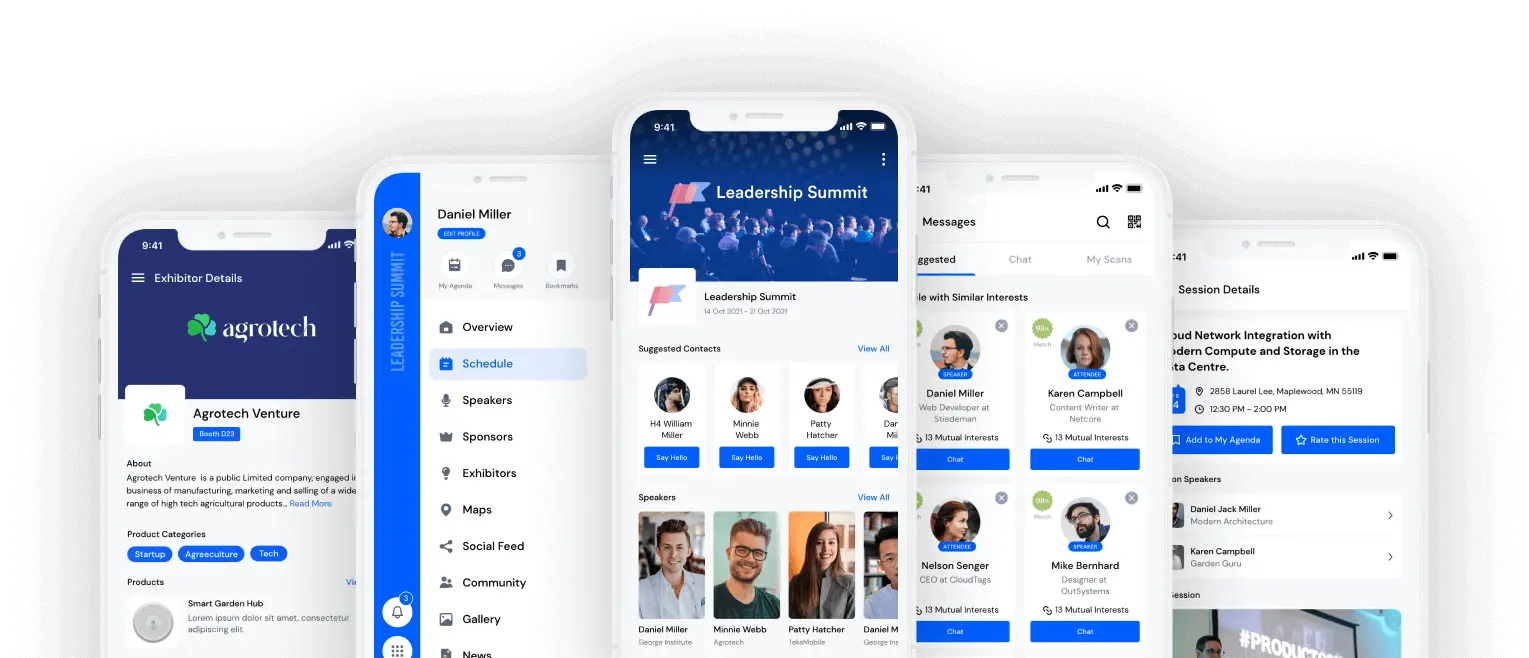
A branded mobile event app gives attendees their personalized schedule, real-time notifications, session ratings, networking profiles, and exhibitor directories. It's often the single feature attendees interact with most during the event. For conferences with several hundred attendees, the app effectively becomes the operating system of the entire experience.
6. Speaker Management
This module lets speakers submit bios, headshots, session abstracts, and presentation files through a dedicated portal - saving your teamdozens of back-and-forth emails. Some platforms include speaker approvalworkflows and conflict-checking during session scheduling. If you're coordinating 30+ speakers, this feature alone pays for itself in recovered hours.
7. Networking & Business Matchmaking
AI-powered business matchmaking algorithms suggest relevant connections based on attendee profiles, interests, job titles, and stated goals. This turns passive hall way networking into structured, intentional meetings - and is consistently rated among the highest-value features by conference attendees in post-event surveys.
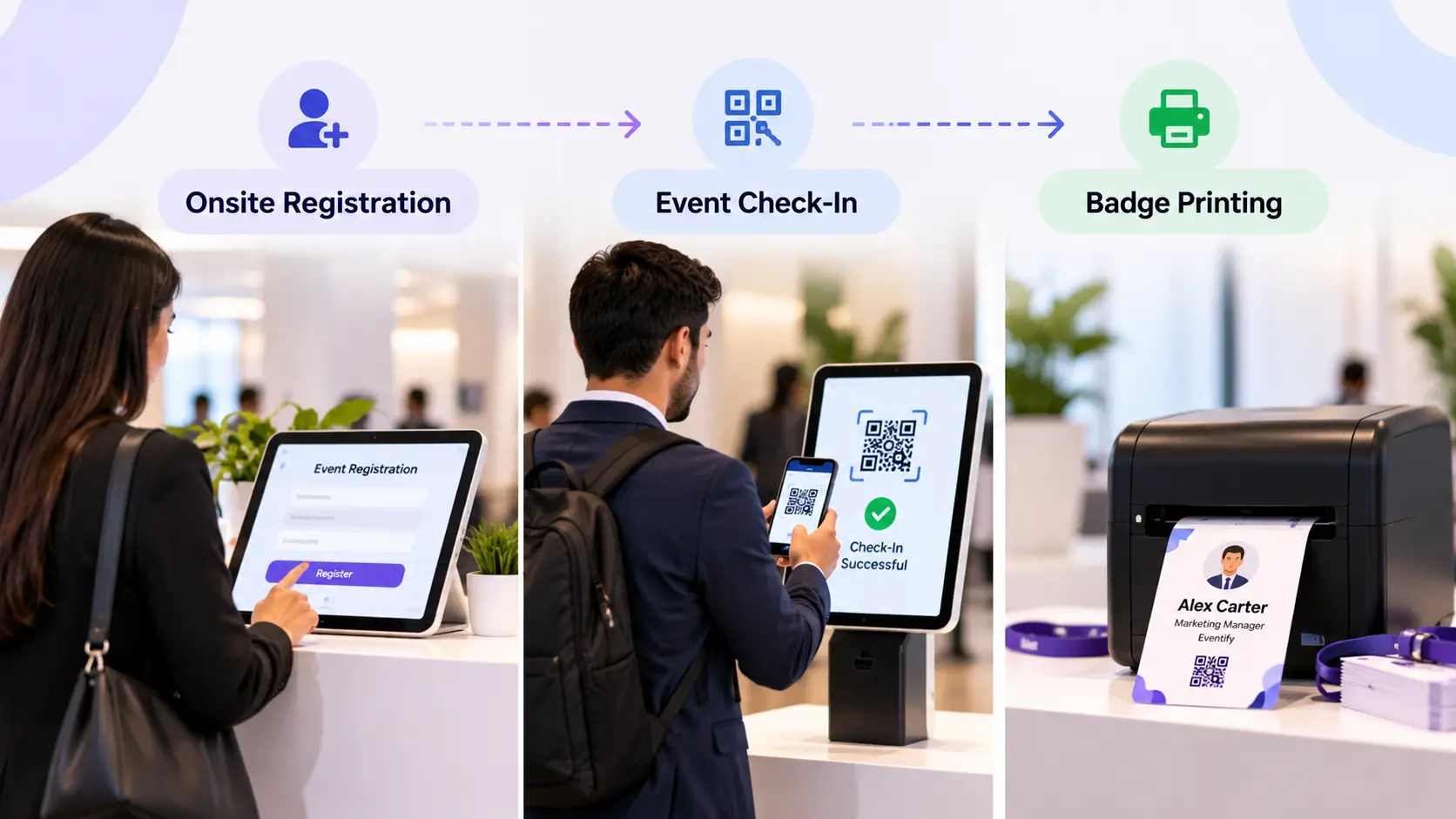
8. Event Check-In
On event day, attendees check in via QR code scanning -either at staffed kiosks or through self-service stations. Real-time dashboardsshow attendance counts by session, time slot, and ticket type. For events withmultiple access tiers, the system enforces session capacity automatically.
9. Event Badge Printing
On-demand event badge printing at check-in eliminatespre-printed event badge waste and removes the alphabetical-search nightmare thatcreates long queues. Badges print in seconds, typically including theattendee's name, company, role, and a QR code for further scanning.
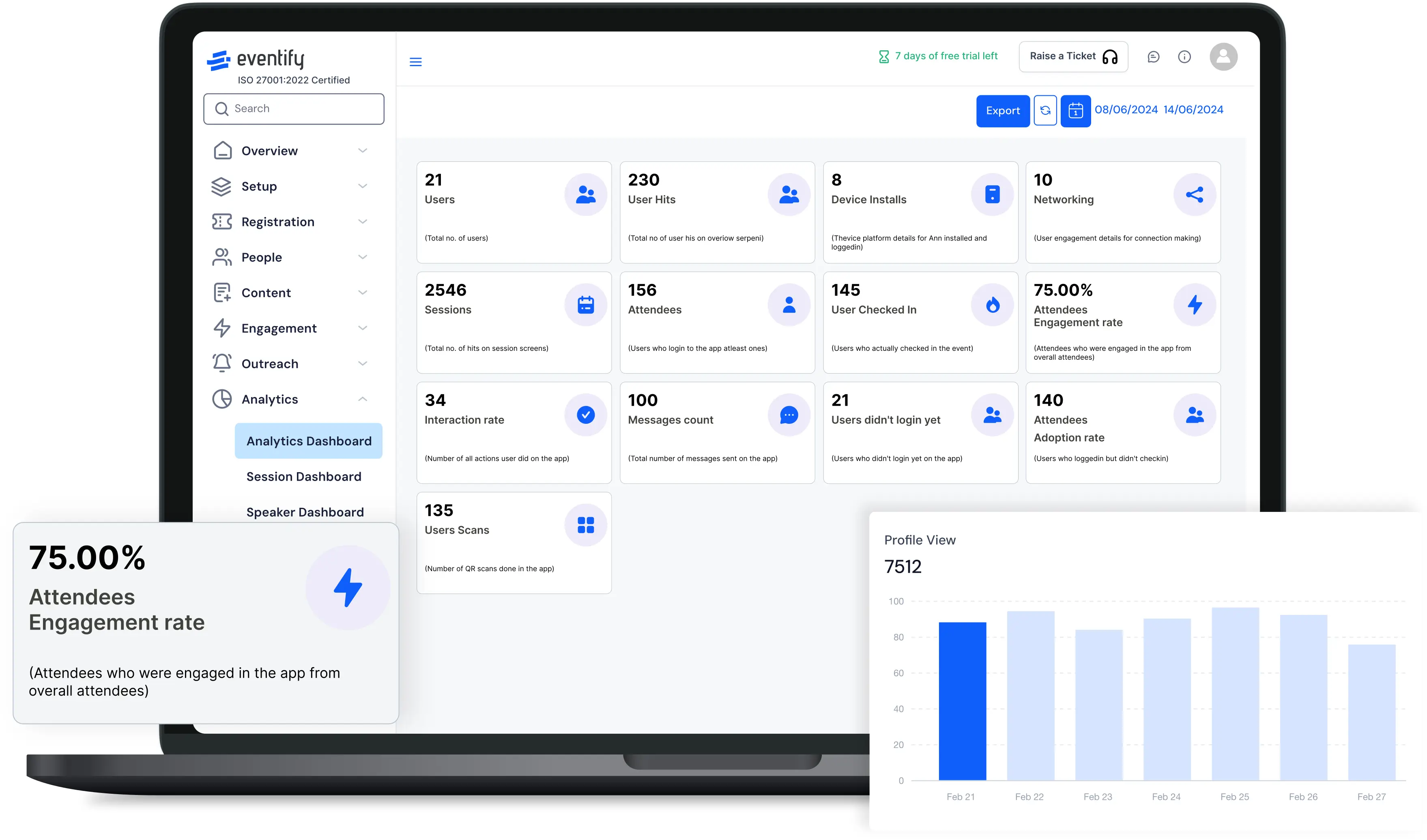
10. Analytics & Reporting
After the event, the online event management platform aggregates attendance data, session ratings, app engagement, lead generation activity, and registration conversion metrics into reports your team can actually use - and share with stake holders without manual reformatting.
Manual Event Management vs. Event Software: Side-by-SideComparison
Quick Summary: How Event Software Works
- Before the event: Setup, registration, ticketing, website, speaker management, communications
- During the event: Check-in, badge printing, mobile app, networking, session management
- After the event: Analytics, sponsor reports, CRM sync, attendee follow-up
Common Problems Event Organizers Face - And How Event Management Software Solves Them
This section covers the operational reality that most online event management software vendor websites gloss over. These are the problems that actually derail events - and what good event management software does (and doesn't do)to fix them.
Problem 1: Spreadsheet Chaos and Registration Errors
The challenge: Your master attendee list lives in a shared Google Sheet. Three team members are editing it simultaneously - two ofthem have sorted the columns differently. Someone overwrites a formula. A late registrant gets added twice. The dietary restriction column has 14 different spellings of "vegetarian," none of which filter correctly. By the day before the event, no one is sure which version of the spreadsheet is authoritative.
Why it happens: Spreadsheets are the default tool because they're free and familiar. But they were never designed for collaborative, live data management at event scale. They lack validation rules, duplicate detection, and real-time sync across teams. The more people editing the same file, the more unpredictable the data becomes.
Real-world impact: Data errors cascade in ways that aren't obvious until event day. You print the wrong number of badges. Caterers receive in accurate head counts. A VIP attendee who registered three weeks agoshows up with no record in the system. Your team spends the 48 hours before the event doing data cleanup instead of event preparation - which is exactly when you can least afford the distraction.
How event management software solves it: Acentralized registration database with field validation, duplicate detectionlogic, and role-based editing eliminates the version control problem entirely. Every team member works from the same live record. Conditional form logic prevents incomplete submissions. Automated confirmation emails and data syncmean there's no reconciliation step before printing event badges.
Practical example: An organizer managing a 450-personannual industry conference was spending roughly two full days before each event cleaning registration data - removing duplicates, standardizing company names, and chasing incomplete records. After moving to a platform with built-invalidation, that pre-event cleanup dropped to under an hour. The recovered time went into sponsor communications and speaker prep - the high-value work thatactually moves the needle.
Problem 2: Long Check-In Queues That Ruin First Impressions
The challenge: Doors open at 8:00 AM. By 8:15 AM there's a 40-minute queue snaking through the lobby. Staff are frantically flipping through pre-printed alphabetical badge lists. Every attendee whoselast name starts with a letter near the end of the alphabet is visibly frustrated. Walk-ins stand to the side with hand-written sticker badges whilethe line grows behind them.
Why it happens: Pre-printed event badge systems require staff to locate each attendee in a sorted list, match their badge, and hand it over - a process that takes 30–90 seconds per person under pressure. At 500 attendees arriving in a 30-minute window, that math creates an unavoidable bottle neck. Any deviation (name misspelling, walk-in, badge reprint request) adds time and disrupts the flow for everyone behind them.
Real-world impact: The first 20 minutes of an event sets attendee perception for everything that follows. A long, disorganized check-in signals operational problems even if everything else runs smoothly. It's also a staffing cost issue - running 8–10 check-in tables requires significant temporary labor for a single-morning task.
How event planning software solves it: QR code event check-in with on-demand event badge printing changes the economics entirely. The process is: scan the attendee's QR code from their phone, badge prints immediately, attendee moves on. A single well-configured station can process attendees significantly faster than alphabetical table lookup. Self-service kiosks reduce the staffing requirement further and handle a portion of arrivals without any staff interaction.
Walk-ins register at an on-site terminal, receive a confirmation QR code, and get a printed badge within 60 seconds. There's no separate queue, no hand-written stickers, no manual list update.
Practical example: One of the most consistent complaints in post-event surveys at large conferences is check-in wait time. Switching from alphabetical pre-print tables to QR-based on-demand printing typically reduces peak wait times from 20–40 minutes to under 5 minutes at the same attendee volume - because through put per station increases dramatically and the system handles exceptions without breaking the flow for everyone else.
Problem 3: Low Attendee Engagement and Weak Networking
The challenge: You've put together a genuinely strong speaker lineup and a thoughtful agenda. But once attendees walk into the venue, engagement fragments. Some spend the morning glued to their phones. Others attend the keynote and skip every breakout. Networking happens mostly by accident - whoever happened to grab coffee at the same time. By the finalsession, the room is half-empty.
Why it happens: Without a structured engagement layer, attendees navigate the event entirely on their own initiative. A printed agenda or PDF schedule is passive - it doesn't remind anyone about sessions, facilitate introductions, or reward participation. Most attendees default to familiar behavior: talking to the people they already know. Networking requires over coming social friction that most people won't push through without astructured nudge.
Real-world impact: Low engagement translates directly into weak post-event survey scores, which affect renewal rates, sponsorship value, and the event's reputation within its industry. If attendees leave feeling they didn't get enough value from the networking or sessions, they'reless likely to return - and more likely to mention it to colleagues who were considering attending next year.
How event software solves it: A well-configured mobile event app creates an active engagement layer. Personalized push notifications remind attendees about upcoming sessions relevant to their schedule. Event gamification elements (session check-ins, exhibitor booth visit challenges, networking leaderboards) give attendees reasons to participate beyond passive interest. Live Q&A and polling make sessions interactive rather than one-directional.
AI-powered business matchmaking addresses the networking problem specifically. Instead of hoping attendees find each other organically, the platform analyzes profiles - job title, company type, stated goals, session interests - and recommends specific connections. Attendees receive suggested meetings they can accept, decline, or modify. This converts random hallway conversations into intentional, pre-qualified meetings.
Practical example: For conferences with several hundred attendees, networking often becomes fragmented without a structured platform. Event apps help centralize schedules, messaging, and meeting coordination in a way that printed materials simply cannot. The shift isn't just about convenience - it's about whether attendees leave with meaningful new professional connections or just a stack of business cards they'll never followup on.
Problem 4: Sponsor Dissatisfaction and Poor ROI Visibility
The challenge: Your Platinum sponsor invested $30,000 in your event. Their two sales reps staffed the booth for a full day. They collected 52 business cards. You send them a post-event summary with your totalattendance number and some photos. Three months later, when you approach them about next year's sponsorship, they're non-committal.
Why it happens: In a world where marketing budgets face increasing scrutiny against measurable outcomes, a logo on a banner and an estimated attendance count simply don't hold up as justification. Sponsors needto justify internal spend to finance teams. If they can't show qualified leads,engagement data, or pipeline activity attributed to your event, the sponsorship looks like pure brand awareness - and brand awareness spend gets cut first when budgets tighten.
Real-world impact: Sponsor non-renewal compounds overtime. Lose two or three significant sponsors between annual cycles and your event revenue drops materially. The compounding effect is the real threat: each lost sponsor reduces the budget available for content quality, which reduces attendee value, which makes the next year's sponsor renewal even harder.
How online event software solves it: Digital lead retrieval gives sponsors something fundamentally different: a searchable, exportable database of every prospect they engaged, with contact information, qualification notes, and session attendance history. Sponsors scan attendeebadges with a smartphone, add notes about the conversation, rate lead quality,and see their running lead count in real time throughout the event.
Post-event, each sponsor receives a formatted report theycan take directly to their internal team. They know exactly who they met, whatthose people were interested in, and how engaged those contacts were with the event overall. That data makes the renewal conversation straight forward becausethe value is already documented - not estimated.
Practical example: The difference between a sponsorwho collected 52 business cards versus one who exported 52 enriched leadrecords - with contact details, job titles, session attendance history, and conversation notes - is the difference between an anecdote and a business case.The second sponsor has something concrete to bring to their VP of Sales. The first one is justifying the spend on vibes.
Problem 5: Communication Failures and Agenda Confusion
The challenge: A session time changes. A speaker cancels and is replaced. A venue room assignment shifts. You send a bulk emailupdate - but 20% of your list has a different email address than what's in the registration system because someone manually added them through a side channel. The app still shows old session data because it's a separate system that hasn't been synced. On event day, 80 attendees line up for a session that moved rooms two days ago.
Why it happens: When communications are managed through a tool that isn't connected to the event's operational data, every update requires a manual reconciliation step across multiple systems. Ther egistration database, the email tool, the mobile app, and the event website all contain slightly different versions of the agenda. Any change has to bemade in multiple places - and it's easy to miss one.
Real-world impact: Attendee confusion about logistics generates a surge of staff questions at exactly the moment your team is most stretched. It creates visible confusion at the venue, which erodes perception of how professionally the event is managed - regardless of how strong the content is.
How event organiser software solves it: An integrated event planning platform means that when you update a session time, the change propagates automatically: the event website, the mobile app, push notificationsto affected attendees, and any relevant communication templates update from asingle action. Targeted communications can go specifically to attendee sregistered for the affected session - not as a blanket broadcast that creates confusion for everyone else.
Problem 6: Managing Multiple Disconnected Tools
The challenge: Your event website is on one platform. Registration is on another. The mobile app is a third vendor. Email runs through Mailchimp. Lead retrieval is a rental scanner from an exhibitor technology company. Post-event analytics require pulling exports from all ofthese and manually building a master spreadsheet. Your team manages fourdifferent logins for five different systems, none of which share data.
Why it happens: Most event tech stacks grow organically - each tool added to solve a specific problem at the time, withlittle consideration for how they connect. The result is a patchwork that requires your team to act as the integration layer.
Real-world impact: Disconnected tools multiply yourteam's workload and data error risk at every connection point. Attendees whoupdate their registration details won't automatically have those updates in the app. A lead captured at a booth won't appear in your CRM without a manual export step. Post-event, assembling a coherent performance picture requireshours of spreadsheet work.
How event software solves it: An all-in-one event management platform is the cleanest solution - one system where registration, communications, the mobile app, check-in, and analytics all share the same data layer. For organizations with existing tools they can't move away from (aspecific CRM, a particular email marketing platform), strong native integrationsare the practical alternative.
What to watch for: "Integration" can mean anything from a native, bidirectional real-time sync to a one-way Zapier exportthat runs once daily. Ask specifically how data flows, at what frequency, andwhat happens when a sync fails. The gap between those two scenarios issignificant.
Problem 7: Budget Waste from Inefficient Processes
The challenge: You pre-print 900 badges for an 800-person event. Event day arrives: 170 registered attendees don't show, buttheir badges are already printed and useless. Fifteen walk-ins receive hand-written sticker badges because you've run out of blank stock in the right format. You hire 11 check-in staff when the technology could have done the samejob with 4. Catering is ordered at full registered capacity, not adjusted for the typical 15–20% no-show rate.
Why it happens: Without reliable attendance prediction data and without on-demand badge printing capability, event teams default to over provisioning as risk mitigation. Better to have too much than too little - except "too much" has a real cost that compounds across every event in a portfolio.
Real-world impact: These inefficiencies are individually small but collectively significant. Organizations running 5–10 events per year are routinely over-spending on printing, catering, and temporary staffing in ways that add up to meaningful budget impact - money that could fund better content, speakers, or venue upgrades.
How event production software solves it: Historical event data on your event platform builds an attendance base line you can actually use for planning. If your annual conference has historically seen a 17% no-show rate from registered attendees, you plan catering and staffing accordingly. On-demand badge printing eliminates pre-print waste entirely - you produce exactly as many badges as people actually check in.
Quick Summary: Problems and Software Solutions
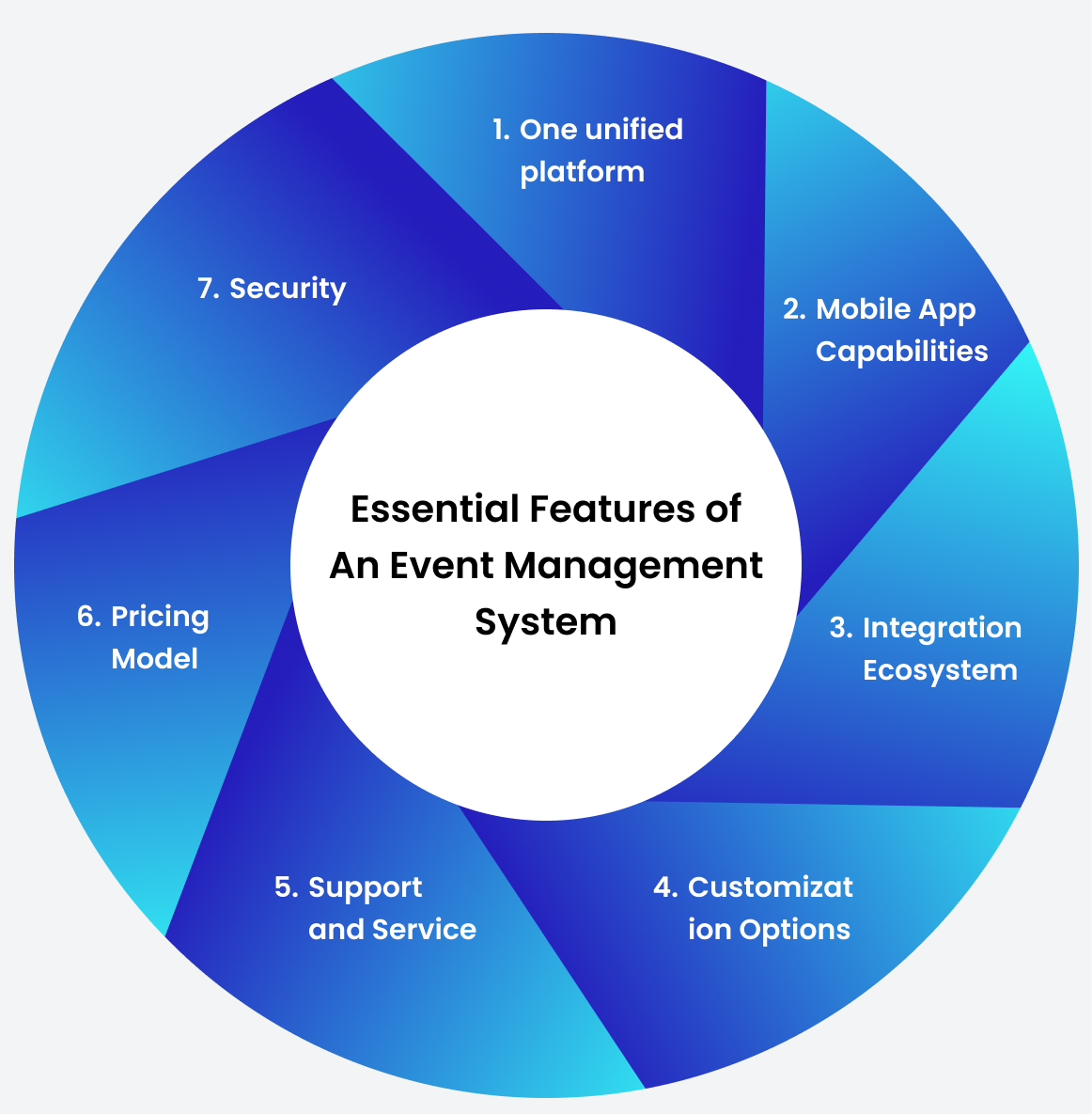
Key Features to Look for in Event Management Software
Not every platform excels at every feature - and not every feature matters equally for your event type. Here's a detailed breakdown ofwhat each capability should include, what separates a strong implementation from a weak one, and when a feature is truly necessary versus a situational add-on.
Event Registration Software
Why it matters: Registration is the first experienc eattendees have with your event brand. A clunky form drives drop-off. Missing validation creates bad data you'll spend hours cleaning later.
What to look for:
- Custom form builder with conditional logic (show field X only if attendee selects option Y)
- Multiple ticket types: free, paid, VIP, group, exhibitor, speaker, student, member/non-member
- Early-bird pricing with automatic cutoff dates
- Promo and discount code support with usage limits
- Waitlist management with automatic promotion when spots open
- Group registration with individual attendee data collection
- Multi-currency and multi-language support for international events
- GDPR consent fields and data processing agreements
- Instant confirmation emails with calendar invite attachments
- Mobile-optimized registration experience
- Accessibility compliance (WCAG)
When this feature really matters: Always. Every event has registration. The difference between platforms shows up in edge cases - how they handle group bookings, partial refunds, or mid-form ticket type changes.
Common organizer mistake: Choosing a registration tool without testing the mobile experience. A form that's awkward on mobile costs you real registrations.
Event Ticketing
Why it matters: Ticketing is where revenue lives. Errors here have direct financial consequences.
What to look for:
- Integrated payment gateways (Stripe, PayPal, bank transfer)
- Tax and VAT calculation with country-specific rules
- Automated refund handling with configurable policies
- Ticket transfer between attendees
- Print-at-home and mobile wallet delivery
- Per-session capacity limits with real-time enforcement
- Revenue reporting by ticket type and time period
- Abandoned registration cart recovery
When this feature really matters: Essential for paidevents. For free events with complex access tiers (VIP, speaker, exhibitor), the ticketing system still determines what each attendee can access on-site.
Event Website Builder
Why it matters: Your event website is where most registration decisions are made and where your organic search presence lives.
What to look for:
- Drag-and-drop builder with responsive mobile design
- Custom domain support (yourconference.com, not platform.com/event)
- Speaker profile pages with individual bio and session links
- Agenda display with filtering by track, day, or speaker
- Sponsor tier display with logo and link support
- Countdown timers and prominent registration CTAs
- Integration with email marketing and CRM tools
When this feature really matters: If organic discovery and brand consistency matter to you, the custom domain and SEO capabilities are non-negotiable. Events on generic platform subdomains rank poorly in search and signal less professional credibility to prospective attendees.
Mobile Event App
Why it matters: For professional events, the mobile app is the primary attendee interface during the event. It determines whether engagement happens or doesn't.
What to look for:
- Personalized schedule builder with session bookmarking
- Push notifications for session reminders and live announcements
- Interactive venue map
- Exhibitor and sponsor directory with booth locations
- Attendee directory with opt-in visibility controls
- In-app messaging and meeting request system
- Live Q&A and polling during sessions
- Session ratings and speaker feedback
- Gamification (leaderboards, session check-ins, booth challenges)
- White-label branding - your logo, not the vendor's
- Progressive Web App (PWA) option for attendees who prefer not to download
- Offline functionality for venues with unreliable connectivity
When this feature really matters: Any professional conference with 100+ attendees. Below that thres hold, a well-designed event website may be sufficient.
Common organizer mistake: Choosing a platform with ageneric-branded app to save money. Attendees who see a different company's namein the app store and throughout the experience question your event's professionalism. White-labeling is usually worth the cost.
Networking & AI Business Matchmaking
Why it matters: For most conference attendees, networking is the primary reason they attend - often cited above content quality in post-event surveys. If networking is fragmented, the event under delivers on its core promise.
What to look for:
- AI-powered attendee matching based on profile data and stated goals
- 1:1 meeting scheduling with calendar integration
- Meeting room or time slot reservation
- Group meetup creation for shared-interest clusters
- Connection requests and in-app messaging
- Post-event connection export (LinkedIn integration, vCard download)
When this feature really matters: B2B conferences,trade shows, association events, and any event where relationship-building isan explicit value proposition. Less critical for consumer events or events where content is the primary draw.
A practical note on matchmaking quality: The qualityof AI matchmaking depends heavily on the data you collect at registration. A matching algorithm is only as good as the profile data it has to work with. Make sure your registration form captures enough meaningful attributes -industry, job function, what the attendee wants to learn or solve - to enablegenuinely useful recommendations.
On-Demand Badge Printing Software
Why it matters: Badges are both a functional tool (QRcodes for scanning) and the first tangible product of your event's productionquality.
What to look for:
- On-demand printing triggered by QR check-in
- Customizable badge templates by ticket type or attendee role
- Photo badge support for high-security events
- Color-coded badge backgrounds by role (speaker, VIP, sponsor, general)
- Compatible with standard printers (Zebra, Dymo, Boca)
- Reprint capability for lost or damaged badges
- Self-service kiosk mode
When this feature really matters: Any event where check-in is visible and the attendee experience matters. Pre-printed event badges create waste, long search times, and inflexibility for walk-ins.
On-Site Event Check-In Software
Why it matters: Check-in is your most visible operational moment. Everything wrong with your data or technology surfaceshere.
What to look for:
- QR code scanning via tablet, phone, or dedicated scanner hardware
- Self-service kiosk option with touchscreen interface
- Walk-in registration with on-site payment
- Session-level check-in for capacity-controlled breakouts
- Real-time attendance dashboard visible to all event staff
- Offline mode for venues with unreliable Wi-Fi (syncs when reconnected)
When this feature really matters: Always, butespecially at events with 300+ attendees arriving in a compressed arrival window. That's where check-in technology makes or breaks the experience.
Speaker Management
Why it matters: Speaker coordination is one of thehighest-touch, most email-intensive parts of running a conference. A speakerportal transforms weeks of email chains into a self-managed workflow.
What to look for:
- Speaker portal with individual login
- Bio, headshot, and social media link submission
- Abstract and session submission with word limit controls
- Multi-stage review and approval workflow
- Presentation file upload with version control
- Automated deadline reminder emails
- Conflict detection in session scheduling
- Speaker-specific app access (session view, attendee messaging)
When this feature really matters: Conferences with15+ speakers. Below that threshold, manual coordination is manageable. Aboveit, a portal saves significant time and reduces the chance of missing criticalsubmissions.
Sponsor Management
Why it matters: Sponsors are a major revenue source. How well you serve them operationally determines whether they renew - and at what investment level.
What to look for:
- Tiered sponsor package setup with clear entitlements
- Sponsored sessions with embedded sponsor branding
- Sponsored push notifications to segmented attendee groups
- Branded sponsor profile page in the app and website
- Digital lead retrieval for booth staff
- Self-service sponsor portal for accessing leads and updating materials
- Automated post-event ROI report generation
When this feature really matters: Any event with paid sponsorships. Lead retrieval capability is the single most impactful featurefor sponsor retention - it converts abstract brand presence into a quantifiable business case for renewal.
Lead Retrieval Software
Why it matters: Lead retrieval is how sponsors and exhibitors measure the concrete value of their investment. Without it, they'reguessing.
What to look for:
- Badge scanning via smartphone camera (no dedicated rental hardware required)
- Instant lead capture with full contact details
- Custom qualification notes at point of scan
- Lead quality rating or interest category fields
- Real-time lead count visible to all sponsor contacts
- Direct export to CRM (Salesforce, HubSpot, Pipedrive)
- Formatted post-event lead report per exhibitor
When this feature really matters: Trade shows, expos, and any conference with an exhibition floor. This is often the primary deliverable sponsors use to judge your event's value.
Event Analytics & Reporting
Why it matters: Without data, you're making planning decisions based on gut feel. With it, you make specific, measurable improvements each event cycle.
What to look for:
- Registration conversion funnel (page visits → registrations → check-ins)
- Session attendance rate by time slot and track
- Mobile app engagement (daily active users, session views, message volume)
- Check-in completion rate by ticket type
- Sponsor lead volume per exhibitor
- Revenue breakdown by ticket type and promotional code
- Net Promoter Score (NPS) collection and visualization
- Custom report builder for stakeholder presentations
When this feature really matters: Always - but especially for recurring events where year-over-year comparison drives planning decisions and budget justification.
CRM and Marketing Tool Integrations
Why it matters: Your event data is most valuable when it flows automatically into the systems your sales and marketing teams actually use.
What to look for:
- Native integrations with Salesforce, HubSpot, Marketo, Pardot
- Bidirectional attendee data sync (not just one-way export)
- Lead score enrichment based on session attendance and app engagement
- Campaign attribution tracking (which marketing effort drove which registrations)
- Open API with documentation for custom integrations
- Webhook support for real-time event-triggered syncs
When this feature really matters: B2B events where registrants are prospects or customers, and demand-gen events where proving marketing ROI requires attribution data.
Marketing Automation
Why it matters: Pre-event communication drives registration conversion. Post-event communication captures value while the experience is still fresh. Neither should require manual effort for every touch point.
What to look for:
- Pre-event drip sequences: save the date → open registration → agenda preview → registration deadline → day-before reminder
- Segmented communications by attendee type (speaker, VIP, general, exhibitor)
- Abandoned registration cart recovery emails
- Post-event survey distribution with automated timing
- Social sharing prompts with pre-built content
Hybrid & Virtual Event Capabilities
Why it matters: The expectation of remoteaccessibility has become permanent across most professional event categories. Even primarily in-person events often need to accommodate some virtual participants.
What to look for:
- Live session streaming to virtual attendees
- Virtual networking with AI matchmaking across all attendee types
- Virtual exhibitor booths with live chat and lead capture
- On-demand content access after the event
- Synchronized Q&A and polling across in-room and remote participants
- Separate virtual attendance analytics
AI Features in Event Management Software
Why it matters: AI in event platforms isn't just a marketing check box in 2026 - it's where meaningful differentiation between platforms now exists.
What to actually look for:
- Smart matchmaking that incorporates real-time attendee behavior (not just registration profile)
- Personalized agenda recommendations based on registration data and in-app activity
- Automated session scheduling with conflict avoidance
- Sentiment analysis from post-session ratings
- Predictive attendance modeling for capacity planning
- AI chatbot for common attendee questions (room locations, session times, WiFi passwords)
- Automated post-event content summaries
A practical note: Ask vendors to demonstrate their AI matchmaking in a live environment - not a slide. The difference between agenuine AI recommendation system and a filtered directory with an "AI" label is significant. Good matchmaking surfaces non-obvious connections, not just pairs of people in the same industry.
Feature Comparison: What to Expect by Platform Tier
[→ See Eventify's full feature set: Explore the Platform]
Benefits of Event Management Software: What ActuallyChanges
1. Dramatically Reduces Operational Time
Event organizers consistently report spending substantially less time on administrative tasks after adopting purpose-built event software. What used to take two weeks of back-and-forth emails - speaker confirmations, attendee list updates, badge preparation, sponsor coordination - compresses into hours. This isn't just about efficiency. It frees your team to focus onthe parts of event management that require human judgment: content curation, relationship management, creative problem-solving.
2. Elevates Attendee Experience at Every Touchpoint
From first-click registration to post-event survey, every interaction with your event reflects on your organization. A mobile-optimized registration form, a personalized event app, seamless check-in, and structured networking opportunities collectively signal professional excellence. Attendees who leave feeling the event was well-organized are significantly more likely to return and recommend it to colleagues.
3. Turns Sponsor Relationships Into Measurable Partnerships
The fundamental shift that digital lead retrieval enables is converting sponsors from passive brand-presence buyers into active ROI-measurable participants. When a sponsor can see exactly how many leads theycaptured, the quality ratings their team assigned, and the session interests ofthose prospects, the renewal conversation changes entirely. You're no longer selling attendance numbers - you're showing documented pipe line activity.
4. Reducesthe Cost of Human Error
Automated workflows, approval steps, and validation rules don't eliminate human judgment - they catch the errors that happen when peopleare tired, rushed, or working from incomplete information. The email sent tothe wrong segment. The ticket price published too early. The session listed twice. Good software creates check points that catch these before they reach attendees.
5. Unifies Your Team Around a Single Source of Truth
Instead of five people managing five disconnected spread sheets, your entire team works from one platform with role-based permissions. There are no "which version is current?" emails. Everyone sees the same live data at the same time.
6. Creates Post-Event Intelligence for Continuous Improvement
The most under valued benefit is the data generated for your next event. Session attendance patterns show which topics resonated and which time slots saw drop-off. App engagement shows how actively attendees participated. NPS scores give a clear directional signal. This data makes each event measurably better than the last.
7. Scales Without Proportionally Adding Staff
The economics become increasingly compelling as events grow. Managing a 1,000-person event with software doesn't require ten times the team effort of a 100-person event - the platform handles the volume. Managing a 1,000-person event without software often means adding temporary staff, which erodes your margin.
Quick Summary: Benefits of Event Management Software
- Reduces administrative workload by eliminating manual data entry and disconnected tools
- Improves attendee experience across registration, engagement, check-in, and networking
- Gives sponsors quantifiable ROI data that supports renewal conversations
- Reduces costly human errors through automation and workflow controls
- Creates post-event data foundation for continuous, measurable improvement
How Event Management Software Saves Time and Money: Real-World Scenarios
These scenarios reflect operational realities acrossconference, trade show, and corporate event contexts.
Scenario 1: The Registration Data Cleanup
Without event management software: A 400-person conference team spends 2–3 days before the event cleaning registration data -removing duplicates, standardizing company name variations, chasing attendeesfor missing information, and rebuilding the badge print file.
With event management software: Registration validation catches duplicates and required fields at submission. The badge print file generates automatically. Pre-event data clean up drops from days tounder an hour.
Time recovered: 15–20 hours across the organizing team.
Scenario 2: Check-In Staffing and Logistics
Without event software: A 600-person event requires10 check-in staff at alphabetical pre-printed badge tables. Peak morning arrival creates 25–40 minute waits. Each staff member is paid $25/hour for an-hour day - $2,000 total.
With event software: QR scanning with on-demand badge printing requires 3–4 stations. Peak waits clear in under 5 minutes. Self-service kiosks handle a portion of arrivals without staff interaction.
Cost recovered: Roughly $1,400–$1,750 in reduced staffing for a single event day.
Scenario 3: Badge Pre-Printing Waste
Without event planning software: 750 badges pre-printed for a 600-person event. 130 registered attendees don't show. 20 walk-ins receive hand-written sticker badges.
With event planning software: On-demand printing means exactly the right number of badges are produced. Walk-ins receive professional printed badges from the same check-in kiosk in 60 seconds.
Cost recovered: $400–$800 in materials, plus the timespent pre-printing and sorting.
Scenario 4: Sponsor Renewal Rate
Without online event software: Sponsors receive apost-event summary with total attendance and photos. Sponsor renewal rate is in consistent and difficult to improve without meaningful data.
With online event software: Each sponsor receives anautomated report detailing every lead their team scanned - contact information, session attendance, engagement notes. They have a business case to bring totheir internal team before renewal conversations begin.
Revenue impact: Even a modest improvement in sponsor renewal rate - say, from 55% to 70% on a $60,000 annual sponsorship total -represents $9,000 in additional recurring annual revenue.
Scenario 5: Speaker Coordination Hours
Without corporate event management software: Coordinating 40 speakers for a two-day conference involves 4–6 weeks of emailchains - collecting bios, headshots, abstracts, presentation files, and dietary restrictions, with manual follow-up for every incomplete submission.
With corporate event management software: A speakerportal sends automated reminders, tracks submission completion status in adashboard, and stores all files in one place. Speaker coordination drops from 40+ hours to under 10.
Time recovered: 30+ hours per event cycle.
Types of Event Management Software: Choosing by Event Format
Not all event platforms are built for all event types. Some specialize deeply; others claim breadth without depth.
Conference Event Management Software
Purpose-built for multi-day, multi-track professional conferences. Distinguishing features: abstract submission management, session scheduling with conflict detection, speaker portals, detailed agenda publishing with track filtering, and attendee networking. Most full-featured event platforms cover conferences well - the differentiator is how they handle session scheduling complexity and speaker coordination at scale.
Best for: Technology conferences, academic events, industry associations, professional development events.
Trade Show Management Software
Optimized for exhibitor management: booth assignments, exhibitor self-service portals, floor plan display in the mobile app, badge scanning for lead retrieval, and sponsor package management. Trade shows have unique operational requirements that general conference software doesn't always address - particularly exhibitor portal depth and the lead retrieval experiencefor booth staff.
Best for: B2B trade shows, industry expos, products howcases with 20+ exhibitors.
Expo Software
Similar to trade show platforms but oriented toward consumer-facing events - home shows, auto shows, food festivals, lifestyle expos. Key differences: higher emphasis on general admission ticketing volume,simpler exhibitor management, and a consumer-facing mobile experience.
Best for: Consumer expos, ticketed festivals, lifestyle events.
Corporate Event Management Software
Built for internal or external corporate events: town halls,sales kickoffs (SKOs), product launches, executive summits, and employee appreciation events. Key features include SSO for internal attendees, internal ticketing without public payment processing, and executive-grade reporting that integrates with corporate BI tools.
Best for: Enterprise events, internal company meetings, product launches.
Association Event Software
Associations run events for their member base, often with pricing complexity other platforms don't handle natively: member vs. non-member ticket tiers, CEU/continuing education credit tracking, committee managementtools, and multi-chapter coordination.
Best for: Professional associations, nonprofit memberorganizations, certification bodies.
Hybrid Event Software
Manages the simultaneous in-person and virtual experience: live session streaming, synchronized Q&A and polling across both audiences, virtual networking with matchmaking, and unified analytics spanning both attendance types.
Best for: Conferences extending reach beyond physicalvenue capacity; organizations with distributed audiences.
Virtual Event Software
Fully online events - virtual conferences, online expos, digital summits, webinars. Features include live streaming, on-demand content access, virtual networking rooms, digital exhibitor booths with live chat.
Best for: Geographically distributed audiences, budget-constrained events, digital-first communities.
Event Type vs. Software Need: Quick Reference Table
Best Event Management Software in 2026: Unbiased Platform Comparison
The table below compares six major event platforms across the criteria event organizers care about most. No single platform is right for every situation - the goal is an accurate picture of where each excels andwhere it has limitations.
Event Management Platform Selection Notes
Eventbrite is the right choice for consumer events, community gatherings, and simple paid ticketing - not for professional conferences or trade shows with complex operational requirements. It lacks ameaningful mobile app, has no lead retrieval capability, and offers minimal post-event analytics beyond basic ticket sales data.
Cvent and Bizzabo are the enterprise standard forvery large, globally complex events with sophisticated CRM integration requirements. Both platforms are powerful and mature, but come with enterprisepricing that puts them out of reach for many mid-market organizers. Implementation timelines are longer and typically require a dedicated internal administrator.
Whova has built strong community trust in academicand professional conference spaces, with well-regarded networking features anda clean attendee experience.
EventMobi is well-regarded for corporate events andassociation meetings, with a mature mobile app product and strong customersupport reputation.
Eventify targets the mid-market to enterprise segment - organizations running professional conferences, trade shows, and expos thatneed white-label apps, AI networking, and sponsor lead retrieval without an enterprise contract procurement process. Its flexible pricing model makes it accessible to a broader range of organizers than the pure-enterprise platforms, without sacrificing professional-grade features.
Best Cvent Alternatives in 2026
[→ Compare Eventify to your current platform: Book aDemo]
How Eventify Helps Event Organizers Run Better Events
Eventify was built around a specific operational insight:the biggest problems event organizers face aren't caused by lack of effort -they're caused by fragmented tools that force manual effort at every connectionpoint.
Here's how the event platform addresses the challenges covered through out this guide:
Unified Registration and Data Integrity
Eventify's registration module handles custom form fields,conditional logic, multi-tier ticketing, group registrations, promo codes, and wait list management within a single workflow. Validation rules prevent the duplicate records and incomplete entries that cause pre-event data cleanup. Attendee information flows automatically to every other module - the app,check-in, badges, analytics, and sponsor tools - without manual export orreconciliation.
[→ Explore Eventify's event registration software]
A Genuinely White-Label Mobile Event App
Every event on Eventify can be powered by a fully branded mobile app - your logo, your colors, your event name - published under your organization's developer account in the app stores. Attendees see your brand throughout. Inside the app, they access personalized schedules, push notifications, session Q&A, the exhibitor directory, networking profiles,and gamification features.
This matters practically: attendees are more likely to download and actively use an app that looks like it belongs to the event they're attending.
[→ Learn about Eventify's mobile event app]
AI-Powered Networking That Creates Real Connections
Eventify's networking engine analyzes profile data collectedat registration - job title, company type, interests, stated goals, sessionpreferences - and surfaces meaningful connection recommendations. Attendees canrequest meetings, book available time slots, and message each other through theapp.
The quality of matchmaking depends on the quality of profile data. Eventify's registration forms are designed to capture the attributes that make matching genuinely useful, not just superficially functional.
[→ Explore Eventify's AI networking and matchmaking]
QR Check-In and On-Demand Badge Printing
On event day, Eventify's check-in module processes QR codescans from attendees' phones and triggers immediate badge printing. Walk-insregister at a self-service terminal and receive a professionally printed badge within 60 seconds. Staff dashboards show real-time check-in counts, enabling informed decisions about when to open additional lanes.
[→ See Eventify's check-in and badge printing tools]
Sponsor Lead Retrieval and Automated ROI Reports
Eventify's lead retrieval tool lets sponsor and exhibitorstaff scan attendee badges using a smartphone - no rental hardware required. They add qualification notes, rate lead quality, and see their running lead count throughout the event. After the event, each sponsor automaticallyreceives a formatted lead export and ROI summary they can use directly in their internal reporting.
[→ Explore Eventify's lead retrieval and sponsor management]
Analytics That Drive Decisions
Eventify's analytics dashboard brings together registration conversion data, session attendance by time slot and track, mobile app engagement, check-in completion rate, lead retrieval volume, and NPS scores into a single view. Reports export and format cleanly for stake holder presentations without manual reconstruction.
[→ Explore Eventify's event analytics and reporting]
Why Event Organizers Trust Eventify
Security & Compliance: ISO 27001:2022 Certified | SOC 2 Type II | GDPR Compliant
Trusted by Event Professionals: 50,000+ events managed | 5,000+ event organizers | Up to 70% higher engagement | 3X organic conversions | 200% business growth
[→ See how Eventify handles the full event lifecycle: Request a Demo]
How to Choose the Right Event Management Software: A Complete Buyer's Framework
Step 1: Define Your Event Parameters
Before evaluating any platform, get specific about whatyou're actually managing:
- Event type: Conference? Trade show? Corporate? Hybrid? Association?
- Attendee size: Under 200 / 200–500 / 500–2,000 / 2,000+?
- Number of events per year: One-off or multi-event portfolio?
- Team size: How many people manage operations?
- Geographic scope: Domestic, international, or multi-region?
- Budget: What percentage of event revenue can realistically go to software?
Step 2: Rank Your Operational Pain Points
From your experience running events, identify the top three problems that most affected your last event. This tells you which features toprioritize:
Step 3: Run a Structured Platform Evaluation
Functionality checklist:
- Handles your specific event type well
- Includes a native mobile app (not just a mobile website)
- Registration flow supports your ticketing complexity
- Native lead retrieval for sponsors included or available
- Speaker portal included (or at what cost)
- Hybrid/virtual capability if needed
Technical checklist:
- Integrates with your CRM and marketing tools (bidirectionally, not just export)
- Supports custom domain for event website
- White-label app available (and what it costs)
- Open API with documentation
- Offline event check-in mode for venue connectivity issues
Support and reliability:
- What support channels are available (email, phone, live chat, dedicated CSM)?
- Documented uptime SLA
- On-site support available for large events?
- Support response times during live events?
Pricing and contracts:
- Pricing model: per-event, per-attendee, or subscription?
- What's included vs. what costs extra?
- White-label app branding fee?
- CRM integration fees?
- Hardware requirements and costs?
- Contract length and cancellation terms?
Step 4: Run a Purpose-Driven Demo
Go beyond the vendor's standard demo flow. Specifically request:
- The check-in and badge printing workflow from QR scan to badge in hand
- The mobile app from an attendee's perspective (not the admin view)
- Thesponsor lead retrieval process - how does a booth staffer actually use it?
- A real analytics report from a past event (not a screenshot)
- The speaker submission portal end-to-end
- How the system handles a walk-in at peak check-in volume
Ask: "Show me how you'd handle a VIP attendee wholost their phone and needs to check in without their QR code." The answer reveals how the system handles real-world exceptions.
Step 5: Speak to References
Ask for two or three contacts from events similar to yoursin type and size. Ask them:
- "What went wrong on event day, and how did the platform handle it?"
- "How responsive was customer support during live event hours?"
- "What hidden costs did you encounter after signing?"
- "What would you do differently in your platform selection?"
Step 6: Negotiate the Contract
Before signing, clarify:
- Whether pricing is locked for multi-year terms
- What happens to your data if you cancel or switch platforms
- Whether you can export all attendee data, lead data, and analytics history on your plan
What the onboarding process looks like and how long implementation typically takes
Event Management Software Pricing Explained
Pricing models in event technology vary significantly, and the gap between list price and total cost of ownership is often wider than itappears.
The Five Pricing Models You'll Encounter
Per-Event Flat Fee A fixed fee per event, oftentiered by attendee count. Works well for organizations running 1–3 events peryear. You only pay when you have an active event, which keeps costs predictablefor seasonal programs.
Per-Attendee Pricing A fee for each registered orchecked-in attendee. Transparent, but scales costs quickly for large events. Critical question: is the fee based on registrations or actual check-ins? A15–20% no-show rate means you're paying for attendees who never arrived if it'sregistration-based.
Annual Subscription A flat annual fee covering unlimited events (or a specified number). Better value for organizations running 4+ events per year. Typically includes a feature tier with optionalpaid add-ons.
Enterprise Contract Custom pricing negotiated annually, including dedicated account management, custom integrations, uptime SLAs, and white-label services. Standard for Cvent and Bizzabo.
Freemium / Revenue Percentage Platforms like Eventbrite charge a percentage of each ticket sale (typically 2–6%) plus aper-ticket fee. Works for free or low-cost consumer events. Becomes expensive quickly for professional conferences - on a $500 conference ticket with a 3.5%+ $1.59 fee, you're paying nearly $19 per attendee in platform costs.
Hidden Costs to Ask About Before Signing
Typical Event Management Software Pricing Ranges in 2026
Pricing varies significantly by platform, featuresincluded, market, and negotiated terms. Use these ranges for budget planningand initial vendor filtering, not direct comparison.
[→ Get a custom Eventify quote for your next event: Contact Sales]
The Future of Event Management Software in 2026 and Beyond
AI Agents for Autonomous Event Operations
The next evolution beyond AI-powered features is AI agents -systems that handle entire operational workflows autonomously. An agent mightmonitor registration conversion in real time and trigger additional promotionalemails to specific audience segments when signups fall below pace. Another might optimize session scheduling based on early registration patterns tobalance attendance across tracks. These aren't hypothetical for 2026 - earlyversions are already deployed in leading platforms.
Predictive Attendance Modeling
Machine learning models trained on historical registrationdata, no-show rates, session popularity patterns, and external signals (travelcosts, competing events, economic conditions) are giving event planners unprecedented precision for capacity planning. This has direct financial impacton catering orders, staffing levels, and venue configuration decisions.
Real-Time Adaptive Matchmaking
The next generation of networking features goes beyond profile-based matching at registration. Systems that observe which sessions anattendee actively engages with, which exhibitor booths they visit, and whothey've already connected with can refine recommendations dynamicallythroughout the event - not just at registration. Networking becomes anintelligent, evolving surface rather than a static directory.
Event Automation Maturity
Routine operational tasks - registration confirmations,sponsor report generation, speaker deadline reminders, post-event surveydistribution, CRM data sync - are handled automatically within defined workflows. This isn't new, but the sophistication and reliability of these automations has matured significantly in 2025–26, making them genuinely trustworthy for mission-critical event communications.
Hyper-Personalized Attendee Journeys
Every attendee receiving a meaningfully different event experience based on their role, interests, and observed behavior is moving from a spirational to standard. The registration data exists in every event platform -the differentiator in 2026 is which platforms are sophisticated enough to use it across session recommendations, networking suggestions, push notification targeting, and content delivery simultaneously.
Integrated Sustainability and ESG Reporting
Corporate events face increasing scrutiny on environmental and social responsibility metrics. Event platforms are adding carbon tracking (travel and venue emissions), digital-first material management, and sustainability reporting to meet the requirements of corporate ESG programs and government procurement requirements.
Quick Summary: Event Software Trends in 2026
- AI agents handling autonomous operational workflows (monitoring, triggering, optimizing)
- Predictive analytics for attendance, capacity, and staffing decisions
- Real-time adaptive matchmaking based on in-event behavior
- Mature automation for routine communications and reporting
- Hyper-personalization driven by richer attendee profile data
Sustainability and ESG metrics integrated into event reporting suites
Complete Eventify Event Management Software Features
Frequently Asked Questions About Event Management Software
What is event management software?
Event management software is a digital platform that entralizes the planning, execution, and measurement of events. It replaces manual spreadsheets and disconnected tools with a unified system covering registration, ticketing, mobile apps, on-site check-in, badge printing, speaker management, sponsor tracking, attendee networking, and post-event analytics.The core value is connectivity - data entered once flows through every aspectof the event automatically, eliminating the manual reconciliation that creates errors and wastes time.
Who needs event management software?
Any organization running professional events with 50+ attendees benefits from purpose-built event software - conference organizers,trade show managers, corporate event planners, nonprofits, associations, universities, government agencies, and event agencies. The ROI case isstrongest for organizations running multiple events per year or events with complex logistics: multiple session tracks, sponsor management, or largeattendee counts.
What software do event planners use?
Professional event planners use a range of tools dependingon event type and scale. Full-platform solutions like Eventify, Cvent, Whova,EventMobi, and Bizzabo handle the complete event lifecycle. Eventbrite iscommon for consumer ticketing. Many organizers also use complementary tools:Salesforce or HubSpot for CRM, Mailchimp or Marketo for email, and Zoom or StreamYard for virtual sessions.
What's the difference between event management software and ticketing software?
Ticketing software focuses narrowly on sellingtickets and processing payments. Event management software covers the fullevent lifecycle - registration, mobile apps, on-site check-in, speaker management, attendee networking, sponsor ROI tracking, and analytics. Ticketingis a component of event management, not a substitute for it. Using aticketing-only tool for a professional conference is like using a single spreadsheet to run a restaurant - it handles one task adequately and failseverywhere else.
Is event management software worth the investment?
For most professional event organizers, the answer is yes -often within the first event cycle. The combination of reduced staffing costs at check-in, eliminated badge pre-print waste, recovered administrative hours,and improved sponsor renewal rates typically exceeds platform cost. The casebecomes more compelling for organizations running multiple events per year,where efficiency gains and sponsor retention improvements compound across eachcycle.
What's the difference between event management softwareand a CRM?
A CRM tracks ongoing relationships and interactions withcontacts over time. Event management software manages the logistics of specificevents - before, during, and after. The two complement each other: the best event platforms push attendee data, lead data, and engagement scores directlyinto your CRM so your sales team can follow up with context immediately after the event.
How is event management software different from project management software?
Project management tools (Asana, Monday, Trello) help teams track tasks and deadlines - but they have no awareness of attendees,registrations, badge printing, or session scheduling. They're useful for managing your team's internal to-do list but don't replace event-specific operational tools.
What is the best event management software in 2026?
The best event platform depends on your event type, attendeevolume, and budget. For mid-market to enterprise conferences and trade shows, Eventify offers white-label mobile apps, AI matchmaking, sponsor lead retrieval, and flexible pricing without requiring an enterprise contract. Cvent and Bizzabo are the standard for very large global events. Whova is popular for academic and professional conferences. Eventbrite remains the go-to for consumer ticketing but lacks professional event management depth.
What is the best event management software for small businesses?
Small businesses should prioritize platforms with clear per-event pricing (rather than large annual contracts), simple setup, andstrong mobile app capability. The key is finding a platform that grows with you- starting with per-event pricing but offering annual subscription options asyou scale. Platforms with self-serve onboarding and live support for events reduce the learning curve significantly.
What is the best event management software for nonprofits?
Nonprofits should look for platforms with nonprofit pricing discounts (several offer them), donation and fundraising integration, andtiered ticket pricing for donors, volunteers, and general public. Data privacy compliance is important if the organization operates in regions with strong data protection requirements.
What is the best conference management software?
For professional conferences with multi-track agendas,speaker management, and B2B networking, strong options include Eventify, Cvent, Whova, and EventMobi. Evaluate specifically on session scheduling complexity, speaker portal quality, mobile app engagement features, and AI networking capability. Each event platform has a different strength profile - use the buyer check list in this guide to match against your specific requirements.
What is the best trade show management software?
Trade shows need strong exhibitor portal management, floorplan display in the mobile app, lead retrieval for booth staff, and sponsor package management. Eventify and Cvent both handle trade shows well at different price points. Evaluate the exhibitor portal specifically - this iswhere most trade show platforms show the greatest variation in quality.
What is the best all-in-one event management software?
A true all-in-one event management platform handles registration, ticketing, event website, mobile app, check-in, badge printing, networking, speaker management, sponsor management, lead retrieval, and analytics within a single event management system. Eventify, Cvent, and Whova all approach all-in-one status; how well any platform covers each area is thekey evaluation question.
What is the best corporate event software?
Corporate events often need SSO integration for internal attendee login, internal ticketing without public payment processing, and executive-grade reporting. EventMobi and Cvent are both well-regarded in thecorporate event segment. Eventify also serves corporate events effectively with flexible event configuration and white-label branding.
What is the best event management platform for large events?
For events with 2,000+ attendees, prioritize check-in through put (QR scanning with self-service kiosks), server reliability under peak load, multi-session capacity management, and enterprise-grade analytics. Cvent and Eventify both support events at this scale; Bizzabo is also commonly deployed at large marketing-led conferences.
Eventify vs. Cvent: Which is better?
Cvent is the established enterprise standard - deep integrations, global support infrastructure, and a long track record with very large events. Eventify offers comparable features for conferences and tradeshows at more accessible pricing with a simpler implementation process. Forevents at 500–5,000 attendees where you don't need global enterprise procurement, Eventify is worth evaluating seriously. For a 15,000-person international event with complex enterprise CRM requirements, Cvent is thesafer, more proven choice.
Eventify vs. Whova: What's the difference?
Both platforms are strong for professional conferences. Eventify's white-label event app and more flexible pricing give it an edge for organizations where brand consistency matters and budget flexibility is important. Whova has strong community following in academic conference spaceswith well-regarded networking features. The choice often comes down to specific feature priorities - run both through the buyer checklist with your event's specifics in mind.
Eventify vs. Eventbrite: Which should I use?
These platforms serve fundamentally different use cases. Eventbrite is for consumer ticketing - concerts, community events, simple paidregistrations. Eventify is for professional events requiring mobile apps, networking, speaker management, sponsor lead retrieval, and detailed analytics. If you're running a professional conference or trade show, Eventbrite won't meet your operational needs.
What are the best Cvent alternatives?
Organizations looking for Cvent alternatives at more accessible pricing should evaluate Eventify (conferences, trade shows,mid-market to enterprise), Whova (professional and academic conferences), and EventMobi (corporate and association events). Each offers a strong feature setwithout Cvent's enterprise contract requirements.
EventMobi vs. Eventify: How do they compare?
EventMobi is particularly strong in the corporate event and association segment, with a mature mobile app and well-regarded customer support. Eventify covers a broader range - conferences, trade shows, expos -with stronger AI networking and sponsor lead retrieval capability. For acorporate-focused event portfolio, EventMobi is a credible option; for a tradeshow or multi-format conference series, Eventify typically offers more depth.
Bizzabo vs. Eventify: What's the difference?
Bizzabo is deeply focused on marketing-led B2B conferenceswith strong integrations into marketing automation platforms (Marketo,HubSpot). It's enterprise-priced and contracts accordingly. Eventify serves abroader event type range at more accessible pricing, with comparable corefeatures for conferences and trade shows. If your primary event format is marketing-led B2B conferences and you have an enterprise budget, Bizzabo isworth evaluating. For a mixed event portfolio or tighter budget, Eventify is astrong alternative.
What features should I look for in event management software?
The most important features depend on your event type. Forconferences: session scheduling, speaker portal, mobile app, and AI networking. For trade shows: exhibitor portal and lead retrieval. For any professional event: registration with validation, QR check-in, on-demand badge printing, sponsor management, and post-event analytics. The feature comparison tables in this guide map event types to priority features.
Do I need a mobile event app?
For professional events with 100+ attendees, a mobile app meaningfully improves session attendance rates, networking activity, and survey completion. It's not a luxury for events where attendee engagement is a primarysuccess metric. For smaller, simpler events like internal workshops, awell-designed event website may be sufficient.
What is AI business matchmaking in event management software?
AI business matchmaking uses attendee profile data - job title,company, industry, interests, stated goals - to recommend relevant connections and suggest 1:1 meetings. Unlike a basic attendee directory, AI matchmaking surfaces non-obvious connections attendees wouldn't find on their own, and its quality improves as more profile data is collected during registration. Ask vendors to demonstrate their matching in a live environment, not just a slide.
What is lead retrieval in event management software?
Lead retrieval allows exhibitors and sponsors to scanattendee QR codes and capture contact information and qualification notes digitally. It replaces business card collection with a searchable, exportable database of prospect interactions. Modern platforms let booth staff use their smart phone camera for scanning - no dedicated rental hardware required. Leads export directly to CRM tools after the event.
What is a white-label event app?
A white-label event app is a mobile application branded entirely with your organization's identity - your name, logo, and colors - withno visible reference to the platform vendor. It's typically listed in app stores under your organization's developer account. This matters for brand consistency and attendee trust. Non-white-label apps display the vendor'sbranding alongside yours.
What is on-demand badge printing?
On-demand badge printing means badges are printed at the moment an attendee checks in, rather than pre-printed before the event. When anattendee scans their QR code, the check-in system triggers immediate printing at a connected printer. This eliminates pre-print waste, removes the need for alphabetical lookup, and lets walk-ins receive professional badges instantly - the same process as every other attendee.
Does event management software integrate with Salesforce?
Most mid-tier and enterprise event platforms offer native Salesforce integration. This pushes attendee registration data, lead capturedata from exhibitors, and engagement metrics directly into Salesforce contacts,leads, or custom objects. Ask specifically about sync direction (one-way orbidirectional), frequency (real-time or batch), and whether the integration isnative or requires a third-party connector like Zapier - the difference matterssignificantly.
Can event management software handle multiple events simultaneously?
Most platforms let you manage a portfolio of events within asingle account - each with its own registration page, website, agenda, attendeelist, and mobile app configuration - while giving administrators a central dashboard view across all events. This is important for organizations running event series, regional roadshows, or multiple annual events.
What is a speaker management portal?
A speaker management portal is a dedicated login for event speakers to submit bios, headshots, session abstracts, and presentation files without going through the organizing team. Speakers receive automated remindersfor incomplete submissions. The organizing team reviews and approves submissions in the same interface. This replaces weeks of email chains with astructured self-serve workflow.
What is event automation?
Event automation refers to pre-configured workflows that trigger actions based on specified conditions: a confirmation email sent immediately after someone registers, a push notification 24 hours before a book marked session, a sponsor report generated and emailed 24 hours after the event ends. Automation reduces manual follow-through and ensures consistent communication without per-action team effort.
What is a virtual event platform?
A virtual event platform hosts fully online events - livesessions streamed to remote attendees, virtual networking rooms, digital exhibitor booths with live chat, and on-demand content access after the event.Virtual event platforms may be standalone or built into hybrid event management systems that serve both in-person and remote attendees simultaneously.
Does event management software save money?
Yes, typically across multiple categories: reduced check-instaffing costs, eliminated badge pre-print waste, recovered administrative hours, and improved sponsor renewal rates. For most professional events, the software cost pays back within the first event cycle - and the payback improves with each subsequent event as your team's efficiency on the platform increases.
Is event management software worth it for small events?
For events under 100 attendees, the calculation isevent-specific. If the event generates meaningful revenue, has sponsors whoneed lead retrieval, or involves complex session scheduling, the software oftenpays for itself. For very simple events (a 50-person internal workshop), abasic registration tool and spreadsheet may be sufficient.
How do I calculate ROI from event management software?
Measure across three dimensions: (1) Direct cost savings -reduced staffing hours, badge materials eliminated, manual coordination timerecovered; (2) Revenue impact - improved sponsor renewal rates, higher ticket conversion, reduced refunds; (3) Quality improvements - attendee NPS scores,session attendance rates, networking connections made. Calculating all three gives a full picture of the platform's financial contribution.
How does event software improve sponsor retention?
By giving sponsors quantifiable data. Digital lead retrieval converts abstract brand presence into a documented list of prospectinteractions with contact details, qualification notes, and session attendance history. Sponsors with this data renew at higher rates because they can justifythe investment to their internal finance and sales teams.
What analytics should event management software provide?
Good platforms provide: registration conversion funnel data,session attendance by time slot, mobile app engagement metrics, check-in completion rates, sponsor lead volumes per exhibitor, revenue by ticket type, NPS scores, and post-event survey results. Advanced platforms add attendee journey analytics, predictive modeling, and custom report builders for stake holder presentations.
How long does it take to set up event management software?
A basic event configuration - registration page, agenda,email confirmation - can be live in 2–4 hours on modern platforms. A full professional setup - custom-branded app, speaker portal, sponsor packages,session scheduling, networking configuration - typically takes 1–3 weeks depending on content readiness and team familiarity with the platform.
Do I need technical expertise to use event management software?
No. Modern event platforms are designed for non-technical event coordinators. Most configuration happens through intuitive drag-and-drop builders. API integrations and custom development require technical resources, but core platform setup is accessible without a technical background.
Can I migrate from my current event platform to a new one?
Yes, though complexity varies by data volume and existing integrations. Most platforms assist with data migration from previous systems -attendee lists, historical event data, contact records. Plan for 4–8 weeks fora thorough migration with active integrations to reconfigure.
What kind of customer support do event management platforms offer?
Support varies by plan. Basic plans typically offer email or ticket-based support. Mid-tier plans include live chat and dedicated onboarding. Enterprise plans include a named Customer Success Manager, phonesupport, and optional on-site support during live events. On-site support isparticularly valuable during your first large event on a new platform.
Does event management software work for international events?
Enterprise-grade platforms support multiple languages, multiple currencies, and international payment gateways. For events serving EU attendees, GDPR compliance features - consent capture, data subject rights, data processing agreements - are essential. For global events, verify timezone-aware communications and support availability across your relevant timezones.
Is event management software GDPR compliant?
Reputable platforms include GDPR compliance features: clear consent capture during registration, the ability to export or delete individual attendee data on request, and data processing agreements (DPAs) with thevendor. Verify that the platform can demonstrate compliance documentation, not just claim it, before selecting it for events serving EU attendees.
How is attendee data secured in event managementsoftware?
Professional platforms use TLS encryption for data intransit and AES-256 encryption for data at rest, role-based access controls,and regular third-party security audits. SOC 2 Type II certification is ameaningful security indicator - it requires an independent audit of the platform's security controls over time, not just a point-in-timeself-assessment.
Who owns attendee data in event management software?
Your attendee data belongs to you, not the event platform vendor. Confirm this explicitly in the contract, and verify that you can export allattendee data, lead data, and analytics history at any time and upon termination. This matters for continuity if you ever switch platforms.
What is event management platform?
A platform thatcentralizes event registration, ticketing, mobile apps, on-site check-in, badgeprinting, networking, speaker management, sponsor lead tracking, and analytics -replacing manual spreadsheets and disconnected tools with a single connectedsystem.
What are the best event management software platforms in2026?
Eventify (conferences, trade shows, mid-market to enterprise), Cvent (large enterprise events), Whova (academic and professional conferences), EventMobi (corporate and association events), and Bizzabo(marketing-led B2B conferences). Eventbrite serves consumer ticketing but lacks professional event management depth.
How much does event management software cost?
Starter plans range from $2,000–$5,000/year for small events. Mid-market platforms cost $5,000–$20,000/year. Enterprise contracts range from $40,000–$150,000+/year. Most professional mid-market platforms fallin the $8,000–$25,000/year range.
What features matter most in event management software?
Registration with validation, QR check-in with on-demand badge printing, white-label mobile event app, AI networking and matchmaking, sponsorlead retrieval, speaker portal, and post-event analytics.
How does event management software save money?
By reducing check-in staffing requirements, eliminating badge pre-print waste, recovering administrative hours, and improving sponsor renewal rates through documented lead data and ROI reporting.
What is the difference between Eventify and Cvent?
Eventify offers enterprise-grade features (white-label app, AI event matchmaking, lead retrieval) at more accessible pricing for mid-market to enterprise organizers. Cvent is the established standard for very large global events with complex enterprise requirements but comes with higher cost and longer implementation timelines.
Conclusion
The right event management software doesn't just reduce your team's workload - it fundamentally changes what your events are capable of delivering. Better attendee experiences. More meaningful networking. Sponsorswho renew because they can justify the value internally. Post-event data thatmakes your next event measurably better than the last.
The platforms available in 2026 are more capable, moreaccessible, and more inter connected than anything event organizers had accessto five years ago. AI event matchmaking that required an enterprise contract in 2019 is now standard in mid-market platforms. On-demand badge printing, white-label mobile apps, and real-time sponsor dashboards are table stakes at professional events across most industry verticals.
The decision is no longer whether to adopt event management software - it's which event platform fits your event type, team size, growth trajectory, and budget. Use the buyer framework in this guide to shortlist two or three platforms, run structured demos focused on your specific pain points, speak to references from similar events, and dig into the contract terms beforesigning.
Your next event starts with this decision.
[→ Ready to run your best event yet? Get Started with Eventify →]
.png)