



Introduction
If you are like me and you host various events, then you already know there is always a need for a platform that actually delivers on its promises. I have used platforms that looked great at first but had limited options upon further exploration. With Attendify, you would quickly notice that it might not serve you well if you need better engagement, smoother navigation, or more control over your events. The good news is that I have tested several strong alternatives that solve these exact problems.
In this guide, I will walk you through the best options I have personally explored, what makes each one stand out, and which one might work best for you depending on your needs. I will also break everything down simply so you can make a quick decision without wasting time. Here is a quick comparison of the top alternatives I will cover:
Eventify
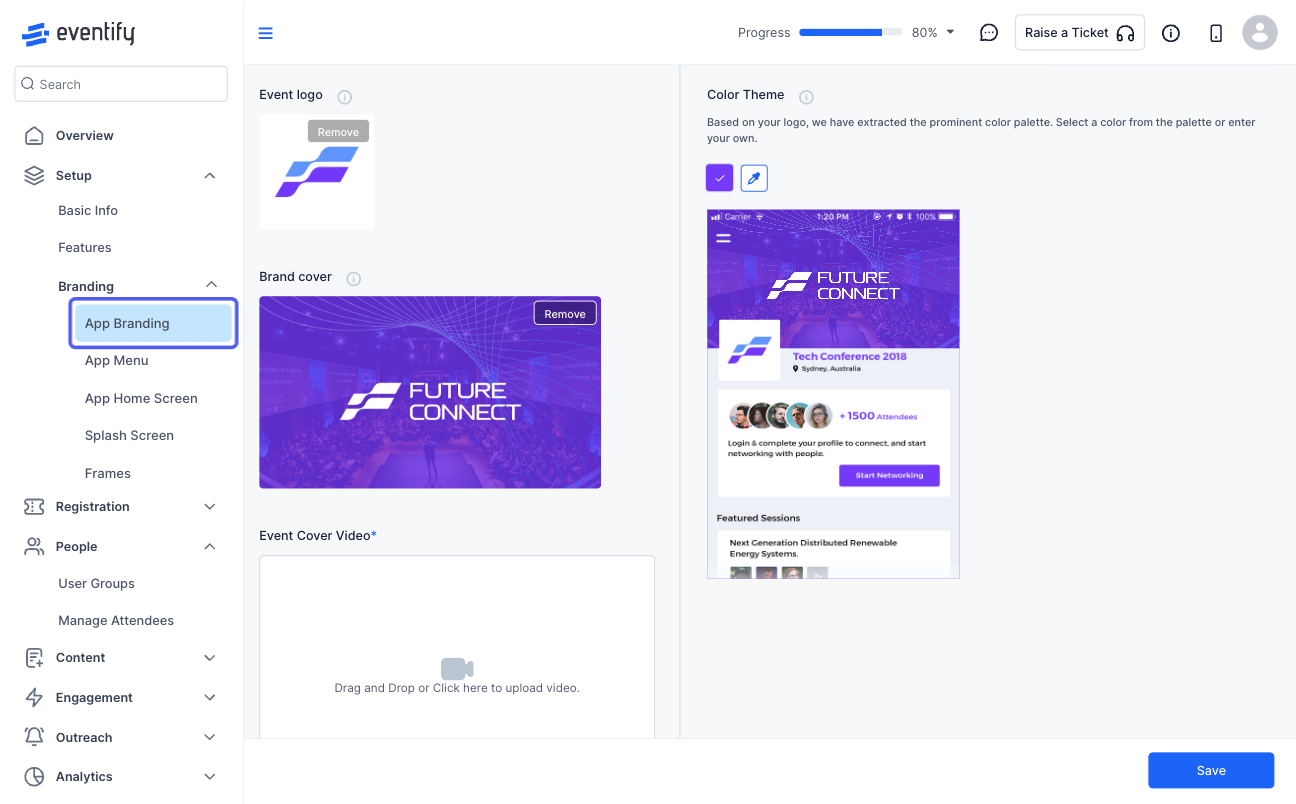
I tried Eventify when I needed something more flexible than Attendify, and it immediately felt easier to control and customise. I could manage my event content, speakers, schedules, and even floor maps in one place without jumping between tools. Many users say that Attendify’s networking features are basic, and that creating meaningful connections during sessions or breaks can be difficult. Eventify fixes this with tag-based matchmaking and interactive lounges that help attendees engage naturally.
What stood out to me most was that I could shape the event experience to fit exactly what I wanted, rather than having to adjust to platform limits. You also get strong engagement features like push notifications and in-app messaging, which helped me keep attendees active and informed throughout my event.
Key features
When I used Eventify event management software, these were the features that genuinely stood out to me. I am not just talking about surface-level tools. These are the ones that actually changed how I managed events and improved the attendee experience.
Standout Feature #1: Ticketing & Registration
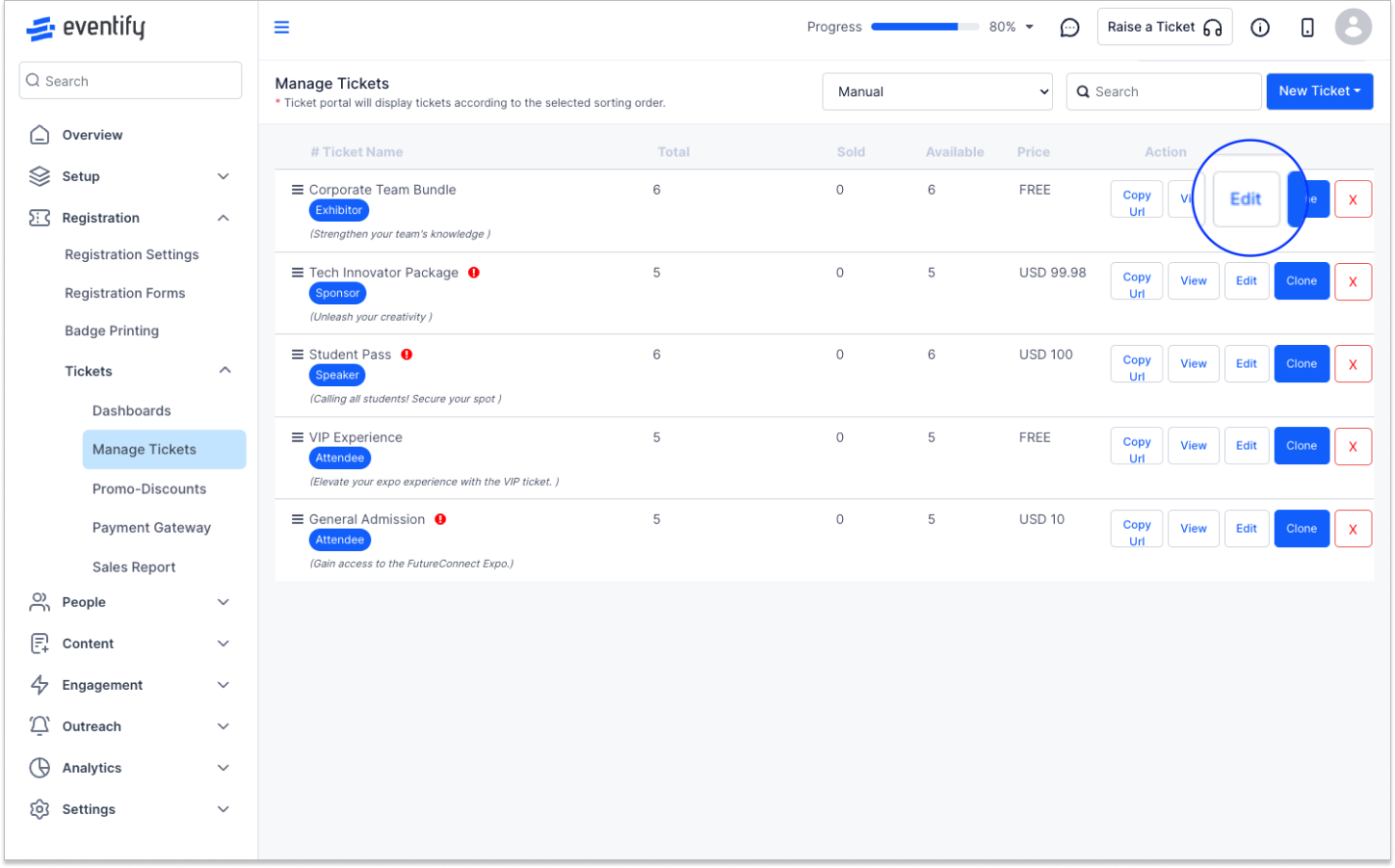
I liked how I could sell tickets and manage registrations without needing a separate platform. I created branded registration pages, customised ticket types, and tracked sales in real time. The entire process felt seamless and secure, making it easier for me to focus on the event itself rather than worrying about payments or attendee data.
While Attendify only lets you create basic ticket types, Eventify lets me customise every ticket, set early-bird discounts, and track multiple sales channels in real time. Compared to RingCentral, which limits ticketing flexibility, Eventify gave me full control over branding, pricing, and attendee data security. It was effortless and far more flexible than the competition.
Standout Feature #2: Event Guide
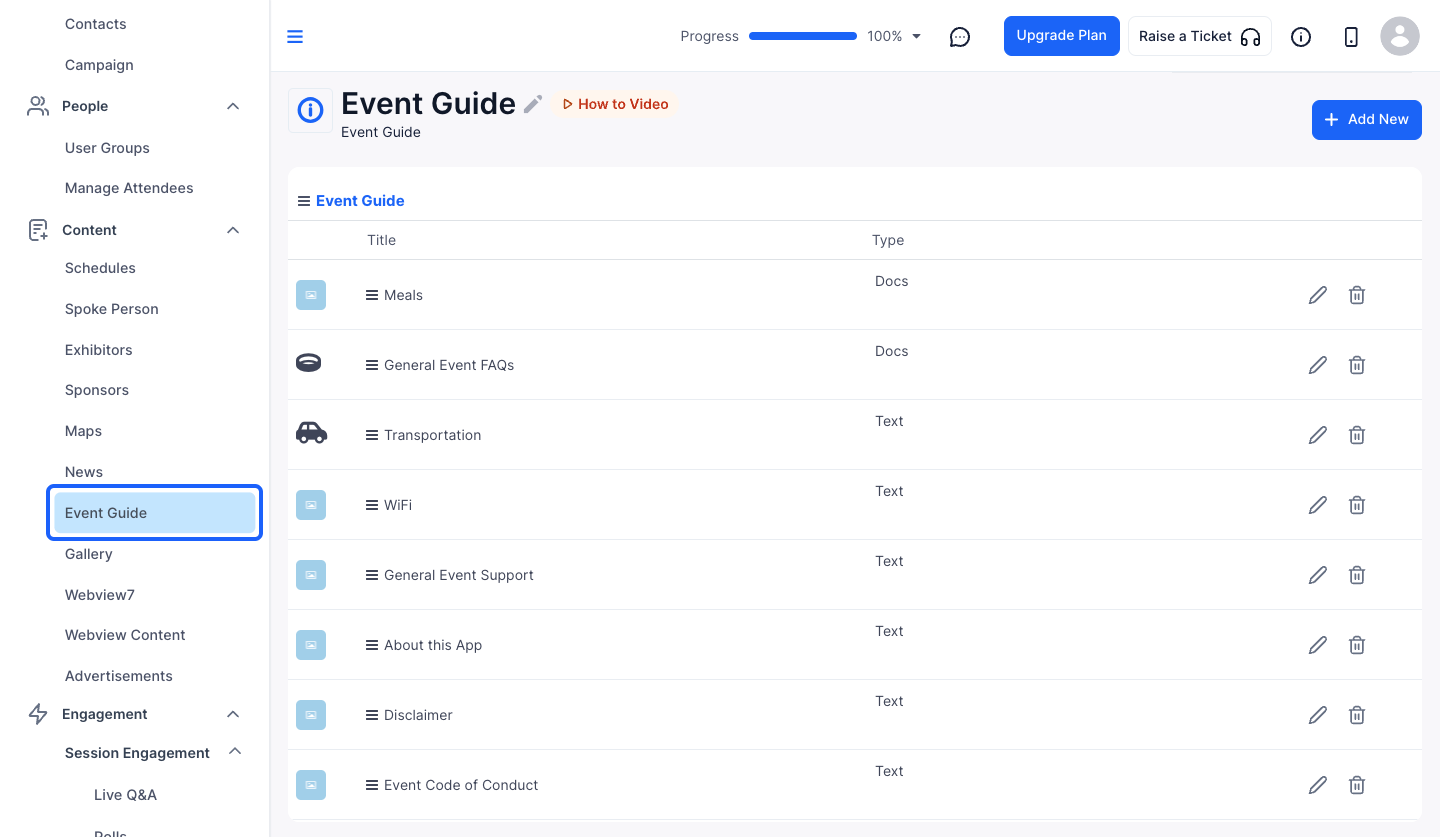
I found the Event Guide feature incredibly useful when I wanted to give attendees a central place to find everything about an event. Instead of sending scattered emails or PDFs, I created a clear, interactive guide that held schedules, venue maps, speaker bios, and more in one view. It made navigation simple for attendees and saved me time answering repetitive questions. Having all event details in one place made the entire experience feel more professional and intuitive for everyone.
Compared to Attendify, which scattered information across multiple tabs, Eventify’s guide kept everything in one interactive hub. RingCentral’s guide section felt basic and hard to navigate, but Eventify gave me a professional, intuitive experience that saved time answering attendee questions. It ensured everyone had exactly what they needed in one place.
Standout Feature #3: In-depth Engagement
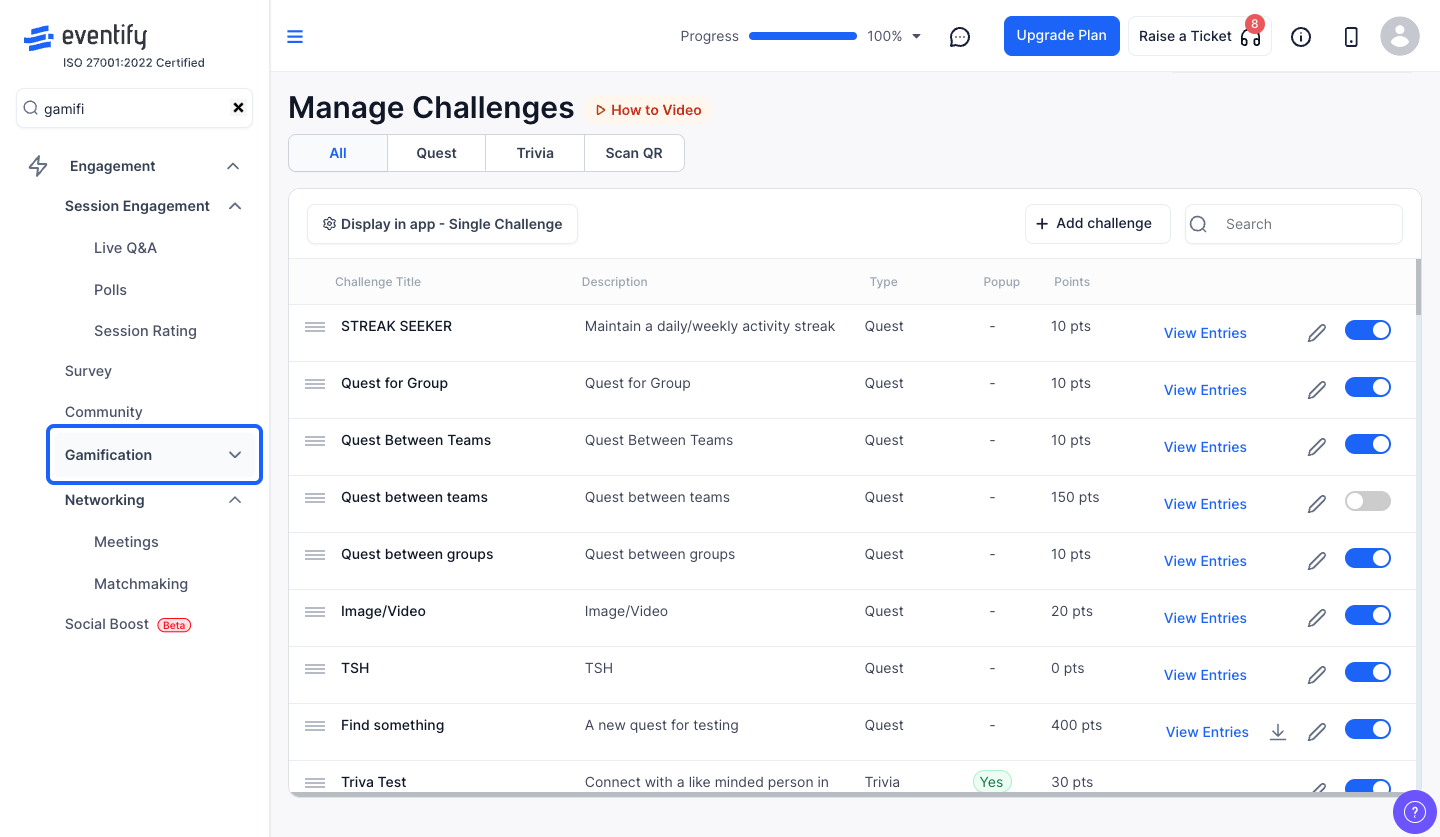
This was easily my favourite feature. I watched attendees engage based on shared interests instead of random networking. The platform uses tags and an intelligent matching system to suggest relevant connections, even showing match percentages to guide interactions. That meant people had more meaningful conversations and got real value from the event, instead of just exchanging contacts aimlessly. It also has different engagement tools such as leaderboards, gamification, trivia, quests, social boost, etc.
Unlike Bizzabo, which only suggests connections based on titles or company, Eventify matches attendees based on interests, tags, and interaction history. I also noticed RingCentral's networking tools often suggested irrelevant connections, but with Eventify, I could ensure attendees met people who truly mattered to their goals. The intelligent matchmaking system increased engagement and made networking meaningful for everyone.
Pricing
Where Eventify shines
When I used Eventify, I quickly saw how it gave me more control and flexibility than other platforms. From managing tickets and schedules to boosting attendee engagement, every feature made my workflow smoother. Compared to Attendify, Whova, or RingCentral, Eventify stood out by making event planning faster, simpler, and more professional.
- Customisation and Control: I could design tickets, registration pages, and event layouts exactly as I wanted, giving me more flexibility than with Attendify or RingCentral.
- Attendee Engagement: I kept participants engaged through push notifications, in-app messaging, and tag-based matchmaking, making networking both meaningful and effortless.
- Streamlined Event Management: I managed schedules, speaker submissions, and interactive guides on a single platform, saving me hours by avoiding the need to juggle multiple tools.
Where Eventify falls short
While I found Eventify to be a powerful and flexible platform, I noticed a few areas where it didn’t fully meet every need. Even though it handled ticketing, networking, and event management better than most alternatives, some aspects required more time, effort, or additional resources to get right. Understanding these limitations helped me use the platform more effectively and set realistic expectations for planning my events.
- Pricing for Larger Events: Some advanced features require custom pricing, which can feel expensive if you are managing a big event.
- Learning Curve: I noticed that setting up complex features, such as abstract management or tag-based matchmaking, took some time to master.
- Limited Integrations: Although I could manage most tasks within Eventify, it doesn’t integrate with every third-party tool I sometimes use, which meant I had to adapt my workflow.
Customer reviews
- “I like how the platform clearly lays out everything, making it easier for our audience to find what they need without needing to converse. The app design is clear, and I appreciate the ability to push real-time updates or media directly. The busy schedule setup was straightforward, and once we got everything connected, the process went smoothly. The support time is responsive and quick whenever we need assistance.” - Alexandria. P
- “Best event app in the space, hands down! I absolutely love how easy Eventify is to set up on the back end. Unlike other event apps, it doesn’t have a steep learning curve — it’s straightforward, intuitive, and quick to configure from scratch. The clean, modern, and user-friendly design is a huge plus, making the entire experience seamless and enjoyable. Eventify offers countless useful features that truly elevate the quality of our event. One standout is gamification — a feature I initially underestimated but have since come to deeply appreciate. Seeing how it naturally engages attendees, encourages interaction, and sparks friendly competition has been eye-opening. The ability for participants to earn points added energy and enthusiasm, enriching conversations and boosting overall engagement throughout the event. It’s a brilliant capability that enhances what was already a high-standard event, helping us maintain our reputation as an industry leader. The app’s intuitive interface deserves special mention. The clear left-hand menu layout makes navigation effortless, and the initial setup couldn’t have been easier — a testament to Eventify’s outstanding user-friendliness. Our attendees also shared overwhelmingly positive feedback, confirming how much value Eventify brings. If I could rate it an eleven, I would —, but it’s definitely a ten!” -Antonio, IT.
- “I like how Eventify is easy to use. It helps me manage events, details, send messages to attendees, and keep everything on track. Registration is straightforward, making event management simpler and keeping everything organised in one place. I appreciate how it saves me a lot of time and reduces mistakes by allowing quick updates to events and direct communication with attendees. The platform helps in making plans and keeps everything running smoothly.” - James. B
Who Eventify is best for
For anyone planning events, choosing the right platform can make all the difference. Eventify works best for a variety of organisers depending on the size, format, and complexity of the event. Based on my experience, it excels in these scenarios:
- Small to Large Event Planners: Managing conferences, workshops, or community events becomes far easier when registration, ticketing, and attendee communication are all in one place. With Eventify, registration pages can be fully customised, ticket types can be managed in real time, and attendees can be contacted directly through the platform. This setup removes the need to juggle multiple tools, saving time and reducing stress while ensuring every detail is covered.
- Virtual or Hybrid Event Organisers: Coordinating online or hybrid events can be challenging, but Eventify makes it simple to run virtual stages, live sessions, and interactive networking. Online participants can access schedules, maps, and engagement tools just as easily as in-person attendees. Compared to Attendify or RingCentral, the platform keeps both audiences connected and engaged without extra work or confusion.
- Speaker-Heavy or Academic Events: Events with multiple speakers, abstracts, or presentations benefit from Eventify’s content organisation and abstract management capabilities. Collecting submissions, reviewing approvals, and arranging sessions becomes straightforward. Unlike Whova or Airmeet, everything can be handled on a single platform, saving hours of manual work while keeping the process professional and organised.
Eventify proved itself to be a versatile, reliable platform in all these scenarios, giving full control over event planning, engagement, and attendee experience. You can start by exploring Eventify today!
Whova
I tried Whova when I wanted stronger attendee engagement, and it delivered. The platform focuses heavily on networking, with features such as community boards, attendee profiles, and interactive agendas that keep participants engaged. Compared to Attendify, I found Whova better for building connections and encouraging interaction throughout the event. Still, I did notice that it offers less flexibility for deep customisation and advanced event setup. Some users have reported that Attendify offers only basic customisation options for event pages, registration forms, and the app's appearance. Branding and layout options are limited, and features such as gamification and advanced engagement tools are missing. Whova adds gamification and engagement features, helping organisers create professional, interactive, and fully branded events.
Key features
When I used Whova, I noticed that its strongest features focus on keeping attendees engaged and connected throughout the event. The platform makes it easy to create an interactive experience, especially if your goal is to boost participation and networking. Here are the features that stood out to me:
- Community and Networking Tools: I found that Whova makes it easy for attendees to interact via discussion boards, attendee profiles, and direct messaging, helping keep engagement high throughout the event.
- Interactive Event Agenda: I could create detailed schedules that attendees could personalise, bookmark sessions, and receive updates on, making it easier for them to stay organised.
- In-App Engagement Features: I used tools like live polls, Q&A sessions, and announcements to keep attendees involved and active during sessions, which improved overall participation
Pricing
Whova uses a custom pricing model, which means the total cost depends on your event size, features, and specific requirements. You would need to request a quote to get exact pricing, which can make it harder to estimate costs upfront compared to platforms with fixed plans. For registration, Whova offers both a free plan for free events and a paid plan for ticketed events. This gives you some flexibility depending on how you structure your event. You can check the table below for a quick breakdown of how it compares with other alternatives.
Whova’s paid ticketing plan is designed for events that charge attendees for admission. Instead of a monthly subscription, the platform uses a per-ticket transaction fee model, meaning organisers only pay when tickets are sold.
Where Whova shines
- Attendee Engagement: Whova offers robust engagement tools, such as live polls, Q&A sessions, and community boards, that help keep attendees active and involved throughout the event.
- Networking Features: The platform makes it easy for attendees to connect through discussion threads, meetups, and attendee profiles, creating a more interactive experience.
- User-Friendly Interface: Getting started feels straightforward, with a clean layout that makes it easy to navigate event schedules, speakers, and sessions without confusion.
Where Whova falls short
- Custom Pricing Only: The overall cost depends on your event size and requested features, making it difficult to estimate expenses upfront.
- Limited Advanced Event Tools: Compared to Eventify, some features, such as abstract management, tag-based matchmaking, and interactive event guides, are either missing or less robust.
- Setup Complexity for Larger Events: I noticed that handling very large or multi-day events can take extra effort to configure, especially if you want to use all engagement features effectively.
Customer reviews
- “They are adapting to the changing world of virtual/hybrid conferences. They have exhibit halls, sponsor listings, and plenty of opportunities for attendees to network. Whova's customer service is lacking greatly. Their Customer Success team is very rigid and inflexible with their wishy-washy terms of service. They have made many changes in service on the platform over the 2 years we were with them, but some were restrictions of service, which I feel we should have been notified about in advance. The new gamification section is a neat idea, but in practice, we find that it is more of a distraction for attendees to not participate in the actual conference. They instead are in essence spamming other attendees to gain points. We should have never given gift cards to the winners of the Leaderboard Contest.” - Michael H.
- ‘I was able to reach local support when issues arose, but problems arose often. The system processed all the sales, but that's where the problems started. Required fields were bypassed-creating shipping issues as mailing addresses (which had to be manually added) were not collected. Buyers were not registered as attendees and managing a group of attendees was difficult. The system is not intuitive nor easy to work with. A list of buyers can be downloaded but is not formatted to be imported to send out emails for further instructions. The email options in other cases are canned Whova messages that cannot be edited, and create confusion among event attendees because they're so poorly worded. This is a poorly thought-out system, which is busy trying to do everything but skips the basics.’ - Shawn J.
- As a participating and attending organization at YIMBYtown 2025, Abundant Housing LA made it easy to connect with event managers and planners to discuss events, share resources, and prepare for upcoming engagements. Furthermore, it allowed us to easily stay in contact and exchange information with other event attendees - Joshua Gonzales.
Who Whova is best for
- Small to Medium Conferences: Whova is ideal if your focus is on keeping attendees connected and engaged. The platform’s discussion boards, polls, and live Q&A sessions make it easy to create interactive experiences without managing multiple tools.
- Networking-Focused Events: If your event relies on attendee connections, Whova’s attendee profiles, meetups, and networking features help participants naturally connect with relevant people. This is especially useful for professional or industry-focused gatherings.
- Events with Simple Registration Needs: For free or ticketed events that don’t require complex workflows, Whova’s registration system provides an easy solution. You can choose the free plan for simple events or the paid plan for ticketed access, giving flexibility depending on your event structure.
EventX
EventX is a platform built to simplify both virtual and hybrid events. It mainly focuses on making event management intuitive while keeping attendees engaged. Its standout features include easy ticketing, live streaming, and interactive networking options. Compared to other tools on this list, EventX was straightforward to set up and offered a clear dashboard for tracking registrations, sessions, and attendee interactions in real time.
Key features
EventX offers several features that make running virtual and hybrid events easier and more engaging.
- Ticketing & Registration: I found it simple to set up event tickets and manage registrations. The platform lets you customise ticket types, track sales in real time, and keep attendee data organised in one place.
- Live Streaming: Hosting sessions felt seamless. I could stream live presentations, webinars, or panels directly on EventX without needing a separate tool. This made the experience smooth for both speakers and attendees.
- Networking Tools: I noticed that EventX offers chat rooms, one-on-one meetings, and interactive lounges. Attendees could connect naturally, fostering meaningful networking opportunities during events.
Pricing
Where EventX shines
- All-in-One Event Management: EventX allowed me to handle ticketing, live streaming, and attendee engagement on a single platform. This reduced the need to switch between multiple tools, saving time and effort. Where Attendify’s restrictive content management and engagement analytics pose as shortcomings, EventX enables fast check-in, global accessibility, and hybrid/virtual content management.
- Interactive Networking: The platform offers chat rooms, one-on-one meetings, and lounges, making it easier for attendees to build meaningful connections. I saw how this helped participants engage naturally without feeling forced.
- Real-Time Analytics: EventX provides a clear dashboard to track attendance, engagement, and ticket sales. Having immediate insights helped me adjust sessions or communications quickly to improve the attendee experience.
Where EventX falls short
- Limited Advanced Features: Compared to Eventify, EventX lacks advanced tools such as abstract management and tag-based matchmaking, which can make managing complex or academic events even more challenging.
- Customisation Constraints: Some design and layout options are limited, so branding and event pages may not feel as fully tailored as on platforms like Attendify.
- Pricing Transparency: EventX uses custom pricing, which means you need to request a quote. This can make it harder to plan budgets for larger events.
Customer reviews
- “The EventX check-in application is best as it provides us with all the steps needed to check in the attendees for an event. It has a proper build-up reception check-in section, where, with the help of a QR code, we can quickly check in the attendees in the event and the event that will be held on a particular day. Even though the EventX check-in application has provided us with more than one step to check in the attendees of an event in the check-in app, it still needs to get better at administrating through these updated features, and provide the guidelines so that everyone can learn about it before using it!” - Petra B
- ‘EventsX goes beyond traditional lectures by offering interactive sessions that extend the guest experience. By facilitating conversations on topics of interest during networking events, EventsX ensures that attendees can engage at their own convenience and explore subjects that matter to them.
- I particularly appreciate EventsX user-friendly interface, ease of setup, and compatibility, which make it an ideal platform for both event organisers and attendees. There are customisable automated emails with different chat options depending on usage, such as event chat, stage chat, or even within session chats, allowing us to connect with fellow attendees in a structured way.’ - Nirmani, GB.
- I like EventX as it is one of the best platforms that organises and arranges in-person events, seminars, webinars & awareness programs for everyone. EventX is localised in Asia. Many people like it as it helps companies and organisations get more attendees, leading to better conversions to reach a booming stage. All my recent important workshops turned out to be positive only due to EventX, proof that every organisation should choose this product to organise any in-person event! As a senior business development manager, it was my duty to get everything priorly set for the events, but EventX often gets slow in this process. I dislike EventX as it sometimes fails to meet its users' guidelines and deadlines due to difficulties faced by the event managers! - George B
Who EventX is best for
- Virtual and Hybrid Event Hosts: EventX handles both virtual and hybrid formats with tools that make streaming sessions and facilitating attendee engagement straightforward, especially if you’re running online or blended experiences.
- Organisers with Moderate Budgets: Because EventX combines ticketing, live streams, networking, and analytics in one platform, it can reduce costs compared with using several separate tools, which makes it ideal if budget and efficiency matter to you.
- Teams Managing Multiple Sessions: EventX’s clear dashboard and real-time tracking help you oversee several sessions or breakout areas at once, which helps when coordinating multi‑part events without confusion or extra platforms.
RingCentral
RingCentral is a communication and collaboration platform that also supports virtual events and webinars. Its main forte is seamless video conferencing, messaging, and team collaboration in one place. Unlike other event platforms, RingCentral integrates communication tools directly into the event experience, making it easier to connect with attendees, manage sessions, and keep teams aligned without switching between multiple apps. RingCentral (formerly Hopin) offers built-in stages, networking spaces, and session transitions, solving Attendify’s lack of auto-redirect between sessions and limited networking capabilities.
Key features
RingCentral stands out by combining event tools with powerful communication and engagement features that support both attendees and teams.
- Video Conferencing: I found that RingCentral offers high-quality video calls with features such as screen sharing, recording, and breakout rooms. This made hosting webinars or workshops seamless and professional.
- Integrated Messaging: Keeping in touch with attendees and team members was easy thanks to built-in messaging. I could send updates, reminders, or announcements without needing a separate chat tool.
- Collaboration Tools: RingCentral allows document sharing, team collaboration, and meeting scheduling all in one platform. I noticed this helped reduce back-and-forth emails and kept everyone organised.
Where Ring Central shines
- AI-Powered Assistance: Its AI features, such as live transcriptions, automated summaries, and voice-to-text support, make hosting sessions easier and more accessible. This saved me time on post-event follow-ups and improved attendee experience.
- Integrated Communication Tools: Messaging, video conferencing, and team collaboration are all in one platform. I could coordinate with my team, share updates, and manage sessions without switching between multiple apps.
- Customer Experience Management: RingCentral makes it easier to handle attendee questions and support requests. Features like call routing and chat workflows helped me resolve issues quickly, keeping participants satisfied and engaged.
Where RingCentral falls short
- Not Ideal for Very Large Conferences: Managing multi-track sessions or thousands of attendees can be cumbersome, as RingCentral is built more for meetings and webinars than for large conference management.
- Primarily Communication-Focused: RingCentral excels at messaging, calls, and video, but it lacks many event-specific features, such as ticketing analytics and interactive event guides, which can limit its ability to support complex event management.
- Limited Advanced Event Features: Unlike Eventify, RingCentral lacks specialised event tools such as abstract management or tag-based matchmaking, making it more challenging to manage complex conferences or academic events.
Customer reviews
- “RingCentral Events makes hosting and attending virtual events simple and professional. The interface is intuitive and clean, and it doesn’t require much training to navigate, even for first-time users. The platform can feel a bit limited in customisation and branding options compared to some competitors. Also, the onboarding documentation could be more comprehensive for new users setting up events for the first time.” - Taha S.
- ‘Overall, our experience was good with RingCentral, but there are definitely things that need to be fixed in the platform. I mentioned most of our issues above, but another thing that caused some issues was the " Who can view/moderator section in Sessions. For one part of our conference, I wanted sessions viewable to a specific ticket type. We had certain speakers moderate the session, but the only way they could see that session was if all speakers had access, which is what we ended up doing, but was not ideal. I wish anyone who is added as a moderator could also see the session, even if they aren't part of the ticket type that the session is viewable to. Another feature I would suggest is the ability to change someone's ticket type. It would have been great to just make one click on my end and change the ticket type if someone registered incorrectly. To summarise, RingCentral has a lot of potential and definitely met our needs, but still has some work to be done.’ - Megan V.
- ‘It was okay for the time being for our event, but RingCentral wasn't a software program that we were wanting to stick with. I tried to contact customer support, but didn't receive a response. Compare this to ViewStub and Airmeet, and the difference is night and day. With ViewStub and Airmeet, I always know I can rely on customer support and that I'm not doing an event blindly. I also have way more customisation features with them. What I do miss with RingCentral is the exclusive backstage option. - Sarah S
Who Ring Central is best for
- Teams Needing Unified Communication: If you manage multiple team members or departments, RingCentral allows messaging, calls, and task coordination all in one place. This makes planning and running events much smoother.
- Tech-Forward Event Planners: EventX and Whova focus on standard event workflows, but RingCentral is great if you want AI features, automated transcriptions, and integrated analytics to make events more efficient.
- Corporate or Team-Oriented Events: For internal company meetings, training sessions, or multi-department workshops, RingCentral makes it simple to coordinate staff, speakers, and attendees while keeping everyone on the same page.
Airmeet
Airmeet is a virtual event platform designed to make online gatherings feel more interactive and engaging. The focus of this platform was on creating social spaces and networking experiences that go beyond basic webinars. Airmeet includes features like virtual tables, roundtables, and lounges that encourage real conversations, making it easier for attendees to connect naturally during sessions.
Key features
Airmeet brings several powerful tools together to help you host interactive and engaging virtual events. These features helped me manage events more professionally while boosting engagement and reducing the need for external tools or complex setups.
- AX360 Event Platform: Airmeet’s AX360 gives you a full suite of tools to run sessions, host panels, and manage event flow all in one place. I noticed this made handling different parts of an event feel smooth and unified, whether it was a keynote or breakout session.
- AirControl Admin Suite: With AirControl, managing speakers, sessions, and attendee access became easier. I used it to monitor live events, update session details in real time, and manage attendee permissions without confusion.
- AI Studio Tools: Airmeet’s AI Studio offers automated production features like smart camera switching, auto‑captioning, and polished layouts. I found this especially useful when running professional-broadcast-style events without a separate production team.
Where Airmeet shines
- Networking and Social Interaction: Airmeet’s roundtables, virtual tables, and lounge features make it easier for attendees to have real conversations instead of just watching presentations. These social spaces help build connections rather than passive attendance. Airmeet provides virtual networking tables and breakout rooms, addressing Attendify’s basic and limited networking features.
- Professional Event Production: Airmeet’s AI Studio and automated production tools help deliver polished sessions without needing an external production team. This made my events feel more professional and easier to manage.
- Centralised Admin Control: With tools like AirControl, managing speakers, sessions, and attendee access felt organised and reliable. I could update event details, track participation, and handle live changes all from one place.
Where Airmeet falls short
- Pricing Can Be Costly: Moving beyond basic plans can become expensive, especially if you need managed events or high attendee limits. This may make budgeting harder for smaller organisers.
- Fewer Branding Options: While Airmeet offers clean layouts, I found that customisation of event pages, registration screens, and session visuals is somewhat restricted compared to other platforms on the list.
- Virtual-Only Focus: Airmeet caters primarily to fully virtual events. It does not support in-person event management as seamlessly as Eventify or EventX, which makes hybrid or on-site event planning more challenging.
Customer reviews
- “Airmeet is the perfect platform for hosting virtual events! We have used Airmeet at Princeton Theological Seminary for our webinars, conferences, and networking events. The user interface is intuitive, and the platform runs well overall! The onboarding process on Airmeet can be tricky for new users, especially for speakers or attendees who are less technically minded. Along with this, customisation can be somewhat limited,” - John W.
- I have organised several virtual events on Airmeet, and I have to say this platform is a gem. Most attendees love the interface, chat system, and networking room. And for me, it is very useful to have all the information from the attendees to follow up with a marketing plan.’ - Miguel D.
- I see this as an almost perfect solution - it would be lovely to have more options for third-party integration, such as interpretation (other than interpret, you should be able to assign your own interpreters). I have a little more freedom to customise, and you're there! - Matthew J
Who Airmeet is best for
- Virtual Event Hosts: Airmeet shines for fully online events. Webinars, online workshops, and digital conferences benefit from features such as virtual tables, lounges, and networking spaces that help keep attendees engaged.
- Interactive Networking-Focused Events: If connecting participants is a priority, Airmeet’s social features let attendees meet and interact naturally. I found that roundtables and discussion lounges encourage meaningful conversations that go beyond standard chat boxes.
- Organisers Prioritising Streamlined Digital Production: Airmeet’s AI Studio and automated production tools make it easier to deliver professional-looking sessions without needing an external team. I found this particularly useful for events where quality and polish matter.
Cvent
Cvent is a comprehensive online and on-site event management platform built for conference planning, large‑scale events, and professional meetings. It combines tools for registration, venue sourcing, event marketing, and attendee engagement all in one place. What sets Cvent apart is its depth in planning features and analytics, making it a strong choice if your events require detailed logistics, robust reporting, and enterprise‑level support. For instance, managing session materials, speaker content, and personalised agendas on Attendify can feel clunky, as many others have noticed. Uploading abstracts, updating files, and keeping everything organised require multiple steps, and group information is often missing from exported agendas. This is where Cvent comes in. It supports detailed agenda exports, including attendee groups, ensuring smooth management and clarity for participants.
Key features
Cvent provides a suite of tools that help manage every phase of an event with detailed control and professional support.
- Event Registration & Ticketing: Cvent’s registration tools let you build custom forms, set attendee tracks, and manage ticket types. I found that this level of control made tracking attendee data and preferences much easier than simpler platforms.
- Mobile Event Apps: With Cvent’s mobile event apps, attendees get easy access to schedules, speaker info, maps, and personalised agendas right on their phones. I noticed this helped reduce confusion and kept participants engaged throughout the event.
- Supplier Network & Venue Sourcing: Cvent’s supplier network helps planners find venues, request proposals, and compare options in one place. I used it to streamline venue selection without having to search multiple sites or send endless emails.
Cvent Pricing
Cvent does not publish fixed pricing on its website. Instead, pricing is customised based on your event needs, features, attendee volume, and modules selected. You must contact the Cvent sales team to receive a quote tailored to your specific requirements. Here’s a rough guide to how Cvent pricing usually works based on industry data and reported contracts:
Where Cvent shines
- Comprehensive Event Management: Cvent lets me handle everything from registration and ticketing to scheduling and attendee tracking in one platform. This centralisation makes planning large events much smoother.
- End-to-End Event Planning: Cvent covers every aspect of event management, from registration and ticketing to session scheduling and reporting. This all-in-one approach reduces the need for multiple tools and keeps workflows organised.
- Venue and Supplier Sourcing: Cvent’s supplier network simplifies venue searches and proposal comparisons. I used it to save time and get better options without sending dozens of emails or making multiple calls.
Where Cvent falls short
- Pricing Accessibility: Cvent’s pricing is generally higher than that of most alternatives on this list. For smaller budgets or simpler events, that cost can be hard to justify compared with lighter platforms like EventX or Whova.
- Overwhelming for Simple Events: Because it is built for deep event planning, the platform can feel overly complex for straightforward events. Setting up basic events sometimes required extra steps that weren’t necessary on other tools.
- Longer Onboarding Time: Getting comfortable with all of Cvent’s features took longer than with other platforms. Learning to use registration, mobile apps, and sourcing tools together required upfront investment.
Customer reviews
- “I use Cvent on a daily basis as an event planner. It is a crucial tool in my day to day role. It is used for staffing, registration, budget entry, and more. It's very helpful to keep a variety of information organised.” - KS, US
- Because Cvent offers such a broad set of features, the interface can still feel complex and occasionally overwhelming for new users. Navigation between modules and understanding where certain functions live can take time to learn. Continued improvements in usability and simplification of workflows would make the platform more accessible for teams that do not use it daily - Jordan Y
- ‘Overall, Cvent is Just Okay. I do feel like the sales reps (during your software search) sell you "a lot," only for many of those features not to have been past Beta testing or not to be available yet... so that's a bit misleading. We did struggle with features not working on 'Game Day' and not being able to get a hold of our support team members, but I do think that was likely due to the time zone differences.’ - Samantha H
Who Cvent is best for
- Enterprise and Corporate Event Teams: Cvent suits large companies that host frequent conferences, internal training sessions, or multi‑day events with many attendees and sponsors. The platform’s depth helped me manage schedules, registrations, and reports without depending on multiple tools.
- Associations and Professional Conferences: If you host industry‑level gatherings or recurring conferences, Cvent’s analytics, mobile apps, and attendee engagement tools give you the control needed to deliver polished, high‑impact experiences.
- Global or Multi‑Location Events: Events spanning different regions, time zones, or languages benefit from Cvent’s extensive customisation and localisation options. I noticed that features like multi‑currency registration and venue sourcing made international planning easier.
Reasons to consider an alternative to Attendify
While Attendify is popular for event management, there are a few areas where organisers may find it limiting. These gaps create opportunities to consider alternatives like Eventify, which address these challenges with stronger features and flexibility.
Reason #1: Limited Networking Options
Attendify’s networking features are basic, often limiting meaningful interactions among attendees during sessions or breaks. I found that creating spontaneous connections can be challenging. Eventify, on the other hand, provides robust networking tools, including tag-based matchmaking and interactive attendee lounges, helping participants engage more naturally.
Reason #2: Restrictive Content Management
When I tried Attendify, managing session materials and speaker content felt clunky. Uploading abstracts, updating files, and keeping everything organised required multiple steps and often left me confused. Eventify handles this seamlessly with its abstract management system, making content submission, approvals, and integration into the event schedule smooth and intuitive.
Reason #3: Limited Event Customisation
Attendify offers only basic customisation for event pages, registration forms, and apps. I noticed branding and layout options were very limited. Eventify excels here by giving full control over event design, app appearance, and user experience, helping create professional, branded events.
Reason #4: Engagement Analytics Shortcomings
Attendify’s reporting and analytics are minimal, making it hard to track attendee participation or measure event success effectively. Eventify provides detailed engagement analytics and real-time reporting, giving insights into attendee behaviour and interaction levels.
What's next?
Choosing the right event platform depends on your priorities. If your focus is on seamless networking, robust content management, and professional customisation, Eventify stands out as a solution built to make your event smooth and engaging. For those looking primarily for virtual-only experiences or simpler setups, alternatives like Airmeet or Whova might suit your needs. To take the next step, explore Eventify’s features in action and see how it can elevate your events from planning to execution. Get started with this free demo and discover the difference firsthand.
.png)