

Onsite event management software helps event teams manage event registration, event ticketing, event check-in, onsite badge printing, attendee tracking, and other event-day operations through a connected workflow. Instead of moving attendee information between separate systems, organizers can use the same data from registration through event check-in, event badging, session attendance, and post-event reporting.
For event teams, the biggest benefit is not simply having more features. It is having the key onsite event processes connected so staff can handle walk-ins, last-minute changes, badge reprints, check-in queues, and attendance tracking without creating separate manual processes.
A connected onsite event workflow typically includes:
- Event registration and ticketing
- QR code and self-service check-in
- Onsite badge printing and reprinting
- Walk-in registration
- Session attendance tracking
- Attendee engagement
- Lead retrieval
- Real-time attendance and event analytics
What does onsite event management software include?
Onsite event management software brings the operational tasks that happen before and during event arrival into one connected system. Depending on the platform, this can include registration, ticketing, QR code check-in, self-service kiosks, badge printing, walk-in registration, session attendance, attendee tracking, lead retrieval, notifications, and real-time event reporting.
The important part is how these functions work together. When registration, check-in and badge printing use the same attendee information, event teams can make changes without repeatedly updating separate systems.
What to look for in onsite event software
When evaluating onsite event management software, look beyond the individual features. The important question is whether registration, ticketing, check-in, badge printing, attendee tracking, and reporting can work together using the same attendee information.
A good onsite event platform should help your team manage the complete event-day workflow without repeatedly moving data between systems or maintaining separate attendee lists.
Connected attendee data
Registration, ticketing and check-in should work from the same attendee information.
Flexible event check-in
Look for QR scanning, attendee search, self-service options and staff-assisted check-in.
On-demand badge printing
The system should support printing, editing and reprinting badges when needed.
Walk-in event registration
The onsite event egistration process should work for attendees who weren't registered in advance.
Real-time attendance information
Your team should be able to see current event check-in information instead of relying on an old exported list.
Session tracking
For conferences and multi-track events, session attendance can provide useful information about attendee behavior.
Offline capability
Check whether critical onsite workflows can continue if venue connectivity becomes unreliable.
Easy staff workflow
Event-day software should reduce the number of steps your team needs to manage, not create another complicated system.
Add a manual vs. connected workflow comparison
The registration list is ready, tickets are sold and the agenda is finalized. Then the doors open.
Attendees arrive at the same time. Someone cannot find their registration. Another person needs to change their company name. A group of walk-ins arrives. A event badge needs to be reprinted. At the same time, your team needs to know how many people have checked in.
These situations are normal. The challenge is managing them without creating another manual process.
Onsite event management software connects registration, ticketing, check-in, badge printing and attendee tracking so your team can manage the event from one connected workflow.
Key takeaways
- Connect registration, ticketing, check-in and badge printing.
- Use the same attendee information throughout the event.
- Prepare for walk-ins, last-minute changes and event badge reprints.
- Give staff real-time attendance information.
- Test the complete onsite event workflow before event day.
Why event day becomes difficult even when planning goes well
Event planning and event-day operations are different challenges.
Before the event, event organizers have time to prepare event registration forms, tickets, schedules, badges and communications. On event day, everything happens much faster.
Common situations include:
- Hundreds of attendees arriving within a short period.
- Attendee information changing after registration.
- Someone arriving without their QR code.
- Walk-in attendees needing to register.
- Incorrect information appearing on a badge.
- Different attendee types requiring different access.
- Staff needing current attendance numbers.
- A session or schedule changing at the last minute.
When these tasks are handled in separate systems, staff may have to move information between platforms or maintain multiple attendee lists.
The goal of onsite event management should be the opposite: keep information connected so your team can focus on attendees instead of managing different systems.
What onsite event management software actually helps with
Onsite event management software can bring several event-day processes into one workflow:
- Event registration
- Event ticketing
- Event check-in
- Badge printing
- Attendee tracking
- Session check-in
- Networking and engagement
- Lead retrieval
- Event analytics
The value isn't simply having all these features. It is how they work together.
For example, information collected through event registration software can become the same attendee record used during event check-in and badge printing. That means your team doesn't need to repeatedly enter or upload the same information.
Event registration creates the foundation
A smoother event-day experience starts before attendees arrive.
With online and onsite event registration software, organizers can collect the information they need and organize attendees by ticket type, attendee category, session or other requirements.
The information collected during registration may later be used for:
- Attendee event badges
- Event check-in
- Session access
- Attendee communication
- Networking
- Reporting
This is why registration shouldn't be treated as a separate process from onsite event operations.
If registration data is accurate and connected to the onsite workflow, the event team has a reliable attendee record when the doors open.
Event check-in software keeps the line moving
Event check-in is often the first major pressure point on event day.
When hundreds of attendees arrive around the same time, manually searching spreadsheets or printed lists can quickly create queues.
Event check-in software can simplify the process with QR codes, attendee search and self-service check-in.
A typical workflow looks like this:
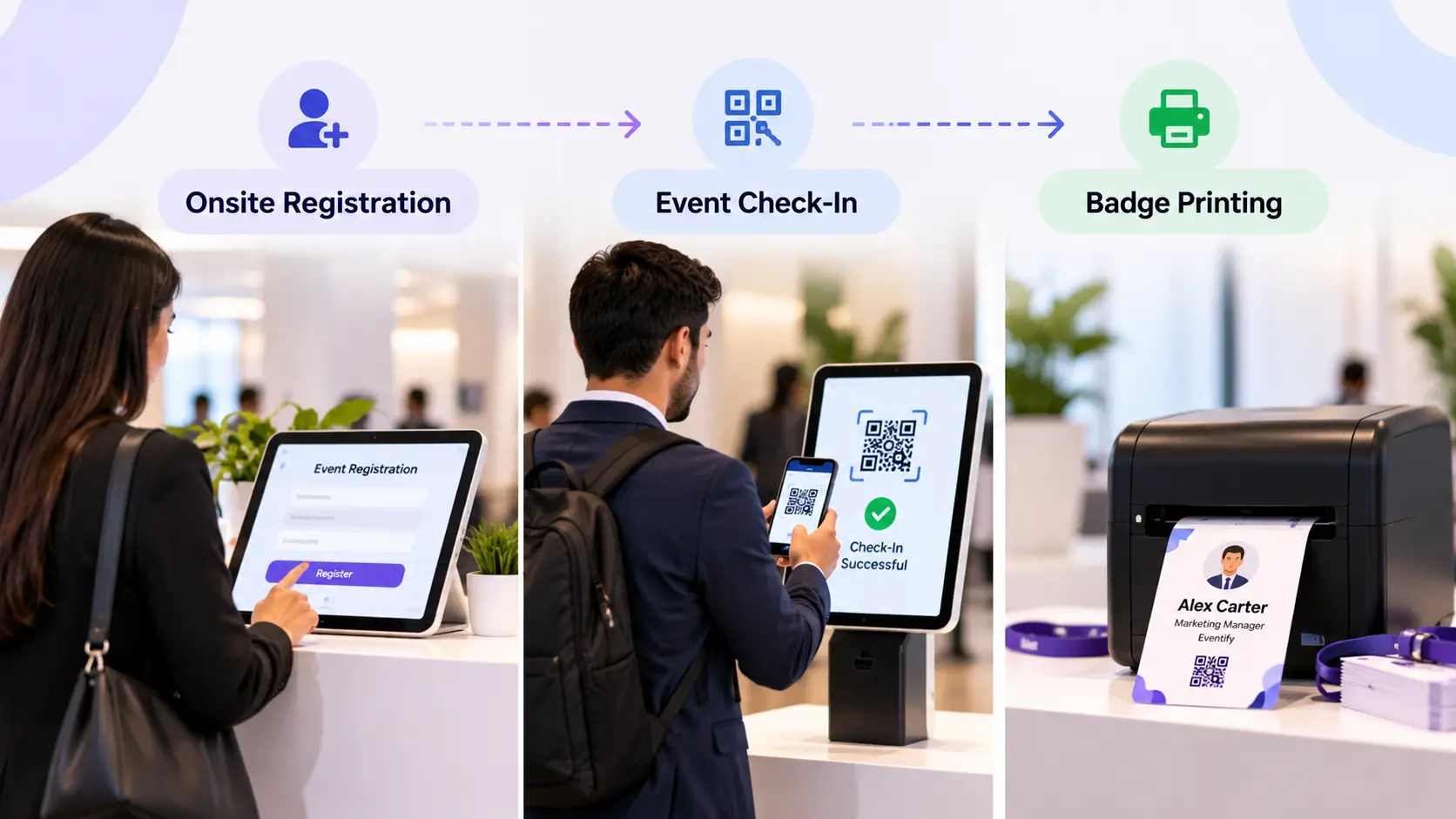
Attendee arrives → QR code is scanned → Registration is verified → Attendee is checked in → Badge is printed
The important part is that the event check-in action updates the attendee record.
Organizers can then see who has arrived instead of maintaining a separate attendance list.
Eventify's current event check-in software supports QR scanning, self-service kiosks, walk-in registration, session-level attendance tracking and offline event check-in.
Self-service check-in can help with busy arrivals
For larger events, self-service kiosks can give attendees another way to check in without requiring a staff member to process every person.
Staff can focus on exceptions, questions and attendees who need assistance.
This creates a simple division:
Self-service for straightforward check-ins.
Staff support for exceptions.
Event badge printing should be connected to check-in
Event badge printing is another area where disconnected processes can create problems.
Pre-printing every event badge may seem convenient, but attendee information can change between registration and the event.
A person's:
- Name
- Job title
- Company
- Attendee type
may need to be corrected.
With event badge printing software, organizers can print badges using current attendee information.
That creates a workflow like:
Registration → Check-in → Badge printing
Instead of:
Registration → Export list → Create badges → Print badges → Sort badges → Check-in
Eventify's badge printing tools connect badge printing with registration and check-in. They support customizable event badges, onsite event badge printing, attendee information changes and event badge reprints.
How registration, check-in and badge printing work together
This connection is one of the most important parts of an onsite event workflow.
Consider a simple example.
An attendee registers for a conference and receives a QR code.
When they arrive:
- The QR code is scanned.
- Their registration record is found.
- Their attendance is recorded.
- Their badge information is pulled from the attendee record.
- The badge is printed.
- The attendee enters the event.
If the attendee notices that their company name is incorrect, the team can update the record and reprint the badge.
There is no need to create a new attendee record or manually update another spreadsheet.
That is the difference between having several event tools and having a connected onsite event management system.
How to handle situations that don't go according to plan
A good event-day system needs to handle more than the normal workflow.
A walk-in attendee arrives
Walk-ins shouldn't require a completely different process.
The team should be able to register the attendee, collect payment if necessary, create the attendee record, check them in and print their badge.
An attendee needs to change their information
If someone notices that their name, company or job title is incorrect, the team should be able to update the information without starting again.
A badge needs to be reprinted
Lost or damaged event badges happen.
The attendee shouldn't have to repeat the entire registration process. Staff should be able to find the existing record and print another event badge.
An attendee can't find their QR code
A good event check-in workflow should provide another way to locate the attendee, such as searching their registration details.
The internet connection becomes unreliable
Venue connectivity can be unpredictable.
For important onsite operations, offline functionality can help keep event check-in moving when the connection is interrupted. Eventify's current onsite event platform documents offline event check-in capabilities.
Onsite event management doesn't stop at the entrance
Getting attendees through the door is only the beginning.
Once the event starts, organizers may still need to manage:
- Session attendance
- Room capacity
- Attendee engagement
- Networking
- Exhibitor interactions
- Announcements
- Schedule changes
- Attendance reporting
This is where attendee tracking becomes useful.
Instead of knowing only how many people entered the venue, organizers can build a clearer picture of what is happening during the event.
For a multi-track conference, for example, session-level event check-in can show which sessions attendees are actually attending.
That information can also become useful after the event when organizers review attendance and engagement.
What to look for in onsite event software
Choosing onsite event software isn't just about counting features.
Look at how the different parts of the workflow connect.
Connected attendee data
Event registration, event ticketing and event check-in should work from the same attendee information.
Flexible event check-in
Look for QR scanning, attendee search, self-service options and staff-assisted check-in.
On-demand badge printing
The system should support printing, editing and reprinting event badges when needed.
Walk-in registration
The event registration process should work for attendees who weren't registered in advance.
Real-time attendance information
Your team should be able to see current event check-in information instead of relying on an old exported list.
Session tracking
For conferences and multi-track events, session attendance can provide useful information about attendee behavior.
Offline capability
Check whether critical onsite workflows can continue if venue connectivity becomes unreliable.
Easy staff workflow
Event-day onsite event software should reduce the number of steps your team needs to manage, not create another complicated system.
A simple event-day workflow
A connected onsite event workflow can look like this:
Before the event
Registration → Ticketing → Attendee data → Badge setup
↓
When attendees arrive
QR scan / attendee search → Verification
↓
Check-in
Attendance recorded
↓
Event badge
Event badge printed or reprinted
↓
During the event
Session event check-in → Networking → Engagement → Notifications
↓
After the event
Attendance data → Session data → Analytics → Reporting
The exact workflow will vary by event, but the principle is simple:
Each step should build on the information from the previous step.
How Eventify helps simplify onsite event management
Eventify brings the main onsite event workflows together on one event platform.
Organizers can manage event registration and ticketing, including onsite event registration and walk-ins. The platform also provides event check-in software with QR scanning, self-service event check-in, session attendance tracking and offline mode.
For onsite event badging, Eventify supports customizable event vbadge templates, on-demand badge printing, badge edits and reprints.
The platform also connects onsite operations with attendee engagement, lead retrieval and event analytics, allowing organizers to continue managing the attendee experience after event check-in.
The workflow is straightforward:
Registration → Ticketing → Check-in → Badge → Engagement → Analytics
Instead of treating these as separate event tasks, they can work as parts of one attendee journey.
Event-day checklist for organizers
Before attendees arrive
- Test QR code event check-in.
- Test event badge printers.
- Confirm attendee information.
- Test walk-in registration.
- Prepare staff roles.
- Test the offline workflow if available.
During attendee arrival
- Monitor event check-in queues.
- Keep staff available for exceptions.
- Watch real-time attendance numbers.
- Handle attendee information changes.
- Reprint event badges when required.
During the event
- Track session attendance.
- Monitor attendee engagement.
- Communicate important schedule changes.
- Monitor exhibitors and leads.
- Review live event data.
FAQs
What is onsite event management software?
Onsite event management software helps organizers manage the in-person side of an event, including registration, check-in, badge printing, session tracking, attendee engagement and analytics through connected workflows.
What does event check-in software do?
Event check-in software verifies attendees, records arrivals and can support QR scanning, self-service check-in and onsite badge printing.
Can event registration and check-in use the same attendee data?
Yes. A connected system can use registration information during check-in rather than requiring organizers to maintain a separate attendee list.
Can badges be printed onsite?
Yes. Event badge printing software can generate event badges when attendees arrive. Eventify supports onsite onsite event badge printing, customizable event badge layouts, edits and reprints.
Can onsite software handle walk-in attendees?
Yes. Onsite event registration workflows can allow organizers to register walk-ins and move them through the same event check-in and badge process as pre-registered attendees. Eventify documents walk-in registration as part of its onsite event workflow.
Why connect registration, check-in and badge printing?
Because they all depend on the same attendee information. Connecting them reduces duplicate data entry and makes it easier to handle changes, walk-ins and badge reprints during the event.
Final thought
A successful event day isn't only about getting attendees through the door quickly.
It's about having a process that can handle what actually happens when the event begins: queues, changes, walk-ins, badge corrections, session movement and last-minute requests.
When event registration software, event check-in software and event badge printing software work together, the event team has fewer disconnected processes to manage and a clearer view of what's happening throughout the event.
That is where onsite event management software can make event day easier.
.png)