Nederlands
 Deutsch
 Français
 Español
 Italiano
 Svenska
 Português (Brasil)
 Português (Portugal)
 العربية
 Türkçe
 Polski



You know check-in has a problem when the line reaches the coffee stand before the keynote starts. And the frustrating part is that the delay is rarely the scan itself. It is the attendee scrolling through their email, looking for a ticket, while everyone behind them waits.
Key Takeaways
- Facial recognition check-in removes the slowest part of self check-in: finding the ticket or QR code. The attendee looks at a camera, is matched to their profile photo, and their badge prints.
- It verifies the person, not just the ticket, and gives you live entry data to manage event flow.
- Eventify's kiosk runs on any Android or iOS tablet and can match faces on the device, so it keeps working when venue Wi-Fi doesn't.
- The best setup is hybrid: face check-in for fast lanes and VIPs, with QR and name search as a universal fallback.
- Biometric data is sensitive. Plan explicit opt-in consent and an alternative for anyone who declines.
- Face check-in is a strong fit for large conferences, expos and high-security events. For very small, low-risk gatherings, a simple desk may be enough.
Introduction
Facial recognition check-in was built to remove that moment. It used to belong to stadiums and high-security venues, but it is now a practical, privacy-conscious option for events well beyond that, from conferences and expos to member meetings, as long as you set it up with consent and a fallback.
What I like about Eventify's approach is that it is powerful but simple. The kiosk runs on a standard tablet, setup takes three steps, and it sits inside the check-in app you already use. In this guide I walk through why traditional check-in breaks, how face check-in works, where it fits, and where it doesn't.
Expert insight: From an event operations point of view, the entrance is the one moment every single attendee experiences, so it carries far more weight than its share of the budget suggests. A slow line doesn't just cost time. It shortens your first session, delays the keynote and sets a tone that sponsors and speakers notice too.
Why Traditional Check-In Breaks at Scale (and Why QR Isn't Always Enough)
Manual lookup and QR scanning both work well at small scale. They strain when hundreds of people arrive in the same 30 minutes, for three predictable reasons:
- Staff dependency. Every lane needs a person to search names, resolve errors and hand over badges. More attendees means more staff, and speed varies from desk to desk.
- Phone readiness. A QR code only works if the attendee can find it. Dead batteries, missing emails and forwarded tickets all stall the line.
- Data sync issues. If check-in depends on a live connection and venue Wi-Fi is patchy, scans lag, duplicate or fail.
QR is still a great default, and I wouldn't throw it away. But it leaves one gap. Facial recognition fixes the “last-inch” problem: the moment between walking up and being identified, when the attendee is hunting for a QR code. With face check-in there is nothing to find and nothing to type.
There is also a bit of queueing arithmetic worth knowing here. Lines form when people arrive faster than you can serve them, and arrivals are never even. They bunch up around doors opening and the first session. A lane that copes comfortably on average can still collapse for 20 minutes at the peak.
Expert insight: There are only two ways to shorten a line: add lanes, or shorten each check-in. Adding staff scales your cost in a straight line, and it only helps if you have the space and equipment. Shortening each check-in improves every lane at once. It matters more than it looks, because the slowest few attendees set the pace for everyone behind them. One person who can't find their ticket holds up the whole lane, so the real goal isn't a faster average. It is removing that slow tail.
What Facial Recognition Check-In Actually Solves (Beyond Speed)
Speed is the headline, but it isn't the only thing that stood out to me.
- It removes friction: No phones, no codes, no stopping. The attendee walks up, looks at the camera, and the kiosk guides them with prompts such as “Move closer” and “Hold still”.
- It improves security: The kiosk verifies the person, not just a ticket. It matches the live face to the profile photo on the registration, and a liveness check confirms a real person is present. That makes ticket sharing and badge swapping much harder, which matters for paid workshops, member-only sessions and AGMs.
- It gives you live visibility: Every face check-in is recorded exactly like a QR scan, so real-time entry data lands on your live attendee list. You can see how fast people are arriving and move staff to where the queue is building.
Expert insight: It helps to match the security to the risk. For most events, the realistic threat isn't a determined attacker. It is a forwarded ticket, a swapped badge or someone walking in on a colleague's registration. A QR code answers “do you hold a ticket?” Face check-in with liveness detection answers “are you the person who registered?” That is a proportionate step up for paid sessions and member events, and I wouldn't oversell it as more than that. If you need a legal-grade identity check, a document check is still the right tool.
How It Works: The Complete Event Check-In Flow
Face check-in is a chain, not a single feature. Each step feeds the next, and a weak link early on shows up as queues on the day. Here is the flow using Eventify's kiosk.
Step 1: Pre-event enrollment and consent
Everything starts with the attendee's profile photo. Ask for a clear, front-facing photo in your registration flow and reminder emails: face the camera, even lighting, no sunglasses or hats.
Capture consent at the same point. Tell attendees what the photo is used for, and let them opt out. In the Eventify app, attendees switch Allow facial recognition on or off in Settings, and anyone who opts out checks in with their QR code instead.
Here is the part I'd flag as a real time-saver. In the admin panel, Manage Attendees marks anyone whose photo can't be used as Not eligible for Face Recognition. That gives you a list to chase before doors open, instead of discovering the problem in the queue.
Expert insight: Enrollment is where face check-in is won or lost. The kiosk can only be as accurate as the photo it compares against, so I'd treat photo collection as a product experience, not a form field. Ask for the photo at registration while attendees are engaged, show an example of a good one, and send one reminder with the same guidance. Chasing the flagged profiles a week out is far cheaper than fixing them in a queue.
Step 2: Data sync and kiosk setup
Face recognition runs inside Kiosk Mode of the Eventify event check-in app, and setup takes three steps:
- Turn on the module. In the admin panel, go to Setup > Features and switch on Face Recognition under Modules.
- Add it as a check-in method. In Registration > Badge Printing > Kiosk Setup, tick Facial Recognition under Check-In Methods. Keep QR Scan and Search ticked as fallbacks.
- Enable it on each device. Open Kiosk Mode in the Eventify app, run a Full Sync, open Settings and turn on Enable Face Recognition. Pick Local or Server recognition.
The kiosk needs app version 3.1.49 or later, and it can only recognise attendees it has downloaded, so run Full Sync again after late registrations or setting changes.
The “any tablet” advantage is what stood out to me most here. The hardware is a standard Android or iOS tablet (or phone) running the Eventify app, plus a badge printer if you print on site. There is no proprietary kiosk to buy.
Expert insight: Run a dry run with your own team before the event, using staff photos on the actual tablets and in the actual lighting. A kiosk that works perfectly in the office can struggle at a venue entrance with a glass wall behind it. Decide your sync schedule up front too: sync after registration closes, again on the morning of the event, and again after any late changes, because the kiosk only knows who it last downloaded.
Step 3: Onsite entry and liveness detection
This is what the attendee sees:
- They walk up and the screen shows Face / QR check-in.
- The kiosk reads the largest face in view and draws a square around it. Prompts guide them to move closer or hold still.
- It matches the face to a registered attendee and runs a liveness check.
- The screen shows Verifying, then Badge preparation.
The liveness check is the part I'd care about most. A printed photo or a picture on a phone screen fails the check, and the kiosk shows “Face verification failed”. That is what stops someone from checking in on another person's behalf.
If the face isn't recognised, often because of strong backlight, the kiosk asks the attendee to scan their QR code or search by name instead.
Expert insight: Small physical details matter more than people expect. Mount the tablet at about eye level, light faces from the front, put a floor marker where one person should stand, and add a simple sign saying “Look at the screen”. If you can, station a greeter near the kiosk to nudge attendees along and point anyone who struggles to the QR or search fallback. A good greeter turns a possible failure into a ten-second detour.
Step 4: Instant badge printing and data capture
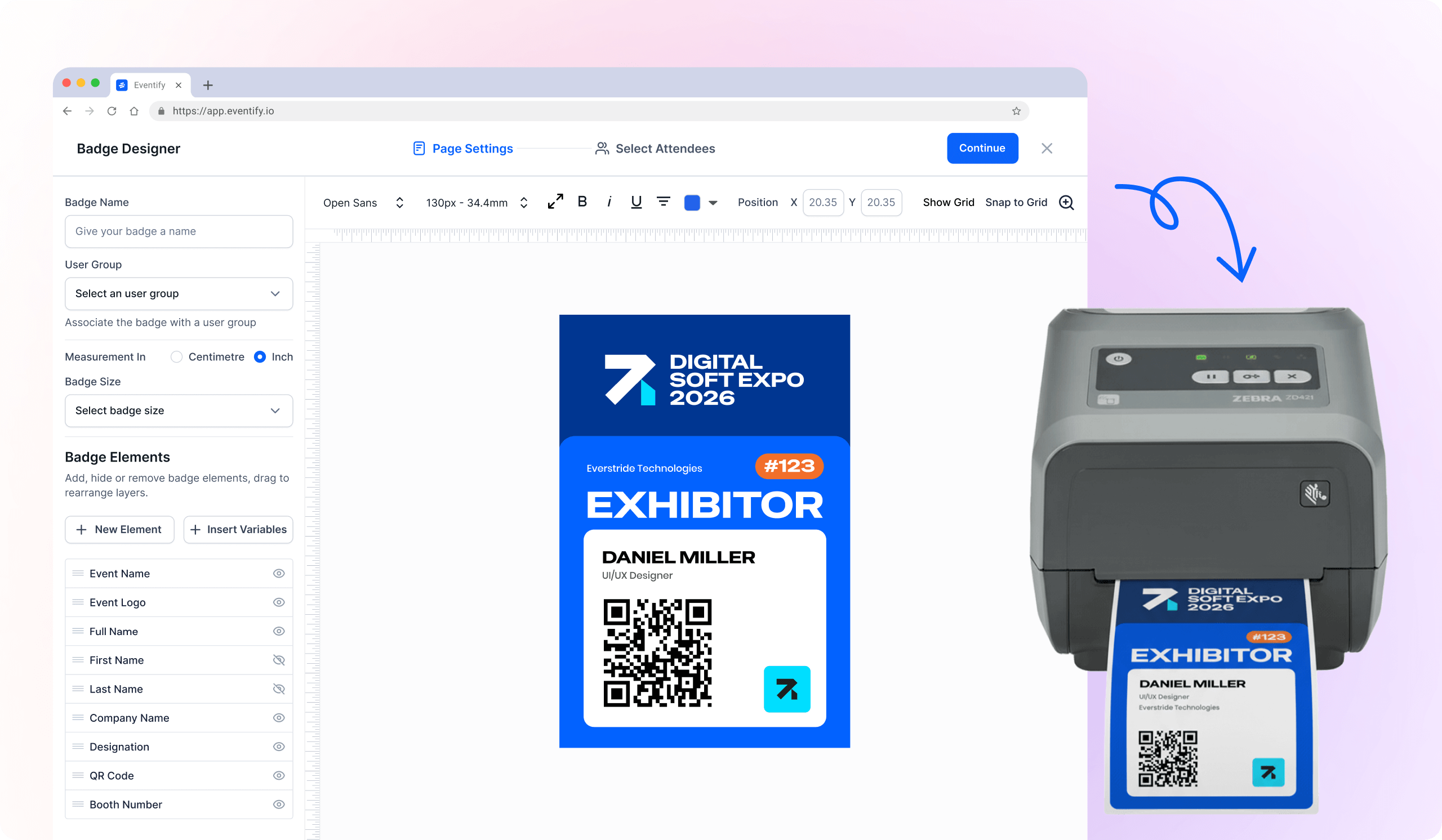
A successful match triggers the same badge templates and printers as a QR scan. Auto Print, Auto Check-in and Allow Check-in Only all work as before. The arrival is recorded and updates your live dashboard, so face and QR check-ins show up in one list.
Expert insight: Don't ignore the data side. The arrival curve from your live dashboard is one of the most useful planning tools you'll get. It shows when people actually arrive, how long the peak lasts and how many lanes you really needed. Use it to set staffing for your next event instead of guessing.
The Eventify Advantage: Offline Mode and Hardware Flexibility
Local vs. Server recognition
Venue Wi-Fi is the most common failure point in check-in, which is why this is a key differentiator for me. Eventify gives you two modes:
- Local mode matches faces on the device, using the attendee data from its last sync. It keeps working when the venue Wi-Fi doesn't, and check-ins queue and send when the connection returns.
- Server mode matches in the cloud. It suits very large attendee lists and devices that struggle to match locally, but it needs an internet connection.
If you're not sure which to pick, I'd start with Local mode for venues with shaky Wi-Fi, and Server mode for very large lists.
Expert insight: The golden rule for check-in technology is to design for the failure, not the demo. Venue Wi-Fi is shared with hundreds of devices, exhibitors and streaming equipment, and it tends to degrade exactly when the doors open. An offline-capable setup takes that risk off your day. The trade-off with on-device matching is freshness: the kiosk only knows what it last synced, so schedule a sync after your last registration changes.
Turn any tablet into a kiosk
There is no proprietary hardware. Face check-in runs in Kiosk Mode of the Eventify app on Android and iOS tablets and phones. Each device has its own switch, so you can put a face kiosk at the main entrance and a QR-only kiosk at a side door or VIP desk.
Two things to know. Face check-in is currently in beta, so I'd test it on your own attendee list before relying on it as your only lane. And it is built for kiosk check-in, not for re-verifying people at every session door.
Expert insight: Because the hardware is a standard tablet, resilience is cheap. Keep a charged spare, use a stand with power, lock the device into Kiosk Mode and set a screen lock, so the attendee data on it is protected. Treat the kiosk like any device that holds personal data.
Facial Recognition vs. QR Code: A Decision Framework
| Facial recognition | QR code | Manual check-in | |
|---|---|---|---|
| Speed | Fastest when the photo is good; no code to find | Fast when the code is ready; slows when attendees hunt for it | Slowest; depends on typing and staff |
| Security | Verifies the person; liveness check blocks photos and screens | Verifies the ticket; codes can be forwarded | Weakest; relies on staff judgment |
| Cost | No extra hardware beyond a tablet; confirm module pricing for your plan | Low; codes are sent automatically | Low hardware cost, higher staff time |
| Hardware | Android or iOS tablet with a front camera | Any phone, scanner or tablet | Any device |
| Attendee experience | Hands-free, but needs a photo and consent | Familiar, but needs a phone and ticket | Friendly for walk-ups and lost tickets, but slow |
My recommendation: use facial recognition for fast lanes and VIPs, and keep QR and search as a universal fallback for 100% coverage. Eventify supports this hybrid approach natively, with face, QR and search on a single screen. A face-only lane can also use a staff passcode to bring QR and search back for 60 seconds when needed.
Expert insight: The benefit of a face lane depends heavily on how many attendees actually use it. If few people opt in, you've built a lane nobody uses. So promote it: tell attendees in your pre-event emails that a fast lane is available, explain the opt-in in plain language, and signpost it at the venue. Think of it as a hybrid with a clear default, QR for everyone and face as the faster option for those who choose it.
Privacy, Compliance and GDPR: Building Trust with Biometrics
Let's address the elephant in the room: data privacy. Face data is biometric data, one of the most regulated kinds of personal data, and I wouldn't run a face lane without a clear plan for it.
Here is what Eventify does:
- Face images are converted into encrypted face vectors and stored securely, with data encrypted in transit and at rest.
- Eventify is GDPR compliant, ISO 27001:2022 certified and SOC 2 Type 2 audited, with role-based access and audit logs.
- In Local mode, matching happens on the device instead of a round trip to the cloud, which minimises the amount of data in transit. Since the kiosk holds the synced attendee data, treat it as a secure device.
Opt-in consent matters most
In the EU and UK, biometric data used to identify a person is special category data under GDPR Article 9, which generally means explicit consent. Other regions, such as Illinois under BIPA, have their own rules on written consent and retention. In practice that means:
- Ask for consent clearly at registration, and explain what is captured, why and for how long.
- Let attendees opt out. In the Eventify app they switch Allow facial recognition off, and the system lets them check in with QR or name search instead.
- Set a retention and deletion plan for face data after the event.
- Have your legal or privacy contact review your setup. Compliance for your event is still your responsibility as the organiser.
This is planning guidance, not legal advice.
Expert insight: One mistake worth avoiding is treating consent as a checkbox buried in the terms. Under GDPR, consent for biometric processing has to be specific, informed and freely given, which in practice means asking for it separately and not making it a condition of attending. Treat it as a product experience: a short, plain-language screen that says what is captured, why, how long it is kept and how to opt out. Done well, it also builds trust. Then ask your vendor the less glamorous questions: where is data processed, who are the sub-processors, how long is face data kept, and how is deletion confirmed? A signed data processing agreement and a documented retention date matter more than a badge on a website.
The ROI of Faster Entry: Metrics That Matter
Let's talk about the numbers, because this is where face check-in usually gets sold.
The best published evidence I could find comes from vendor-published case studies, so treat it as a likely ballpark rather than a guarantee. Zenus-sponsored case studies of a 2018 conference reported an average check-in time of nine seconds per attendee, badge printing included, and about 400 attendees an hour per kiosk. A summit case study from EventX reported check-ins averaging under 10 seconds, with the face scan itself taking under three. Nine seconds per attendee works out to exactly 400 an hour per lane, which matches the lane math below.
Adoption matters as much as speed. In a Keller Williams case study, opt-in reached 68% of attendees after reminder emails: 15% from the first confirmation email, and another 28% after the first reminder. The lesson is that a face lane is only as useful as the number of people who sign up for it.
Here is the lane math, which shows why seconds matter. These figures are illustrative:
- At 10 seconds per attendee, one lane clears about 360 people an hour.
- At 5 seconds per attendee, one lane clears about 720 an hour.
- If 1,000 attendees arrive in the 45 minutes before the opening keynote, that is roughly 22 arrivals a minute. You need about 4 lanes at 10 seconds, or 2 lanes at 5 seconds.
Faster entry improves the attendee experience, because the first thing people feel at your event is how quickly they get in. It also improves operational efficiency, because fewer people are stuck at registration desks and live entry data tells you where to move staff.
There is also a potential revenue upside. At venues with on-site sales, such as food and drink, less time in line can mean more time to spend. I'd treat that as something to measure at your own event rather than a promise.
Whatever you decide, track the change on your own events: average seconds per check-in by method, peak queue length, first-attempt match rate, fallback rate, opt-out rate and staff hours at registration.
Expert insight: Measure before you celebrate. Capture a baseline at your last event, then compare like for like, using median times and peak-hour queue length rather than a single average, because the average hides the slow tail. Remember to blend in adoption too. Not everyone will use the face lane, so your real gain is a mix. For example, if 60% of attendees opt in at 6 seconds each and 40% use QR at 12 seconds, the blended average is about 8.4 seconds, not 6 (these numbers are illustrative). That is still a useful improvement, and it is the number to plan your staffing around.
When Should You (and Shouldn't You) Use Facial Recognition?
Use it for
- Large conferences and expos with a morning arrival rush
- High-security events, where you need to confirm the person and not just the ticket
- VIP experiences and member-only lanes
- Events with high no-show or ticket-sharing risk, because face check-in gives you a verified record of who actually arrived
Maybe skip it for
- Very small, low-risk gatherings where a staffed desk with QR is already instant
- Events where you can't collect usable photos or explicit consent in advance
- Venues with strong backlight you can't work around
The Eventify way: Even for smaller events, the three-step setup makes it low effort to try. The real work is collecting good photos and consent, so a sensible first step is one opt-in face kiosk beside your normal desk, with QR as the default for everyone else.
Expert insight: A simple way to decide is to ask three questions. Do many people arrive in a short window? Does it matter that the person is the registered person? Can you collect good photos and explicit consent in advance? If you answer yes to at least two, a pilot lane is worth trying. If it is mostly no, stick with QR and a good desk. Agree your success measures before the event, such as a maximum fallback rate and no rise in complaints, so you can judge the pilot fairly instead of by gut feel.
Conclusion
Facial recognition check-in is no longer a luxury. It is a practical tool for modern events, as long as you collect consent, offer an alternative and keep a fallback running.
The way I see it, Eventify's kiosk is an accessible, privacy-conscious and operationally resilient option: it runs on a standard tablet, matches on the device when Wi-Fi drops, rejects photos and phone screens, and keeps QR and search ready for everyone else. Just remember it is in beta, so test it on your own attendee list.
My bottom line: don't choose a check-in method because it is new. Choose it because it solves a problem you actually have, whether that is a morning rush, badge sharing or unreliable Wi-Fi. Pilot it, measure it, keep the fallback, and expand once the numbers justify it.
See how Eventify's facial recognition kiosk works on your own attendee list. Request a demo today. You can also read the facial recognition kiosk page and the launch announcement.
Frequently Asked Questions (FAQs)
How accurate is facial recognition for events?
Accuracy depends more on your setup than on the algorithm. Lighting is the biggest factor: strong backlight, such as a window behind the attendee, causes most misses, so place the kiosk where faces are lit from the front and mount it at eye level. Photo quality matters just as much, so ask attendees for a clear, front-facing photo and use the admin flag to chase anyone with an unusable one. Independent benchmarks such as NIST's face recognition evaluations show strong results in controlled conditions, but an event door isn't controlled, so test on your own attendees. And always keep QR and search as a fallback.
What happens if an attendee's face isn't recognised?
The kiosk shows “Face not recognised” and falls back automatically to QR scan or name search, and their badge prints as normal. On a face-only kiosk, a staff member taps Report an issue and enters the kiosk passcode, which brings back QR and searches for 60 seconds for that attendee.
Is facial recognition check-in legal under GDPR?
It can be, if you meet the requirements. Biometric data used for identification is special category data, so you generally need explicit consent, a clear notice, an alternative for those who decline and a retention plan. Eventify supports this with an attendee opt-in switch, encrypted face vectors and optional on-device processing in Local mode, and it is GDPR compliant. Compliance for your event is still your responsibility as the organiser, so involve your privacy or legal contact.
Does it work offline?
Yes. In Local mode the kiosk matches faces on the device using the attendee data from its last sync, so it keeps working when the Wi-Fi drops, and check-ins queue and send when the connection returns. Server mode matches in the cloud and needs internet.
What hardware do I need?
Any Android or iOS tablet (or phone) running Kiosk Mode in the Eventify app, version 3.1.49 or later, plus a badge printer if you print on site. There is no proprietary hardware.
Do attendees have to use it?
No. It should always be opt-in. Attendees switch Allow facial recognition on or off in the Eventify app, and anyone who opts out checks in with QR or name search.
What about attendees with no photo, or walk-ins?
Face check-in needs a usable profile photo. Attendees without one check in with their QR code or by name search, and the admin panel flags anyone whose photo can't be used so you can chase them beforehand.
Can someone cheat with a photo of another attendee?
Not easily. Every Eventify face check-in runs a liveness check, so a printed photo or an image on a phone screen fails and the kiosk shows “Face verification failed”. Look-alikes and twins are a separate risk, so add an ID check for high-security events.
Does it work with glasses, masks or a new hairstyle?
Often, but not always. Sunglasses, masks and big appearance changes since the photo was taken can cause a miss. Ask attendees to upload a recent, clear photo, and keep QR or search ready for anyone the kiosk doesn't recognise.
Is facial recognition equally accurate for everyone?
Not necessarily. Independent testing, including by NIST, has found that accuracy can differ across demographic groups depending on the algorithm. Ask your vendor for its test results, try the kiosk with a varied group of staff before the event, and keep a fallback lane for everyone.
For context, NIST publishes ongoing results in its Face Recognition Technology Evaluation (FRTE), and its latest 1:1 verification report came out on September 1, 2026. Two lessons from it matter at an event door. First, capture conditions make a big difference. In the kiosk-to-border test, most of the leading algorithms reported error rates of roughly 3.7% to 4%, compared with well under 1% when comparing controlled travel-document-style photos, according to Biometric Update's analysis. Second, there is no single best algorithm, only algorithms that perform well on the image conditions, demographics and matching mode of a particular deployment. That is why I'd always test on your own attendees.
NIST's latest data points the same way. In the 1:1 results analysed by Biometric Update, error disparity was highest for female subjects, adults aged 65 to 99 and West African subjects for the large majority of algorithms examined (98.8%, 98.2% and 97.3% respectively), although the size of the gap varied widely between algorithms. In practice, that makes it worth asking vendors for demographic results and testing with a varied group before the event.
Sources
- NIST Face Recognition Technology Evaluation (FRTE) 1:N Identification
- NIST FRTE 1:1 report, September 1, 2026
- Biometric Update: NIST FRTE 1:1 update shows shifting leaders, persistent demographic disparities (September 21, 2026)
- Event Manager Blog: How Facial Recognition Can Speed Up Check-in Times (Zenus-sponsored case study)
- Event Manager Blog: How Facial Recognition Can Speed Up Check-in Times (Zenus case study, throughput figures)
- Event Manager Blog: Streamlining Registration At Large Events With Face Recognition (Zenus case study)
- EventX: Internet Economy Summit case study
The case studies were published by the vendors involved and describe their own systems, not Eventify's.