Everything We Built in 2025 - Here's All of It.

We've been heads down building — and it shows. Across 2025, we shipped improvements to every part of Eventify, from smarter ticketing and registration to on-site badges, gamification, and payments. Here's everything that's new, all in one place.
April 6, 2026

Heads Down, Hands Full — Everything We Built in 2025

We've been heads down building — and it shows. Across 2025, we shipped improvements to every part of Eventify, from smarter ticketing and registration to on-site badges, gamification, and payments. Here's everything that's new, all in one place.

15 Areas improved100+ New capabilitiesAll yours No extra cost

01 — Floor Map & Booth Management

Your exhibition floor is often the centrepiece of an event — so we gave the floor map builder a serious upgrade. You can now import your own custom layouts, let exhibitors purchase booths directly, and present attendees with a front-end map they can actually navigate. Small details like sold-out booth colours and automatic admin notifications on purchases mean less chasing and more time running your event.

  • New floor map editor tools
  • Booth purchase flow
  • Import custom maps & layouts
  • Protected floor map settings
  • Front-end sorting option
  • Unit support: cm to feet
  • Sold-out booth colour & tag
  • Admin email on booth purchase

02 — Ticketing, Checkout & Orders

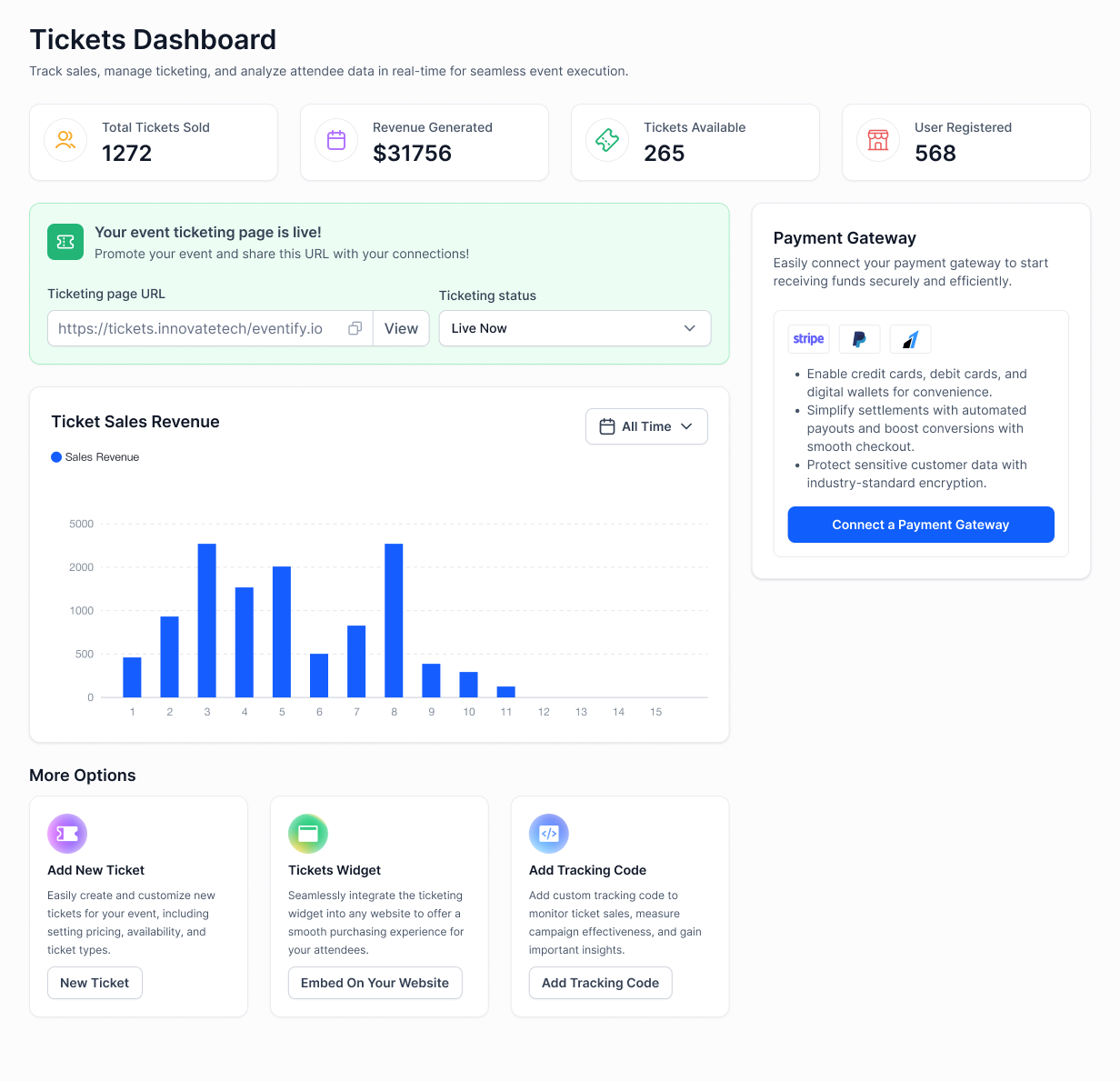
Ticketing is where most organiser headaches live — so we tackled it from every angle. You can now create and update orders directly from the admin panel, set prices that change automatically based on date or time, and limit how many tickets one person can buy per order. We also added an automatic nudge for anyone who left their cart behind. Fewer gaps, fewer support emails, more completed sales.

  • Create & update orders from admin
  • Promo redemption limits & logic
  • Abandoned ticket confirmation email
  • Restrict same-time session tickets
  • Purchase limit per order
  • Auto-select minimum ticket quantity
  • Ticket sold-out option
  • Dynamic pricing (time & date based)
  • Push new orders to selected admins
  • Hide ticket sales end date
  • Display price as single total
  • Addon restriction per user ID

03 — Registration & Forms

Registration is the first thing your attendees experience — it should feel smooth and personal, not clunky. We've rebuilt the checkout form UI, added personalised registration links, and made it possible to require approval before a registration goes through. You have full control over which fields appear, and attendees can select their own user category on the way in, reducing the manual tidying-up afterwards.

  • New checkout form UI
  • Personalised registration links
  • Registration approval flow
  • Registration confirmation email
  • Hide fields during registration
  • Date field UI update
  • Multiple same-type fields in forms
  • Import checkbox/radio/dropdown options
  • User category selection on register
  • User other group set option
  • Exhibitor company profile on register

04 — RSVP, Sessions & Agenda

Managing sessions used to mean juggling a lot of moving parts. Now you can tie a session directly to a survey or a trivia game, track check-ins and check-outs per session, and set RSVP limits so popular sessions don't get overbooked. User-level RSVP reports tell you exactly who signed up for what — and if a session is invite-only, you can add it quietly from the user edit screen without disrupting the main schedule.

  • Session link with survey
  • Session link with trivia gamification
  • Session check-in & checkout
  • Session-based multiple check-ins
  • Mandatory RSVP for single session
  • RSVP limits & date-time restriction
  • User-wise RSVP report
  • Track for all sessions
  • Session custom colours & reorder
  • Private session add from edit user
  • Session edit by admin & speaker (app)
  • Schedule notification logic update

05 — Meetings & Networking

Networking is one of the biggest reasons people attend events — so we rebuilt the meetings experience from the ground up. Public and private meeting modes give you more control, and practical touches like auto-filling the booth location and pre-filling the meeting spot make the whole process feel effortless for attendees. You can export meeting lists and ratings directly whenever you need them.

  • Full meeting experience revamp
  • Public & private meeting modes
  • 1:1 slots auto-filled with booth location
  • 1:1 meeting list view & export
  • Meeting rating export
  • Meeting location auto-prefill

06 — Email, Notifications & Communication

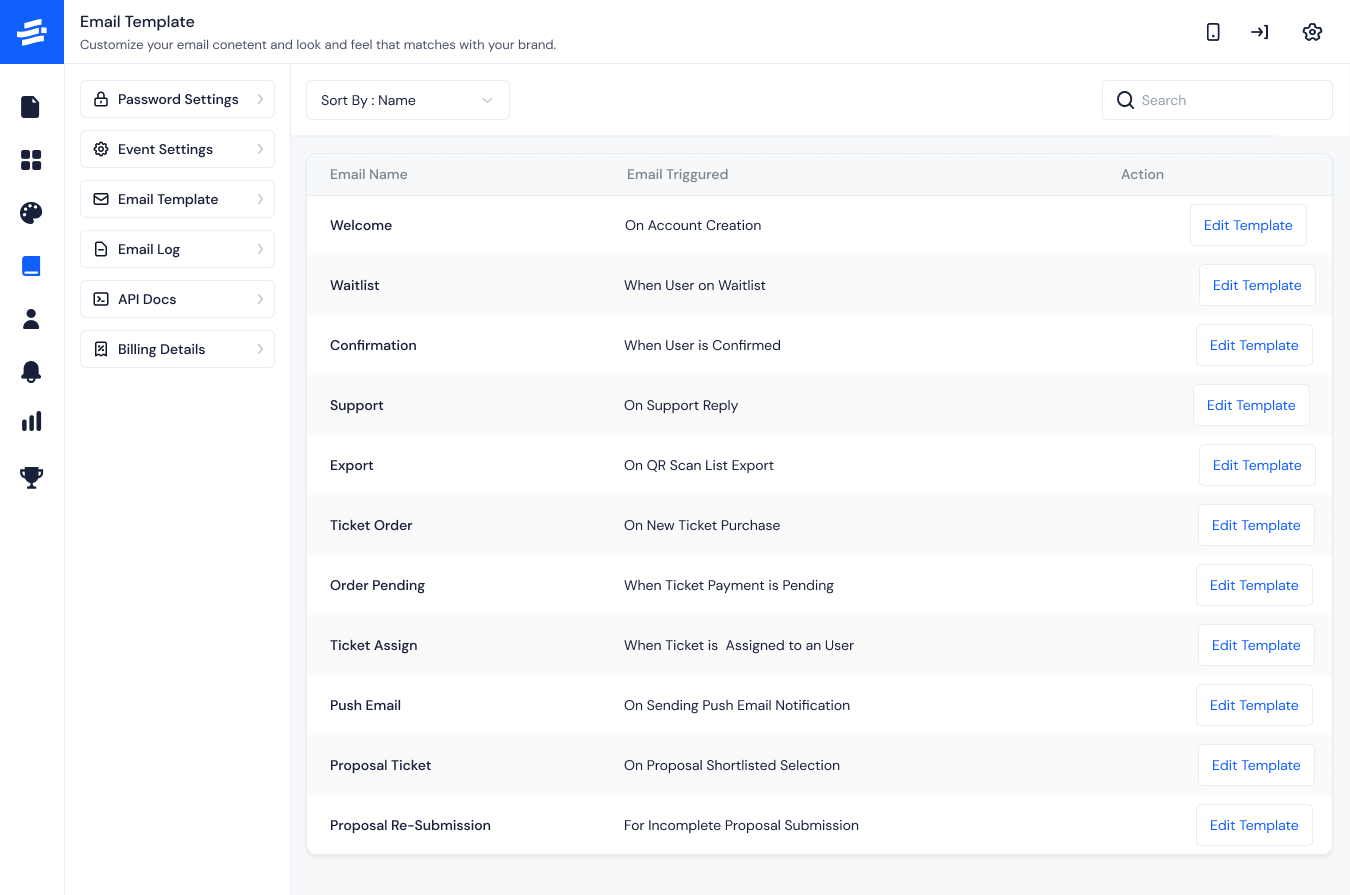
The right email at the right moment makes all the difference to how an attendee feels about your event. This year we added a raw HTML editor for full creative control, CC & BCC support, and a way to re-send welcome emails to anyone who was missed on import. Whether it's a badge confirmation, a cart reminder, or an RSVP nudge — there's now a template for it, and a log to prove it was sent.

  • Email template section UI
  • Variable hints in email templates
  • Raw HTML email editor
  • Email log for own SMTP
  • Own SMTP support (badge, certificate)
  • CC & BCC support in templates
  • Welcome email on user import
  • New login email template
  • Resend welcome to unreached users
  • Cart abandoned email
  • RSVP notify email & push
  • Push notification group targeting
  • Reply-to as organiser support email
  • Badge email on registration
  • Additional invoice email
  • Ticket order bulk email

07 — Surveys, Abstracts & Content

Collecting feedback and managing abstract submissions shouldn't feel like admin work. The survey builder has a new UI with group logic, so you can show different questions to different attendees. On the abstract side, you can now shortlist, filter, and bulk-confirm submissions — and even issue tickets directly from an abstract, cutting out several manual steps that used to slow the process down.

  • Survey new UI & group logic
  • Survey public page optional info
  • Certificate link with survey
  • Abstract shortlist, filter & bulk confirm
  • Abstract direct ticket & confirm
  • Abstract export with comments
  • All responses download
  • Abstract subject as email variable

08 — Sponsors, Exhibitors & Speakers

We made it easier to manage the people and organisations that bring your event to life. Exhibitors can now be grouped into categories and subcategories, sponsors can be tied to specific ticket types, and speakers get their own content and image settings. Exhibitors can even create their company profile right during registration — saving your team a significant amount of manual setup time.

  • Exhibitor category & subcategory
  • Sponsor category via ticket type
  • Min ticket assignment for sponsor/exhibitor
  • Company creation via registration
  • Featured sponsors & custom sorting
  • Enable/disable by role
  • Speaker category
  • Speaker content & image settings

09 — Gamification

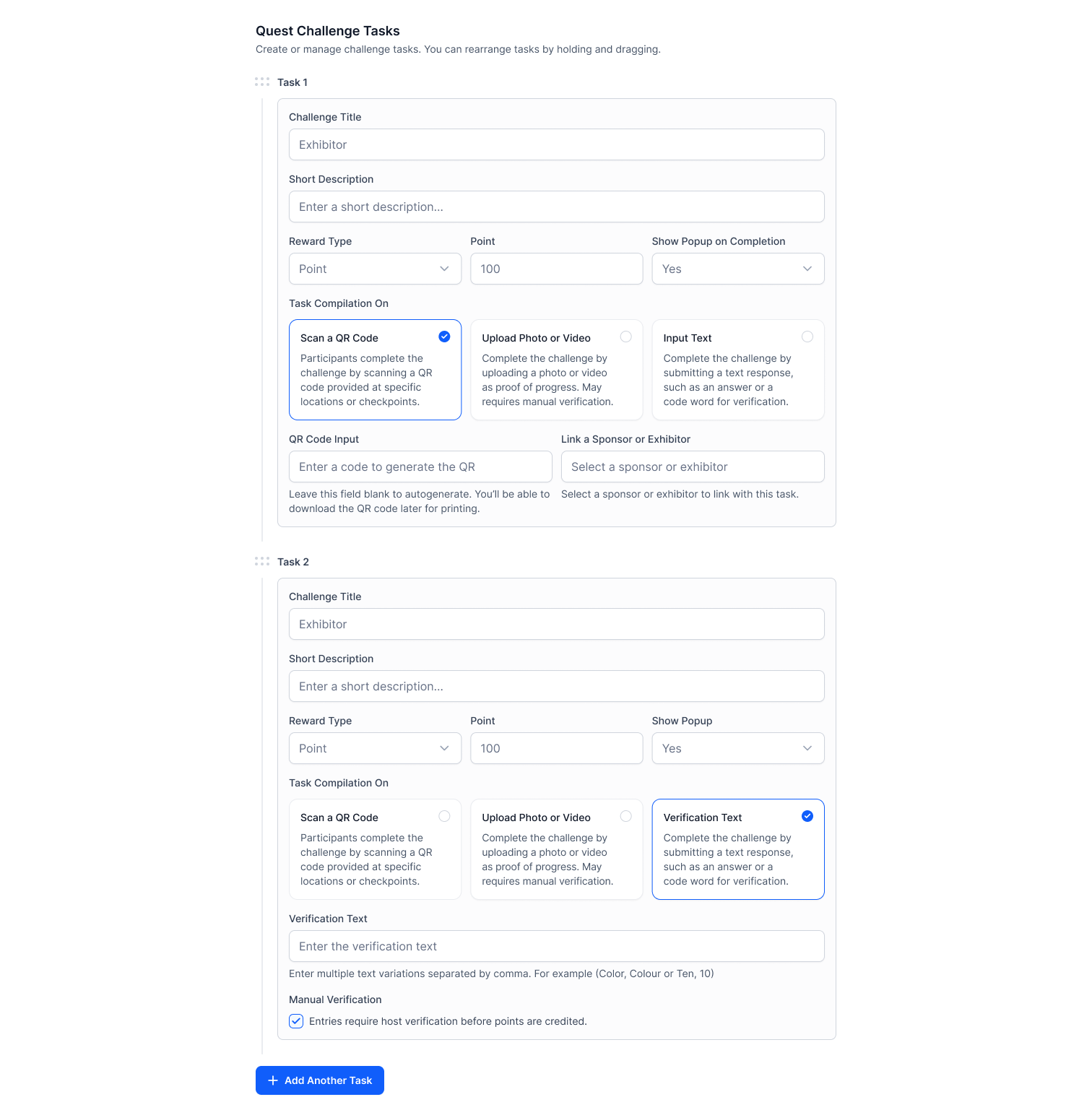
Keeping attendees engaged throughout a multi-day event is one of the hardest things to get right. We added Trivia and Quest gamification to give people something to work towards, a team-wise leaderboard so groups can compete together, and a reset option so you can start fresh across different event days or stages — keeping the energy high right through to the end.

  • Trivia gamification
  • Quest gamification
  • Reset points option
  • Team-wise leaderboard

10 — Campaign Feature (v8+)

Word of mouth is still the best marketing — and the Campaign feature makes it easier to turn attendees into advocates. Social boost lets attendees share your event directly, with ready-made email templates to encourage them. The live Q&A word cloud adds a visual, real-time layer to audience interaction that looks great on screen and keeps energy high in the room.

  • Campaign spinning
  • Social boost
  • Social boost email templates
  • Live Q&A word cloud

11 — Admin Panel, Roles & Permissions

A cleaner admin experience means your team spends less time finding things and more time running the event. We've redesigned the main panel UI, the add/edit user screens, and grouped event tools into a dedicated side menu section. Super admins now have finer control over what each role can access — useful when you're working with a larger team or external partners who shouldn't see everything.

  • Admin panel new UI
  • Add/Edit user new UI
  • Side menu "Event Tools" section
  • Admin role access by super admin
  • Settings icon in ticket page
  • Super admin reply email routing
  • Bulk user import optimisation

12 — Analytics, Reports & Exports

Good events run on good data — and we've made it much easier to get yours out of Eventify and into wherever you need it. Session check-in analytics, user group breakdowns, RSVP reports, and meeting ratings are all exportable now. We also fixed some check-in analytics mismatches that were causing headaches, so the numbers you see are numbers you can actually trust and act on.

  • Sale report bulk import & email
  • Session check-in analytics export
  • User group in check-in export
  • Additional analytics & optimisation
  • User-wise RSVP analytics
  • Meeting rating export
  • Badge printed info in exports
  • Export users by group
  • Sale report order import
  • Check-in analytics mismatch fixes

13 — Badge, Kiosk & Check-in

On-site is where everything has to just work. Badge downloads are now available as ZIP or PDF, with A4 foldable support and Chinese character rendering for international events. The kiosk has a new profile card view, configurable timeout, and a numeric-only passcode option to keep queues moving. And if someone never showed up, you can now email them directly from the check-in list — no switching screens.

  • Badge download (ZIP & PDF)
  • A4 foldable badge PDF
  • Chinese character support
  • Badge alignment & variable labels
  • Badge printed info export
  • Show my badge setting
  • Kiosk profile card & timeout settings
  • Kiosk numeric-only passcode
  • Session check-in list new UI
  • Email to not-checked-in users

14 — Web, App & UI Enhancements

TAG: Platform

Your event website is what the world sees before they ever set foot in the room. The v10+ website editor gives you much more control over your landing page layout, a countdown timer to build anticipation, and a custom SEO domain so your event is easy to find. Attendees can download their agenda, access a private community, and share sessions or speakers directly using embed links.

  • Website editor (v10+)
  • Landing page section control
  • Countdown timer
  • SEO custom domain
  • Phone country code default
  • Hide QR & App Store links
  • My agenda download (admin)
  • Private community visibility
  • User private file download
  • Event guide category
  • Embed links for sessions/speakers/exhibitors

15 — Payments, Tax & Invoicing

TAG: Payments

We've expanded payment options significantly — including Eventify's own gateway, plus Stripe Afterpay and Klarna for buy-now-pay-later flexibility. Country-specific tax settings mean you can sell tickets globally without manually managing tax rules for each region. Invoice downloads are now available directly for attendees, and less friction at checkout means more purchases actually get completed.

  • Eventify payment gateway
  • Stripe Afterpay & Klarna
  • Country-specific tax
  • Invoice download
  • Date-time format for emails
  • Additional charges display logic

CTA: Want a walkthrough of any of these features? Talk to Support →

See how Eventify can help you organize a successful event! 

Request a Demo

Love the Smell Of Events Every Morning Like Us?

We're Totally Obsessed To Make Your Event Succeed!

Please Fill Out The Form To Request A Demo & Let us Convince You Why You Must Switch To Eventify!
* PS: Nobody can match our pricing :-)
Features

Explore Our Most
Popular Features

Learn more

Registration & Ticketing

Sell tickets online & manage user registration
Learn more

Chat & Meetings

1-1 messagings and meeting to increase attendee engagement
Learn more

Schedule

Event tracks & sessions as per date and time in one place
Learn more

Matchmaking

All-in-one B2B matchmaking for your attendees
Learn more

Social Feed

Private social network feed for your event
Learn more

Community Forum

Forum or group messaging on predefined topics
Learn more

Poll & Live Q&A

Create interactive polls and QnA on live sessions
Learn more

Speaker Profile

Speaker’s detailed information for sessions
Learn more

Event News

A news section for event related news & announcements
Learn more

Event Guide

Create your own event help and support guidebook
Learn more

Gallery

Event photos gallery by host or attendees
Learn more

Product Showcase

Comprehensive exhibitor and sponsor page
Learn more

Sponsored Ads

Built in ads to promote sponsors & exhibitors
Learn more

Lead Scanning

All in one scan and export leads/contacts
Learn more

Interactive Maps

Tappable interactive booth and floor maps
Learn more

Push Notification

Send instant push notifications to attendee app
Learn more

Custom Branding

Customize & design your very own branded event app within minutes
Learn more

Session Rating

Get session rating and feedback from attendees
Learn more

Survey

Build your own surveys to get feedback about the event
Learn more

Email Notifications

Send instant email notifications to your attendees
Learn more

Dynamic Form Builder

Drag & drop from builder for checkout form, survey & profile
Learn more

Schedule

Event tracks & sessions as per date and time in one place
Learn more

Event Guide

Create your own event help and support guidebook
Learn more

Email Designer

Drag and Drop custom email template designer
Learn more

Analytics Dashboard

Get real-time insights on your event on multiple fronts
Learn more

Community Forum

Forum or group messaging on predefined topics
Learn more

Chat & Meetings

1-1 messagings and meeting to increase attendee engagement
Learn more

Registration & Ticketing

Sell tickets online & manage user registration