Checkout Form Settings: User Category Selection, Domain Allowed & User Other Group

Eventify's checkout form now comes with three powerful settings that give organizers more control over who registers and how they are automatically managed. Whether you want to let participants self-select their category, restrict registrations to specific domains, or auto-assign users to a group upon direct registration—it's all configurable in just a few steps.
April 3, 2026

How to Access Checkout Form Settings

To configure these settings, go to the Admin Panel and navigate to Registration > Registration Form. Click the Edit icon on the form you want to update, then proceed to the Settings page to find and apply the options below.
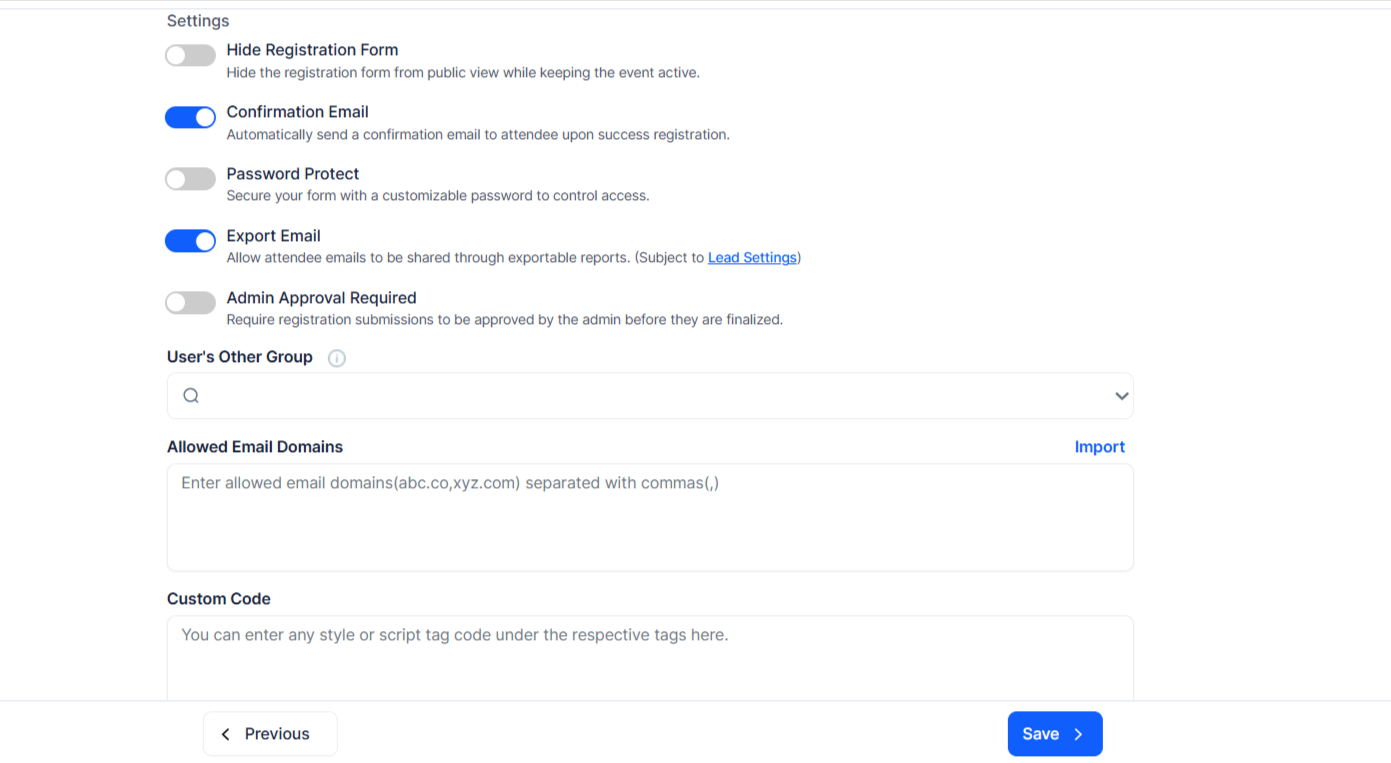
User Category Selection

This setting allows participants to select their own user category during the checkout process. Enabling this gives attendees the ability to self-identify, which can help with segmentation, personalization, and reporting across your event.

Domain Allowed

Restrict registrations to users from specific domains using the *.org wildcard format. This is particularly useful for member-only events, internal conferences, or any scenario where you need to limit access to a defined audience by email domain.

User Other Group

With this setting, you can select an additional group that will be automatically assigned to any user who registers directly. This removes the need for manual group assignment after registration, ensuring every direct registrant is placed in the right group from the moment they sign up.

See how Eventify can help you organize a successful event! 

Request a Demo

Love the Smell Of Events Every Morning Like Us?

We're Totally Obsessed To Make Your Event Succeed!

Please Fill Out The Form To Request A Demo & Let us Convince You Why You Must Switch To Eventify!
* PS: Nobody can match our pricing :-)
Features

Explore Our Most
Popular Features

Learn more

Registration & Ticketing

Sell tickets online & manage user registration
Learn more

Chat & Meetings

1-1 messagings and meeting to increase attendee engagement
Learn more

Schedule

Event tracks & sessions as per date and time in one place
Learn more

Matchmaking

All-in-one B2B matchmaking for your attendees
Learn more

Social Feed

Private social network feed for your event
Learn more

Community Forum

Forum or group messaging on predefined topics
Learn more

Poll & Live Q&A

Create interactive polls and QnA on live sessions
Learn more

Speaker Profile

Speaker’s detailed information for sessions
Learn more

Event News

A news section for event related news & announcements
Learn more

Event Guide

Create your own event help and support guidebook
Learn more

Gallery

Event photos gallery by host or attendees
Learn more

Product Showcase

Comprehensive exhibitor and sponsor page
Learn more

Sponsored Ads

Built in ads to promote sponsors & exhibitors
Learn more

Lead Scanning

All in one scan and export leads/contacts
Learn more

Interactive Maps

Tappable interactive booth and floor maps
Learn more

Push Notification

Send instant push notifications to attendee app
Learn more

Custom Branding

Customize & design your very own branded event app within minutes
Learn more

Session Rating

Get session rating and feedback from attendees
Learn more

Survey

Build your own surveys to get feedback about the event
Learn more

Email Notifications

Send instant email notifications to your attendees
Learn more

Dynamic Form Builder

Drag & drop from builder for checkout form, survey & profile
Learn more

Schedule

Event tracks & sessions as per date and time in one place
Learn more

Event Guide

Create your own event help and support guidebook
Learn more

Email Designer

Drag and Drop custom email template designer
Learn more

Analytics Dashboard

Get real-time insights on your event on multiple fronts
Learn more

Community Forum

Forum or group messaging on predefined topics
Learn more

Chat & Meetings

1-1 messagings and meeting to increase attendee engagement
Learn more

Registration & Ticketing

Sell tickets online & manage user registration